WhatsApp AI Automation for Businesses in Pakistan: What to Automate and How to Start
15 min read
On this page
- What is WhatsApp AI automation?
- WhatsApp Business app vs WhatsApp Business API: which one can you automate?
- Official API vs "use your own phone" tools: the ban risk
- What can you automate on WhatsApp with AI?
- How a WhatsApp AI workflow works (step by step)
- The 24-hour window, explained simply
- 4 WhatsApp automation examples for Pakistani businesses
- 1. Clothing brand: COD confirmation before dispatch
- 2. Real estate or education: inquiry to qualified lead
- 3. Clinic or salon: bookings and reminders
- 4. Distributor or B2B supplier: price list and stock questions
- Handling Urdu, Roman Urdu and voice notes
- When should AI hand the chat to a human?
- What does WhatsApp AI automation cost to run in Pakistan?
- Ready-made WhatsApp bot or custom AI workflow?
- How to start: a 5-step rollout
- FAQs
- What is WhatsApp AI automation for businesses?
- Can AI reply to WhatsApp messages automatically?
- Do I need the WhatsApp Business API, or does the Business app work?
- Is the WhatsApp Business API free in Pakistan?
- Can my WhatsApp number get banned for using automation?
- Can a WhatsApp AI chatbot understand Urdu and Roman Urdu?
- Can WhatsApp AI automation confirm COD orders?
- Can WhatsApp connect to my CRM, Shopify or WooCommerce store?
- What is the 24-hour customer service window on WhatsApp?
- Will a WhatsApp AI bot replace my customer support team?
- How long does it take to set up WhatsApp AI automation?
- Start with the chat that costs you the most
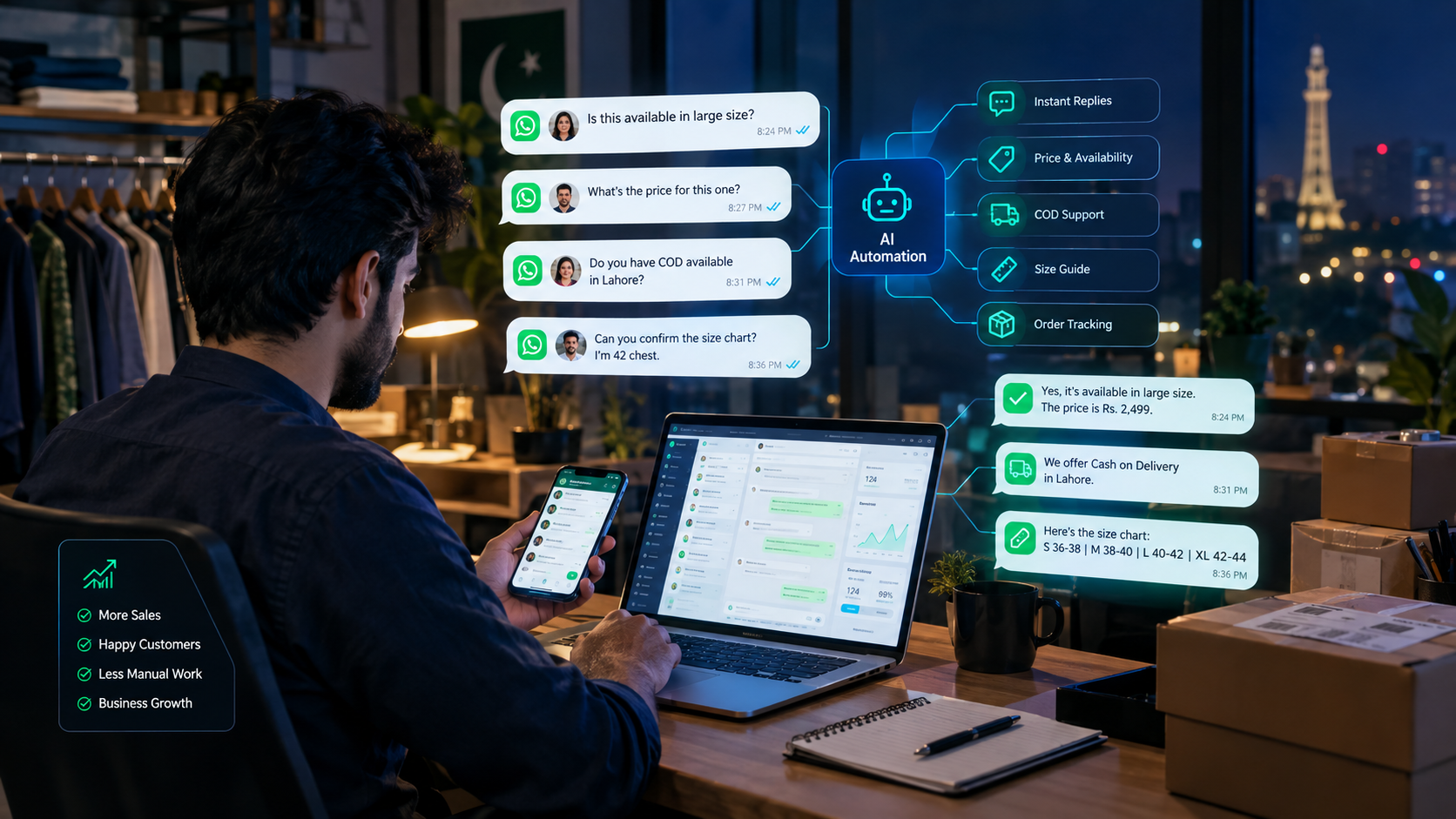
It's 11:40 at night. Your phone buzzes again. "Price?" "Ye available hai?" "COD hai?" "Size M mein milega?" You answered the exact same four questions forty times today, and half of tomorrow's orders depend on how fast you reply.
If that sounds familiar, this guide is for you. WhatsApp AI automation for businesses in Pakistan means letting AI handle that first layer of repetitive chats so your team only steps in when a real decision is needed.
Below, you'll see what you can actually automate, what you should keep human, which WhatsApp setup won't put your number at risk, what it costs to run, and a simple way to start without rebuilding your whole business.
What is WhatsApp AI automation?
WhatsApp AI automation is AI connected to your WhatsApp Business number that reads incoming messages, understands what the customer wants, replies or asks for missing details, and then triggers actions in your other systems, like creating an order, adding a lead to your CRM or alerting a salesperson.
That's different from the quick replies and keyword bots most businesses already use. A keyword bot sees "price" and sends your price list. It falls apart when someone writes "bhai ye blue wala size M mein hai aur Lahore delivery kitne din?". An AI layer can pull three things out of that one message: the product, the size, and a delivery question. Then it can check stock and reply properly.
Think of it as one piece of a bigger picture. WhatsApp is usually where the conversation starts, but the value comes from what happens next in your store, CRM or sheet. If you want the wider view of how this fits across sales, support and operations, read our guide to AI automation for Pakistani businesses.
WhatsApp Business app vs WhatsApp Business API: which one can you automate?
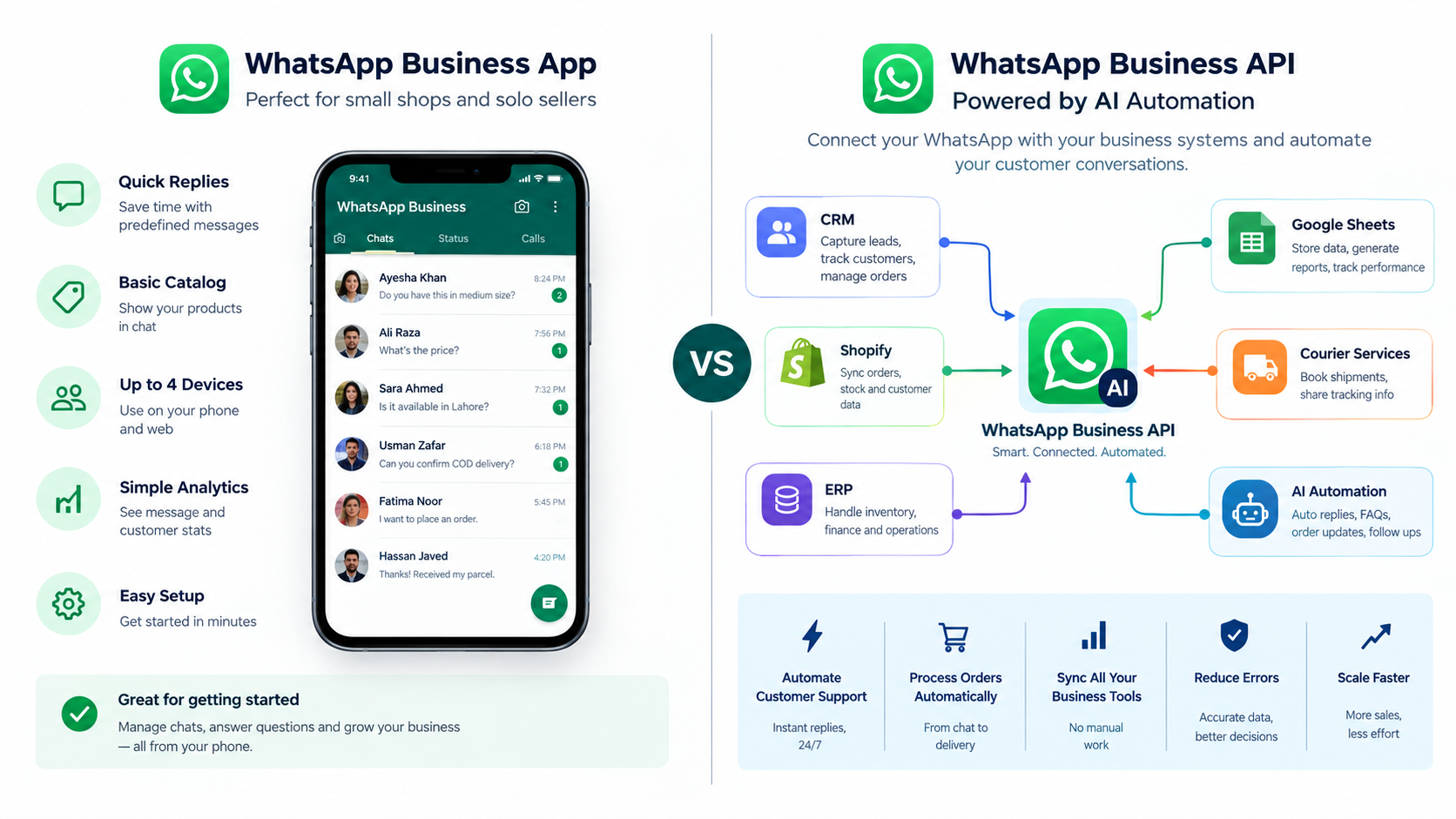
Real AI automation runs on the WhatsApp Business Platform (the Cloud API), either directly through Meta or through an approved provider. The free WhatsApp Business app on your phone gives you greeting messages, away messages and quick replies, but it can't connect to an AI model or your other systems in a reliable, approved way.
|
WhatsApp Business app |
WhatsApp Business Platform (API) |
|
|---|---|---|
|
Best for |
Solo owners, low message volume |
Growing teams, high message volume |
|
Automation |
Greeting, away message, quick replies |
Full workflows, AI replies, routing, triggers |
|
Integrations |
Catalog only |
CRM, Shopify, WooCommerce, ERP, Google Sheets, courier systems |
|
Team access |
Limited linked devices |
Shared inbox through a provider or your own tool |
|
Cost model |
Free app |
Charged per delivered template message, by category and country |
|
Setup |
Install and go |
Meta business verification, number registration, template approval |
The honest answer for most small shops: start on the app while volume is low. Move to the API once you're losing orders because nobody replied fast enough, or once you need WhatsApp to talk to your store or CRM.
Official API vs "use your own phone" tools: the ban risk
If a tool promises WhatsApp automation with no Meta fees, no verification and your normal number, it's almost certainly running outside Meta's official platform. That can work for a while, but your number can get restricted or banned, and there's nobody official to appeal to.
You'll see plenty of these in Pakistan. They usually connect your number through WhatsApp Web or a phone acting as a gateway. The pitch is attractive: live in a minute, zero per-message cost. The trade-off is that your business number, the one printed on your Instagram bio, Daraz listings and delivery bags, now depends on a setup Meta doesn't support.
Our view is simple. If customers rely on that number, put it on the official platform. Verification takes some paperwork, but you only do it once.
One more 2026 change worth knowing. Meta's updated terms restrict general-purpose AI assistants ("ask me anything" ChatGPT-style bots) on the WhatsApp Business Platform. A bot that answers questions about your own products, orders and bookings is a normal business use. Meta explains this in its AI Providers policy. So keep your bot focused on your business, which you'd want anyway.
What can you automate on WhatsApp with AI?
The best WhatsApp tasks to automate are the ones that repeat all day and follow a pattern: product questions, stock checks, order confirmations, order status, lead questions and bookings. Anything involving money disputes, complaints or judgment calls should still reach a person.
|
Task |
What AI handles |
What stays human |
|---|---|---|
|
Product and price questions |
Answers from your catalog or price sheet |
Custom or bulk pricing |
|
Stock and size availability |
Checks live stock, suggests alternatives |
Restock promises |
|
Order taking |
Collects product, size, name, address, city |
Unusual or very large orders |
|
COD order confirmation |
Confirms order and address before dispatch |
Customers who refuse or argue |
|
Order status |
Pulls tracking from your store or courier |
Lost or damaged parcels |
|
Lead qualification |
Asks budget, location, timeline, need |
The actual sales call |
|
Appointment booking |
Offers slots, books, sends reminders |
Rescheduling conflicts |
|
Payment reminders |
Sends approved reminder templates |
Payment disputes |
|
Feedback after delivery |
Asks for a rating, logs the reply |
Responding to a bad review |
|
Routing |
Sends the chat to sales, support or accounts |
Everything after the handover |
Notice the pattern. AI does the reading, sorting and fetching. People do the deciding. That split is what keeps automation useful instead of annoying.
How a WhatsApp AI workflow works (step by step)
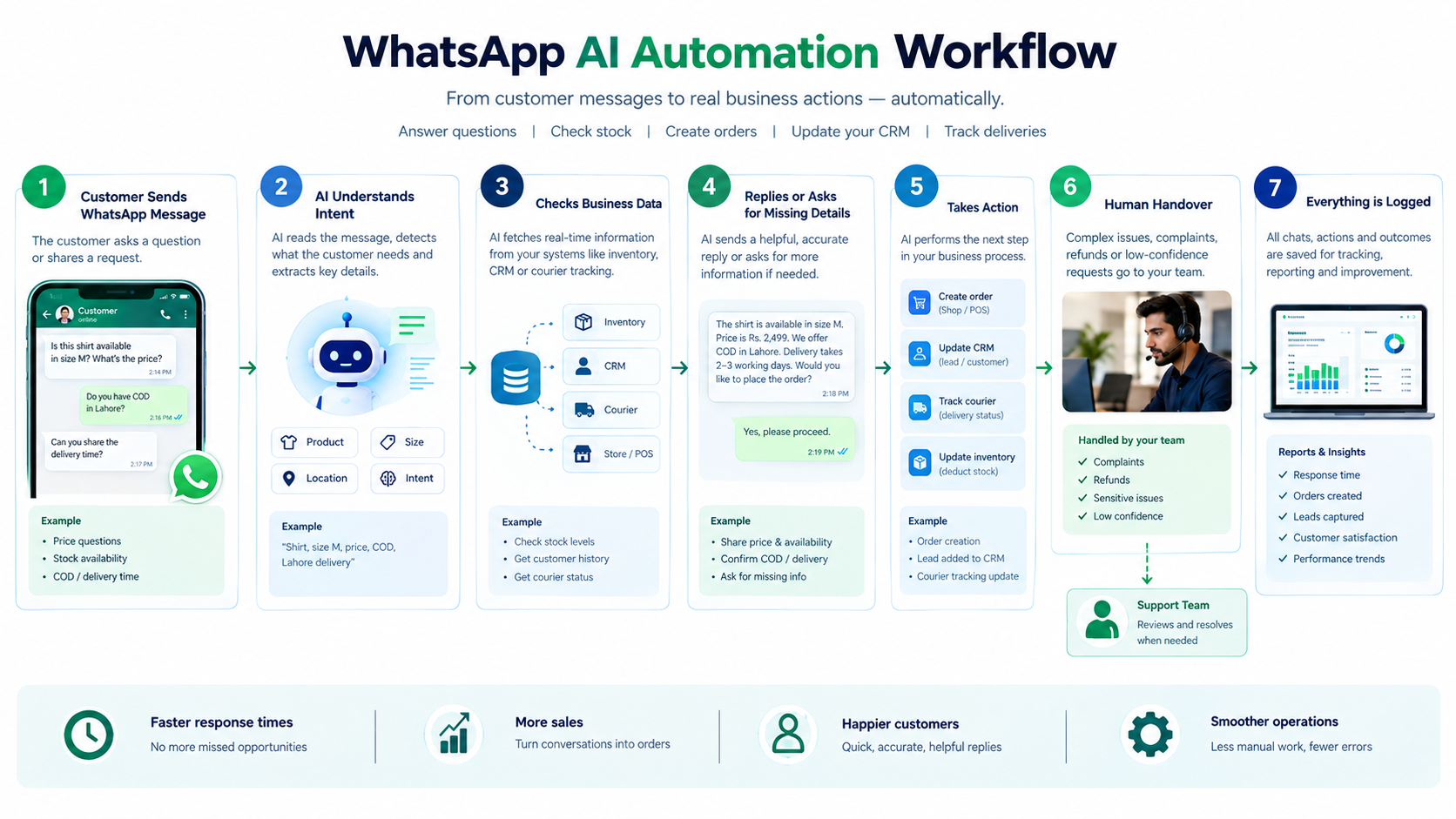
A WhatsApp AI workflow takes a customer message, works out the intent, checks your business data, replies or collects missing details, records the result, and hands the chat to a person when it isn't sure. Here's the typical flow:
- Customer sends a message. Text, Roman Urdu, a photo of a product, sometimes a voice note.
- AI reads the intent. Is this a price question, a new order, a complaint, or a delivery check?
- It looks up your data. Stock from your store, the customer's last order from your CRM, tracking from your courier.
- It replies or asks a follow-up. "Size M available hai. Kis city mein delivery chahiye?"
- It takes an action. Creates the order, adds the lead to your CRM software, or creates a callback task.
- It escalates when needed. Angry tone, refund request or low confidence? The chat goes to a person with a short summary.
- It logs everything. So you can review what the AI said and improve it.
[Image: workflow diagram of the 7 steps, with the escalation branch shown at step 6. Alt text: WhatsApp AI automation workflow from customer message to CRM update and human handover]
The 24-hour window, explained simply
When a customer messages you, a 24-hour customer service window opens. Inside that window you can reply freely with normal messages. Once it closes, you can only reach that customer with a pre-approved message template, such as an order update or a reminder.
This matters for planning. Replying to customers who message you first is the cheapest kind of automation. Sending messages first, like promotions or reminders, uses templates and costs money per message.
4 WhatsApp automation examples for Pakistani businesses
These are illustrative workflows built around common Pakistani business patterns. Use them as starting points, then adjust to how your team actually works.
1. Clothing brand: COD confirmation before dispatch
Cash on delivery is still how a lot of Pakistanis prefer to buy online, and that brings fake orders and parcels that come back unpaid (RTO). A simple fix: when a new Shopify or WooCommerce order comes in, WhatsApp sends a confirmation template with the items, total and address. The customer taps confirm or cancel. Confirmed orders go to dispatch. No reply after a set time? The order gets flagged for a call. If someone replies "address change karna hai", the AI collects the new address and updates the order. More on this in our guide to AI automation for online stores.
2. Real estate or education: inquiry to qualified lead
Someone clicks your Facebook ad and messages "details bhej dein". Instead of a generic brochure, the AI asks three or four short questions: area or course, budget, timeline, best time to call. The answers land in your CRM as a lead with a summary, and the salesperson gets a task to call. That's automated lead qualification doing the boring part while your team does the talking.
3. Clinic or salon: bookings and reminders
The AI checks available slots, books the appointment, and sends a reminder template the day before. If the customer wants to reschedule, it offers new slots. If they ask a medical question, it hands over to staff instead of guessing.
4. Distributor or B2B supplier: price list and stock questions
Shopkeepers message all day asking rates and availability. The AI answers from a live price sheet or your system, takes the order quantity, and pushes it into your ERP for retail and e-commerce businesses. Credit terms and special rates still go to your sales manager.
Handling Urdu, Roman Urdu and voice notes
Modern AI models can usually understand Roman Urdu and mixed Urdu-English messages, but you should test on your own real chats before going live. Spelling varies a lot ("kitne", "kitnay", "ktny"), and product slang is different in every niche.
The practical way to test: export 100 to 200 past chats, run them through the AI, and check where it misreads intent. You'll quickly see which phrases need extra examples or a clear fallback.
Voice notes are a separate step. The audio has to be transcribed first, then the text goes through the same workflow. It's doable, but test the accuracy on your customers' accents and background noise before you promise it.
When should AI hand the chat to a human?
AI should hand over whenever the cost of a wrong answer is higher than the cost of a short wait. Set these rules before launch, not after the first bad experience:
- The customer is angry, complaining, or asking for a refund
- There's a payment dispute or a missing parcel
- The order is custom, bulk, or above a value you set
- The question is medical, legal or financial
- The AI isn't confident about the intent
- The customer simply asks for a person
When it hands over, the AI should pass a two-line summary so your team doesn't make the customer repeat everything. Good handover is a big part of AI-powered customer support that customers don't hate.
What does WhatsApp AI automation cost to run in Pakistan?
There's no single price, because the bill is made of several parts: Meta's per-message charges, your provider's fees, AI usage, the workflow tool, and the one-time setup. Anyone quoting a flat number without asking about your message volume is guessing.
Here's what actually drives the cost:
- Meta's message charges. Since July 2025, Meta charges per delivered template message. The rate depends on the template category (marketing, utility or authentication) and the customer's country. Pakistan has its own rate on Meta's card, and those rates change from time to time, so always check Meta's current pricing page rather than an old blog post.
- What's free right now. According to Meta's pricing page at the time of writing, normal replies inside an open 24-hour window are free, and utility templates sent inside that window are free too. Chats that start from a Click-to-WhatsApp ad get a longer free window.
- Provider or BSP fees. If you go through a provider instead of Meta directly, expect a platform fee, a markup per message, or both. Ask for the full breakdown upfront.
- AI usage. Every message the AI reads and writes uses model credits. For most small businesses this is modest, but it grows with volume.
- Build and integration. Connecting WhatsApp to Shopify, a CRM or an ERP is usually the biggest one-time cost.
- Monitoring and updates. Prices change, products change, and the AI's answers need checking.
Ready-made WhatsApp bot or custom AI workflow?
A ready-made bot builder is fine if you have one store, standard FAQs and want to start this week. A custom workflow makes sense when WhatsApp needs to talk to several systems, like your store, CRM, courier and accounts, or when your escalation rules are specific to how your team works.
A quick way to decide:
|
Choose a ready-made bot if... |
Choose a custom workflow if... |
|---|---|
|
You mainly answer the same 20 questions |
Orders, leads and support all flow through WhatsApp |
|
You use one platform, like Shopify only |
You use a store plus CRM, ERP or courier systems |
|
A shared inbox is enough |
You need routing, reports and handover rules |
|
Budget is tight and volume is low |
Slow replies or manual entry are costing you orders |
Don't overbuild. Plenty of businesses should start with a ready-made tool and upgrade later. When you're past that point, custom AI workflow automation lets WhatsApp fit your process instead of the other way round.
How to start: a 5-step rollout
Start with one conversation type that eats the most time, prove it works with a person checking the AI's replies, then expand. Trying to automate every WhatsApp chat in week one is how projects stall.
- Pick one high-volume chat type. For most stores it's "price, availability, COD". For service businesses it's new inquiries.
- Study your real chats. Export 100 to 200 recent conversations and list the top 15 to 20 questions and how your team answers them.
- Set up the official number. Complete Meta business verification, register the number on the API, and get your templates approved.
- Launch with review on. Let the AI draft replies and have someone approve them for the first week or two. Reduce review as accuracy proves itself.
- Measure before and after. Track first-response time, the share of chats solved without a person, how often the AI escalates, and for COD stores, confirmed vs cancelled orders.
If the numbers move, add the next chat type. If they don't, fix the workflow before adding more AI.
FAQs
What is WhatsApp AI automation for businesses?
It's AI connected to your WhatsApp Business number that understands customer messages, replies to common questions, collects order or lead details, and updates your other systems. It handles the repetitive first layer of chats and passes complex or sensitive ones to your team.
Can AI reply to WhatsApp messages automatically?
Yes. On the WhatsApp Business Platform, AI can read incoming messages and send replies automatically, usually within seconds. Most businesses still route complaints, refunds and unusual requests to a person, and start with human review until they trust the replies.
Do I need the WhatsApp Business API, or does the Business app work?
For real AI automation, you need the WhatsApp Business Platform (API), directly or through a provider. The Business app only offers greeting messages, away messages and quick replies, and can't properly connect to an AI model or your CRM.
Is the WhatsApp Business API free in Pakistan?
Not entirely. Meta charges per delivered template message, based on category and the customer's country. At the time of writing, normal replies inside an open 24-hour window are free. Providers may add their own fees, so ask for a full breakdown.
Can my WhatsApp number get banned for using automation?
Using the official WhatsApp Business Platform within Meta's policies is the safe route. Unofficial tools that connect a normal number through WhatsApp Web or a phone gateway carry a real risk of restriction or ban, with no official support.
Can a WhatsApp AI chatbot understand Urdu and Roman Urdu?
Modern AI models usually handle Roman Urdu and mixed Urdu-English reasonably well. Accuracy depends on your niche and customers' spelling, so test the bot on a few hundred of your real past chats before launch.
Can WhatsApp AI automation confirm COD orders?
Yes. A new store order can trigger a WhatsApp confirmation with items, total and address. Confirmed orders move to dispatch, while cancellations and no-replies get flagged for follow-up, which helps reduce fake orders and returned parcels.
Can WhatsApp connect to my CRM, Shopify or WooCommerce store?
Yes, through the API and a workflow layer. WhatsApp chats can create orders, add leads to your CRM, pull order status, or read from a Google Sheet or ERP. The more systems involved, the more setup it takes.
What is the 24-hour customer service window on WhatsApp?
When a customer messages your business, a 24-hour window opens where you can reply freely. After it closes, you can only message that customer using a pre-approved template, such as an order update or reminder.
Will a WhatsApp AI bot replace my customer support team?
No, and it shouldn't. It takes over repetitive questions and data collection so your team has time for complaints, sales conversations and decisions. Businesses that remove people entirely usually see more frustrated customers, not fewer.
How long does it take to set up WhatsApp AI automation?
It depends on Meta verification, template approvals and how many systems you connect. A simple FAQ and order flow is much quicker than a workflow linking your store, CRM and courier. Starting with one chat type keeps the first launch short.
Start with the chat that costs you the most
Don't start with "let's put AI on WhatsApp". Start with one question: which WhatsApp conversation eats the most of your team's time, or loses you the most orders when nobody replies fast enough?
For a clothing store it might be COD confirmations. For an institute it might be the flood of "fee kitni hai?" messages after every ad. Automate that one properly on the official platform, keep a person on the tricky cases, measure the result, and build from there.
If you'd like help mapping that first workflow and connecting WhatsApp to your store, CRM or ERP, take a look at our AI agent and workflow automation service and book a short call with the Lumen team.