AI Automation for Businesses in Pakistan: How AI Can Automate Repetitive Work
32 min read
On this page
- What Is AI Automation for Businesses?
- AI Automation vs Traditional Automation vs AI Agents
- AI is not automatically the better choice
- What Business Tasks Can AI Automate?
- 10 repetitive business tasks you can automate with AI
- How Does AI Workflow Automation Actually Work?
- Does every workflow need human approval?
- AI Automation Examples for Pakistani Businesses
- Where should a small business start?
- Can AI Handle Urdu and Roman Urdu Customer Messages?
- AI Automation for Sales and Lead Management
- AI Automation for Customer Support
- WhatsApp AI Automation for Businesses
- The part nobody mentions
- AI Automation for E-commerce Businesses
- AI Automation With CRM and ERP
- Which Business Processes Should You Automate First?
- Eight questions to run each process through
- What About Data Privacy and Security?
- How Much Does AI Automation Cost in Pakistan?
- Custom AI Automation vs Ready Made AI Tools
- How to Implement AI Automation in a Business
- Common AI Automation Mistakes
- How to Measure AI Automation ROI
- Frequently Asked Questions
- Where to Start
Most businesses in Pakistan are not short on work. They are short on people to do the boring parts of it.
Someone opens WhatsApp in the morning and finds 40 messages. Someone else copies lead details from a form into a spreadsheet, then into the CRM. An accounts person types invoice numbers that already exist in a PDF sitting in their inbox. None of this is skilled work, but it eats hours every day and it is usually why follow ups get missed.
AI automation for businesses in Pakistan comes down to one idea: handing that work to software. Not the whole job, just the repetitive, predictable, information heavy parts of it.
This guide covers what AI automation actually is, which business tasks it can take over, how it works behind the scenes, what it costs, what it should not be used for, and how to pick your first workflow. If you run a business in Pakistan and you keep hearing that AI will change everything, this is the practical version of that conversation.
What Is AI Automation for Businesses?
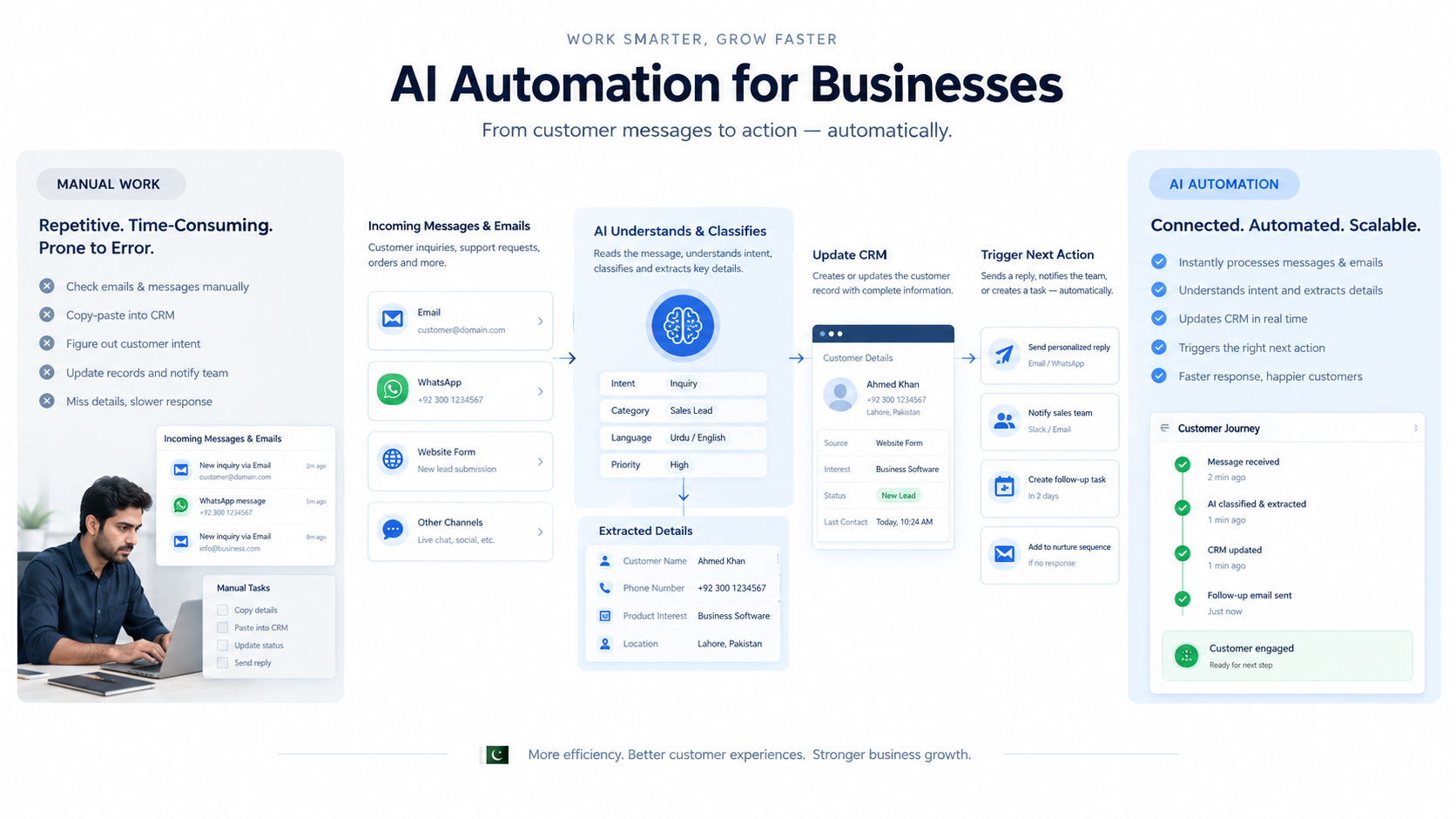
AI automation means putting AI inside a repeatable business workflow so it can read information, understand it, classify it, extract details, make a defined decision, and trigger the next action without a person doing it manually every time.
That last part is what separates it from simply using AI.
Opening ChatGPT and asking it to write a reply is AI usage. You still have to copy the message in, read the answer, paste it back, and update your records. Connecting AI to a workflow so that an incoming customer email is read, understood, logged in the CRM and answered on its own is AI automation. The work happens whether or not you are at your desk.
The practical difference shows up in volume. AI usage helps one person work a little faster. AI automation handles 200 messages a day while your team sleeps.
A few things AI automation is not:
- It is not a chatbot bolted onto your website. A chatbot is one possible front end. The automation is everything that happens behind it.
- It is not replacing your team. It takes the repetitive steps, not the judgement.
- It is not a one time setup. Workflows need monitoring and adjustment, especially in the first few weeks.
AI Automation vs Traditional Automation vs AI Agents
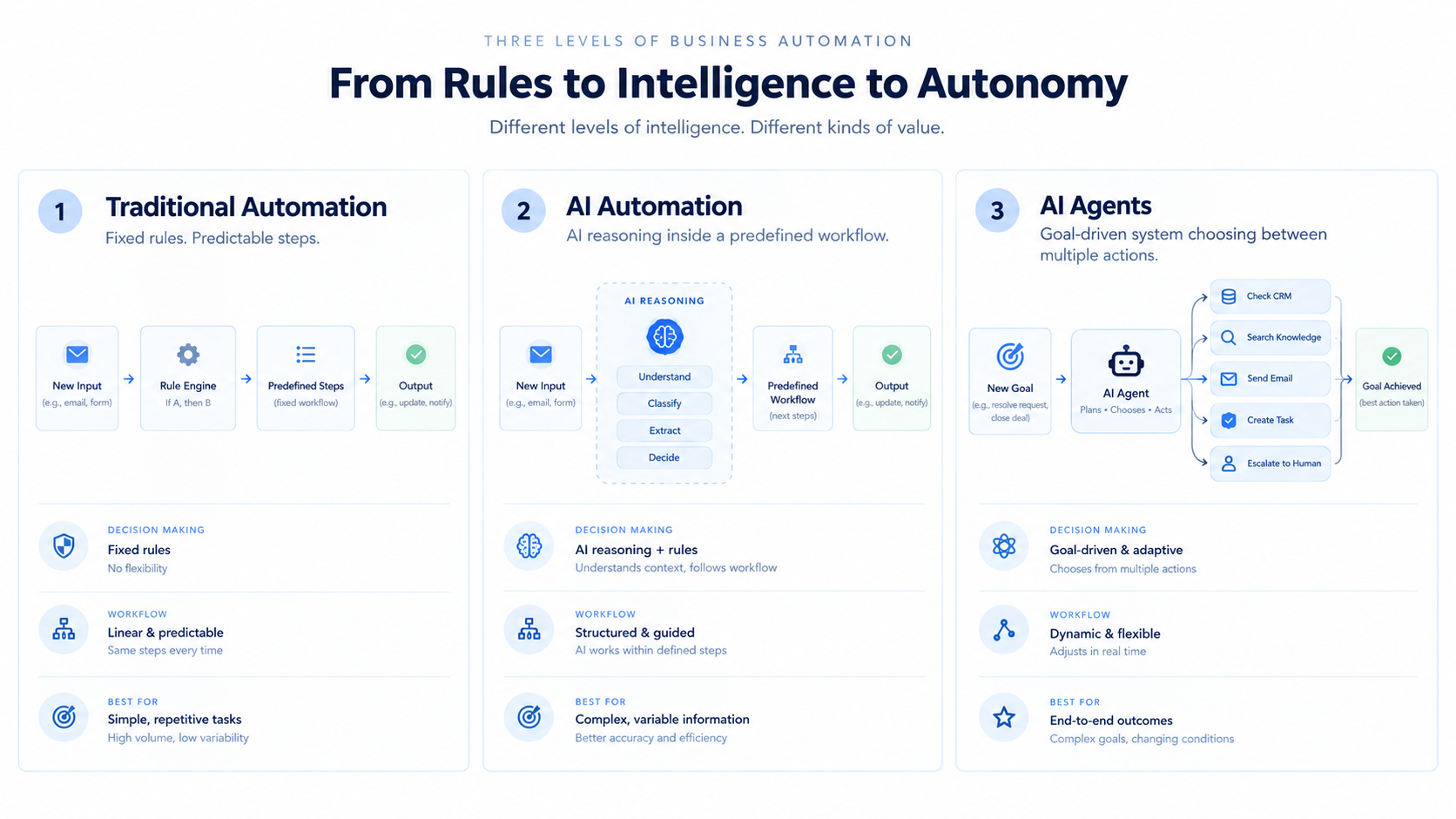
These three get used interchangeably and they are not the same thing. Here is the short version:
Traditional automation follows fixed rules you define in advance.
Form submitted, create CRM contact, send a notification to sales. No thinking involved, and that is the point. It runs the same way every time.
AI automation adds reasoning to specific steps inside that workflow.
Customer email arrives, AI understands what the person actually wants, classifies it as sales or support or complaint, pulls out the order number, drafts a reply, updates the CRM, and flags anything unusual for a human.
An AI agent works toward a goal across multiple steps and decides its own next action within limits you set.
New qualified lead comes in, the agent checks what information already exists, looks the company up, reviews CRM history, prepares a personalised follow up, and creates a task for the salesperson.
|
Factor |
Traditional automation |
AI automation |
AI agent |
|---|---|---|---|
|
Logic |
Fixed rules |
Rules plus AI reasoning |
Goal driven decisions |
|
Input |
Structured data |
Structured and unstructured |
Structured and unstructured |
|
Example |
Form to CRM |
Email, understand, CRM |
Lead, research, follow up, task |
|
Adaptability |
Low |
Medium |
High |
|
Predictability |
Very high |
High |
Medium |
|
Best for |
Repeatable, defined steps |
Context heavy tasks |
Multi step objectives |
|
Human review |
Rarely needed |
Useful for risky actions |
Needed, plus guardrails |
|
Running cost |
Lowest |
Medium |
Highest |
AI is not automatically the better choice
This is the part most AI content skips, and it matters more than anything else in this article.
If a simple rule solves your problem reliably, use the simple rule. It is cheaper, faster and it will not surprise you. Sending a WhatsApp notification when a form is submitted does not need a language model.
There is real data behind this. Zapier studied 375 of its most AI heavy mid market and enterprise customers and found that AI accounted for only 18 percent of the steps in their AI workflows. Everything else ran on conventional automation: rules, filters, app actions and moving data between systems. The same analysis found that workflows which reserve AI for genuine reasoning steps run about 71 percent cheaper than workflows that route every step through a model.
Keep in mind that this is Zapier looking at its own leading customers rather than a neutral survey of all businesses. But the shape of the finding matches what we see in practice. A good AI workflow is mostly plumbing, with AI doing the thinking at two or three specific points.
So the honest framing is this: AI automation is not a replacement for traditional automation. It is a layer you add where rules genuinely cannot cope, usually when the input is messy human language.
What Business Tasks Can AI Automate?
AI is good at a specific kind of work: reading unstructured information, understanding intent, pulling out details, classifying things, and writing text. Anything in your business that fits that description is a candidate.
|
Function |
What AI can take over |
|---|---|
|
Communication |
Email classification, reply drafting, internal notifications, follow up messages |
|
Sales |
Lead qualification, scoring, follow ups, CRM updates, meeting summaries |
|
Customer support |
Ticket classification, FAQ answers, conversation summaries, routing, escalation |
|
Operations |
Data extraction, document processing, task creation, workflow routing |
|
Finance |
Invoice data extraction, document matching, payment reminders, exception flagging |
|
E-commerce |
Order queries, product questions, return requests, review analysis |
|
HR |
CV screening support, candidate communication, interview summaries, request routing |
Notice that none of these say the AI makes the final call. In most of them it prepares the work and a person approves it.
10 repetitive business tasks you can automate with AI
This is the practical list. For each one, here is the manual version, the automated version, and what you actually get out of it.
1. Reading and sorting incoming emails
- Manual: someone opens the shared inbox and decides what each email is about.
- With AI: emails are read, classified by type and urgency, and routed to the right person or system automatically.
- Benefit: nothing sits unread for a day because the wrong person had the inbox open.
2. Entering lead information into the CRM
- Manual: copy name, number, requirement and source from a form, a WhatsApp chat or an email into the CRM.
- With AI: details are extracted from the message itself, including messy free text, and written into the right fields.
- Benefit: no typing, no duplicate records, no leads lost in a notebook.
3. Qualifying leads
- Manual: a salesperson reads every inquiry and guesses which ones are serious.
- With AI: each inquiry is scored against your criteria, budget signals, service fit and urgency, then tagged accordingly.
- Benefit: the sales team starts the day with the good leads on top.
4. Sales follow ups
- Manual: someone remembers to follow up, or does not.
- With AI: a personalised follow up is drafted using the lead history and queued for the rep to review and send.
- Benefit: follow ups actually happen, and they reference the real conversation instead of a template.
5. Routing customer support messages
- Manual: one person reads everything and forwards it on.
- With AI: messages are classified by issue type, matched to the customer record, and sent to the right queue.
- Benefit: faster first response and fewer messages that land on the wrong desk.
6. Summarising meetings and calls
- Manual: nobody takes notes, or one person types them up afterwards.
- With AI: the recording or transcript is summarised into decisions, action items and owners, then pushed into your task tool.
- Benefit: action items survive the meeting.
7. Extracting data from documents
- Manual: reading a PDF and typing the contents into a system.
- With AI: fields are pulled out of the document, validated, and written into the right place.
- Benefit: hours of typing gone, and the typos go with it.
8. Invoice and bill processing
- Manual: open the invoice, check it against the purchase order, enter it in accounts.
- With AI: amounts, dates, vendor and line items are extracted, matched against existing records, and anything that does not match is flagged for a human.
- Benefit: your accounts person reviews exceptions instead of processing everything.
9. Generating recurring reports
- Manual: export the data, build the same summary every week.
- With AI: data is pulled, summarised in plain language, anomalies are called out, and the report lands in your inbox or WhatsApp.
- Benefit: management actually reads the report because it is three paragraphs instead of a spreadsheet.
10. Creating internal tasks from conversations
- Manual: a commitment made in a chat or email never becomes a task.
- With AI: commitments are detected and turned into assigned tasks with due dates.
- Benefit: fewer things that everyone agreed to and nobody did.
If most of these sound like work your team is currently doing by hand, that is normal. Businesses that still run on spreadsheets usually have the most to gain, and the first real step is often moving from Excel to a proper CRM or ERP so that automation has somewhere to write to.
How Does AI Workflow Automation Actually Work?
Every AI workflow, no matter how complex it looks, follows the same seven part skeleton:
Trigger, data, AI processing, decision, action, exception handling, record.
Here is what that looks like with a real example. A customer emails about an order.
- Trigger. A new email arrives in the support inbox. The workflow wakes up.
- Data. The system pulls in the email body, the sender address, and any attachments.
- AI processing. The model reads it and works out what the person wants, in whatever way they chose to write it.
- Decision. It classifies the message as an order status query and extracts the order number.
- Action. The order is looked up in your system, a reply is drafted with the real status, and the customer record is updated.
- Exception handling. If the order number does not exist, or the customer sounds angry, or the amount is above a threshold you set, it stops and hands the case to a human.
- Record. Everything that happened is logged so you can audit it later.
Steps 1, 2, 5 and 7 are plain automation. Step 3 and part of step 4 are the only places AI is doing anything. That is the 18 percent point from earlier, in practice.
This is also where the tooling comes in. Most Pakistani businesses do not need custom engineering for this. Workflow platforms like n8n, Make and Zapier handle the connections, and the AI model plugs in as one step inside the chain. Self hosted n8n is a popular choice locally because the data stays on infrastructure you control. If you want the detail on that approach, our n8n business process automation work covers it.
Does every workflow need human approval?
No, and insisting on it defeats the purpose. The rule we use is simple: the more expensive the mistake, the more human review it needs.
Sending an order status update to a customer is low risk, let it run. Issuing a refund, sending a quotation, or deleting a record is not. Those get a human in the loop, every time.
AI Automation Examples for Pakistani Businesses
Generic examples are easy to nod along to and hard to act on. These five reflect how businesses here actually operate, where WhatsApp is the main sales channel and a lot of the process still lives in someone's head.
Example 1: WhatsApp inquiry to qualified lead
A customer messages your business number asking about a product. AI reads the message, works out what they want, asks one or two qualifying questions, logs the lead in your CRM with the details filled in, and notifies the right salesperson. The rep opens the chat already knowing what the customer needs.
Example 2: E-commerce order support
"Mera order kahan hai" arrives at 11pm. AI identifies it as an order status query, finds the order using the phone number or order ID, replies with the current status and expected delivery, and only escalates if the order is delayed, cancelled, or the customer is clearly upset.
Example 3: Invoice and bill processing
Supplier invoices land in a shared inbox as PDFs. AI extracts vendor, invoice number, date, amount and line items, checks them against the purchase order, writes clean records into your accounts system, and flags mismatches for review instead of processing them silently.
Example 4: Sales follow up at scale
A lead went quiet eight days ago. The workflow pulls up the conversation history, drafts a follow up that references what was actually discussed rather than a generic template, and creates a task for the rep to review and send. Twenty of these get prepared in the time it used to take to write three.
Example 5: Weekly management reporting
Every Monday morning, the workflow pulls sales, inventory and support numbers, writes a plain language summary, points out anything unusual compared to last week, and sends it to management on email or WhatsApp. No one spends Sunday night building a deck.
Where should a small business start?
You do not need an IT department or a big budget to begin. Small businesses in Pakistan usually get the fastest return from these, in roughly this order:
- Lead capture and follow up, because this is where money is being lost right now
- Customer inquiry handling on WhatsApp
- Email sorting and reply drafting
- CRM data entry
- Appointment or booking scheduling
- Document and invoice extraction
The common thread is volume. If something happens five times a day, automating it changes your week. If it happens twice a month, leave it alone for now.
One honest caveat: automation needs a system to write into. If your customer data lives across three WhatsApp accounts and a notebook, fix that first. CRM software for small businesses in Pakistan covers what that groundwork looks like.
Can AI Handle Urdu and Roman Urdu Customer Messages?
Yes, and this is the single biggest reason AI automation works better here than the chatbots businesses tried five years ago.
Your customers do not write clean English. They write things like:
- "bhai rate kya hai iska"
- "order abhi tak nahi aya, kal tak milay ga?"
- "کیا یہ ڈیلیوری کراچی میں ہوتی ہے"
- "price list send krdo plz"
A rule based chatbot fails on all four. It is looking for keywords, and "rate kya hai" is not in its list. So the customer gets "Sorry, I did not understand that" and leaves.
Modern language models handle Roman Urdu, Urdu script, and English mixed into the same sentence without separate configuration. They pick up intent from the meaning, not from matching words. That difference is the whole reason automated customer handling has become viable for Pakistani businesses in the last two years, when it simply was not before.
A few practical notes from doing this:
- Spelling varies wildly in Roman Urdu and that is fine. "karachi", "krachi" and "khi" all resolve correctly.
- Replies should match the customer's language. If they write in Roman Urdu, replying in formal English feels like a robot. This is a prompt instruction, not a technical limit.
- Regional languages like Pashto, Sindhi and Punjabi work less reliably than Urdu. Test before you promise a customer anything.
- Sarcasm and frustration are detected reasonably well, which is useful for deciding when to escalate to a person.
If your business handles a serious volume of voice calls rather than text, the same reasoning applies to AI voice and conversational agents, though voice in Urdu is still harder than text and needs more testing before you put it in front of customers.
AI Automation for Sales and Lead Management
Sales is usually the first place businesses see the money, because the cost of a slow follow up is obvious.
What gets automated across the sales cycle:
- Lead capture. Leads from your website, WhatsApp, Facebook and phone calls land in one place instead of four.
- Qualification. Each lead is assessed against your criteria and tagged, so reps are not reading through the time wasters first.
- Scoring. Leads are ranked by how likely they are to close based on what they said and who they are.
- Follow up. Personalised follow ups are drafted from the actual conversation history and queued for review.
- CRM updates. Call notes, outcomes and next steps are written back automatically.
- Meeting summaries. Call recordings become structured notes with action items.
- Proposal prep. Requirements are pulled from the conversation into a draft proposal.
A typical end to end flow looks like this: a lead comes in from the website or WhatsApp, AI qualifies and enriches it, the CRM record is created, the right rep is notified with context, follow ups are scheduled, and the deal moves through the pipeline with notes written as it goes.
The measurable win here is usually response time. Leads that get a reply in minutes convert far better than leads that get one the next afternoon, and that gap is almost always an operational problem rather than a sales skill problem.
If you want this built around your existing pipeline, our sales and lead generation automation work is where to start.
AI Automation for Customer Support
Support is the highest volume repetitive work in most businesses, which makes it the obvious automation target and also the easiest one to get wrong.
What works well:
- Classifying tickets by type, product and urgency
- Answering genuine FAQs where the answer does not change
- Looking up order, booking or account information and reporting it back
- Summarising long conversation threads before handing them to an agent
- Routing to the right team
- Detecting frustration and escalating early
- Drafting replies for an agent to approve
What should not run unsupervised:
- Refunds, cancellations and anything involving money moving
- Complaints that mention legal action, health, or safety
- Edge cases the workflow has not seen before
- Anything where a wrong answer costs you the customer
The failure mode to avoid is the bot that insists on answering everything. Customers forgive an automated reply that solves the problem. They do not forgive three rounds of an automated reply that does not, with no way to reach a person. Build the escape hatch first.
A reasonable target for most businesses is that automation handles the repetitive half of the queue and makes the other half faster for your agents, not that it handles everything. If you are weighing up a chatbot against a fuller support workflow, our AI chatbots and support automation page breaks down the difference.
WhatsApp AI Automation for Businesses
For most Pakistani businesses, WhatsApp is not a support channel. It is the business. Orders, inquiries, complaints, payments and follow ups all happen there, which means it is also where the most repetitive work piles up.
A WhatsApp automation workflow usually runs like this: a customer message arrives, AI understands what they want, the system looks up the customer or order record, and then either a reply goes out, a task is created, or a human is pulled in.
What businesses typically automate on WhatsApp:
- Order status and tracking replies
- Price and product availability questions
- Capturing new inquiries into the CRM
- Appointment and booking confirmations
- Payment reminders
- Routing serious complaints to a person quickly
The part nobody mentions
Proper WhatsApp automation runs on WhatsApp Business API access through an approved provider. It is not your personal WhatsApp account connected to a tool.
This matters for three reasons. Setup involves business verification and a template approval process, so it takes longer than people expect. There are messaging rules about what you can send outside a customer initiated window, and ignoring them gets numbers restricted. And unofficial workarounds that automate a normal WhatsApp account risk getting your number banned, which is a genuinely expensive mistake when that number is your business.
If someone offers to automate your existing personal WhatsApp in a day, that is a warning sign, not a shortcut.
AI Automation for E-commerce Businesses
E-commerce has a specific problem: the same twelve questions arrive hundreds of times a day, and every one of them needs a real answer pulled from your order system.
Where AI automation fits:
- Order status queries, answered by looking up the real order rather than sending a tracking link and hoping
- Product questions about size, availability, variants and compatibility
- Return and exchange requests, classified and routed with the policy applied
- COD and RTO follow ups, where confirming an order before dispatch directly reduces returns
- Review and feedback analysis, grouping what customers keep complaining about
- Customer segmentation based on purchase behaviour
The RTO point deserves attention because it is a Pakistan specific cost. Cash on delivery means a meaningful share of orders come back undelivered, and a confirmation message that actually gets answered before dispatch cuts that number. Automating the confirmation conversation, including the chasing, is one of the clearest returns in local e-commerce.
Automation on the front end only works if your back end is organised. If your stock, orders and customer data are scattered across platforms, read ERP for retail and e-commerce businesses in Pakistan before you automate anything. For the store side specifically, see our e-commerce and marketplace automation work.
AI Automation With CRM and ERP
AI automation on its own is a floating capability. Connected to your CRM and ERP, it becomes part of how the business runs.
Inside the CRM, AI can:
- Qualify and score incoming leads
- Summarise long email and call threads into a readable history
- Draft follow ups based on what was actually discussed
- Keep records updated without anyone typing
- Suggest the next action on a stalled deal
Inside the ERP, AI can:
- Extract data from invoices, purchase orders and delivery notes
- Classify incoming documents and file them correctly
- Support purchasing workflows by matching documents
- Flag anomalies in stock movement or spending
- Turn operational data into a readable summary
Across both:
A lead enters the CRM, converts to a sales order, moves into the ERP for fulfilment, generates an invoice, triggers a payment, and updates the CRM so the salesperson knows it closed. AI is useful at the specific points where something needs interpreting: reading the inquiry, extracting the invoice, summarising what happened.
The prerequisite is that your systems can talk to each other. If they cannot, AI has nothing to read and nowhere to write. CRM and ERP integration is the groundwork, and it is worth doing before adding an AI layer rather than after.
This also tends to be the point where growing businesses start looking at systems properly. ERP software for growing businesses covers when that shift makes sense.
Which Business Processes Should You Automate First?
Start with the process that is repetitive, high volume, low risk and easy to measure. That combination gives you a quick result you can point to, which is what gets the rest of the team on board.
Good first candidates share these traits:
- It happens many times a day or week
- It takes real employee time
- The steps are mostly consistent
- The data needed already exists somewhere
- A mistake is annoying rather than expensive
- You can measure the before and after
- It is currently causing delays people complain about
Leave these for later:
- Decisions that need genuine judgement or negotiation
- Financial approvals above a meaningful amount
- Sensitive HR decisions like hiring and termination
- Processes that are different every single time
- Anything built on messy or incomplete data
That last one is worth repeating. If the underlying data is bad, automation does not fix it. It just produces wrong answers faster.
Eight questions to run each process through
Before you commit to automating something, answer these:
- How often does it happen?
- How many hours a week does it consume?
- Is the input structured, like a form, or unstructured, like a message?
- Does it need human judgement, or just consistency?
- Which systems have to be involved?
- What happens if the output is wrong?
- Can a person review it before it takes effect?
- What number proves it worked?
If question 6 has a scary answer and question 7 is no, redesign the workflow before you build it.
One principle to hold onto: automate the workflow, not the task. Automating one step while the rest stays manual usually creates a new bottleneck somewhere else. Look at the whole chain from trigger to finished outcome.
What About Data Privacy and Security?
This is usually the first real question a business owner asks, and it deserves a straight answer rather than reassurance.
When you use a hosted AI model, the text you send leaves your systems and goes to that provider. For most business workflows this is acceptable, but it should be a decision you make deliberately rather than discover later.
Practical rules worth following:
- Send the model only what it needs for the task. A support reply workflow does not need the customer's full payment history.
- Mask or strip identifiers you do not need, such as CNIC numbers and full card details, before the data reaches the model.
- Keep financial records, HR files and legal documents on tighter controls than general inquiries.
- Check the provider's data retention and training policy. Business tier API access generally does not train on your data, but verify it for the specific service you use rather than assuming.
- Log what the automation did and what data it touched, so you can answer questions later.
- Limit permissions. A workflow that only needs to read your CRM should not have delete access.
When self hosting makes sense
If you handle sensitive client data, work with regulated clients, or simply want the workflow engine inside your own environment, self hosted tooling is a reasonable path. n8n runs on your own server, and open models can run on infrastructure you control, which keeps most of the pipeline in house. It costs more to set up and maintain, so it is a judgement call based on what you are processing rather than a default.
One thing to be clear about: regulation in this area is still developing in Pakistan and rules differ if you serve customers abroad. Treat customer data carefully because it is the right call commercially, not because someone is currently checking.
How Much Does AI Automation Cost in Pakistan?
There is no standard price, and anyone quoting one without seeing your process is guessing. What there is, is a clear set of things that move the number.
What drives the cost:
- How many workflows you are building
- How complex each one is, measured in steps and decision points
- How much AI usage it generates, since models are billed per use
- How many systems have to be integrated, and whether they have usable APIs
- Whether CRM or ERP access needs building or already exists
- WhatsApp Business API setup and the provider's own charges
- How clean your data is, because cleanup is real work
- Whether human approval steps and interfaces need building
- Monitoring, error handling and ongoing maintenance
- Security requirements, including self hosting if you need it
Four rough tiers, from cheapest to most involved:
|
Tier |
What it is |
Typical effort |
|---|---|---|
|
Simple workflow automation |
Rules only, connecting two or three tools |
Days |
|
AI assisted workflow |
One or two AI steps inside an existing process |
1 to 3 weeks |
|
Custom AI agent |
Multi step, goal driven, with tools and guardrails |
Several weeks |
|
Multi system AI automation |
AI across CRM, ERP, WhatsApp and internal systems |
Ongoing project |
Two cost realities people miss. First, the model usage bill is recurring and scales with volume, so a workflow handling 50 messages a day costs very differently from one handling 5,000. Second, the cheapest build is rarely the cheapest over a year, because a workflow nobody maintains quietly stops working and you find out from a customer.
The sensible approach is to start with one workflow, measure what it saves, and expand from there. That also gives you real numbers to budget the next one with.
Custom AI Automation vs Ready Made AI Tools
There are three options here, not two, and the middle one is what most businesses actually need.
Ready made AI tools
Off the shelf products that do one job. Good when your use case is standard, you want it running this week, and you can live with the tool's way of doing things. Cheapest to start, limited to what the vendor built.
Configured workflows
Existing platforms like n8n, Make or Zapier connected and configured around how your business actually works, with AI steps where they are needed. This is the sweet spot for most small and mid sized businesses in Pakistan. You get real customisation without paying for custom software, and you can change it yourself later.
Custom AI automation
Purpose built for your process. Worth it when your workflow genuinely does not exist elsewhere, when you need deep integration with internal systems, when your business logic is specialised, or when volume is high enough that per use tool pricing stops making sense.
|
Ready made |
Configured |
Custom |
|
|---|---|---|---|
|
Setup time |
Days |
Weeks |
Months |
|
Upfront cost |
Low |
Medium |
High |
|
Fits your process |
Partly |
Mostly |
Exactly |
|
You can change it |
Barely |
Yes |
Needs a developer |
|
Best for |
Standard needs |
Most businesses |
Unique or high volume |
An honest note: as a company that builds custom automation, we still tell most businesses to start configured. Build custom when you have hit a real limit, not before. Overbuilding before you have proved the value is the most common and most expensive mistake in this space.
How to Implement AI Automation in a Business
The order matters more than the tools. Here is the sequence that works:
- Find the repetitive work. Ask your team what they do every day that they wish they did not. You will get an accurate list in about ten minutes.
- Map the current process exactly as it happens. Not how it is supposed to work. How it actually works, including the WhatsApp message that triggers everything.
- Pick one high value use case. One. Resist the urge to automate four things at once.
- Check your data. Where does the information live, who owns it, is it accurate, and can a system read it?
- Decide where AI is actually needed. For each step, ask whether a rule could handle it. If yes, use the rule.
- Connect the systems. This is usually the longest part and the part people underestimate.
- Set permissions and guardrails. Define what the automation can do, what it can never do, and what thresholds trigger a human.
- Build it.
- Test with real cases, including bad ones. Feed it your weirdest customer messages and your messiest invoices. The clean ones were never the problem.
- Add human review where the risk justifies it.
- Launch gradually. Run it alongside the manual process first, or on a slice of volume, and compare.
- Monitor. Watch error rates and escalations for the first few weeks, when most of the fixes happen.
- Improve and expand. Tighten the first workflow, then take what you learned to the next one.
Most failed automation projects go wrong at step 2 or step 9. Either nobody mapped the real process, or nobody tested the edge cases until a customer found one.
If you want this designed and built around your existing systems rather than figured out from scratch, that is what our AI agent and workflow automation service does.
Common AI Automation Mistakes
These are the ones that come up repeatedly, roughly in order of how much damage they cause.
Automating a broken process. If the process is badly designed, automating it just means the bad outcome arrives faster and more consistently. Fix the process, then automate it.
Giving AI too much permission. Read access and write access are very different things. Start restrictive and open up as the workflow proves itself.
Ignoring data quality. Duplicate contacts, half filled records and three versions of the same customer will produce confident, wrong output.
No escalation path. Every workflow needs an answer to "what happens when this does not know what to do." Without one, customers hit a dead end.
No monitoring. Automation fails quietly. An API changes, a credential expires, and nobody notices for two weeks. Set up alerts.
No audit trail. When something goes wrong, you need to see what the workflow did and why. Log everything.
Using AI where a rule would do. More expensive, slower, and less predictable, for no benefit.
Sending sensitive data where it should not go. Covered above, but it belongs on this list.
Testing only the easy cases. The clean inquiry in perfect English was never the problem.
No owner after launch. A workflow with nobody responsible for it degrades within months.
Building too much too early. Prove value on one workflow before committing to a platform wide rollout.
The principle underneath all of these: AI automation needs clear boundaries. It should know exactly what it can do, exactly what it cannot, and exactly when to stop and ask a person.
How to Measure AI Automation ROI
Measure before you build, otherwise you will have an opinion instead of a result.
Pick two or three of these, record the current number, and compare after a month:
|
Metric |
What it tells you |
|---|---|
|
Hours saved per week |
The headline number for most businesses |
|
Average processing time |
Whether the workflow is actually faster |
|
First response time |
Directly tied to conversion on leads |
|
Error rate |
Whether quality held up or dropped |
|
Manual data entry volume |
How much typing disappeared |
|
Support tickets handled per person |
Capacity gained without hiring |
|
Cost per processed request |
The number that scales with you |
|
Exception rate |
What share needed a human after all |
|
Conversion rate |
Only where the workflow touches sales directly |
Two warnings about ROI claims. Anyone promising a specific percentage before seeing your process is selling, not estimating. And a high exception rate is not necessarily failure. If 30 percent of cases need a human but the other 70 percent run clean, that is still most of the work gone.
The measurement that matters most is the simplest one: is the thing that used to take four hours a day now taking one? If yes, the workflow is working. If nobody can tell, something is wrong, and it is usually that the automation moved the bottleneck instead of removing it.
This is also where broader thinking on AI at work has landed. Microsoft's 2026 Work Trend Index, published in May 2026, frames the shift around AI and agents taking over execution so that human attention moves to judgement and direction. That is the right lens for measurement too. You are not looking for AI to do more work. You are looking for your people to spend their time on work that needs a person.
Frequently Asked Questions
Will AI automation replace my employees?
No. It replaces tasks, not people. The work that disappears is data entry, message sorting and copying information between systems, which is the work your team already dislikes. What stays is judgement, relationships, negotiation and handling the cases that do not fit the pattern. In practice most businesses redeploy people rather than reduce headcount, because the bottleneck was never that they had too many staff.
Is AI automation worth it for a small business in Pakistan?
It depends on volume, not size. A five person business handling 200 WhatsApp inquiries a day has more to gain than a fifty person business whose work is all bespoke. If something repetitive happens many times a day and currently eats hours, it is worth automating regardless of company size.
Can AI handle customer messages written in Roman Urdu?
Yes. Modern language models read Roman Urdu, Urdu script and mixed English in the same message without separate setup, and they understand intent rather than matching keywords. This is the main reason automated customer handling works here now when keyword based chatbots did not.
Can AI automation work with my existing CRM or ERP?
Usually yes, provided the system has an API or can be integrated. Common platforms are straightforward. Older or heavily customised local systems may need integration work first. If your business currently runs on spreadsheets, expect to set up a proper system before automation has anywhere useful to write.
How long does it take to set up?
A single straightforward workflow can be running in one to three weeks. Multi system automation across CRM, ERP and WhatsApp is a longer project. The integration and testing take most of the time, not the AI part.
What happens when the AI gets something wrong?
That depends entirely on how it was built, which is why guardrails matter. A well designed workflow has confidence thresholds, escalation rules and human approval on anything consequential, so mistakes surface as a flagged case rather than a message sent to a customer. Expect a correction period in the first few weeks.
Do I need an AI agent or just automation?
Most businesses need automation, not an agent. If your process has defined steps and a known outcome, AI automation is cheaper, more predictable and easier to maintain. Agents make sense when the path genuinely varies and the system needs to decide its own next move. Start with the simpler option and upgrade if you hit a real limit.
Where to Start
Most businesses approach this backwards. They start with "where can we use AI" and go looking for a place to put it.
The better question is: which repetitive process is costing us the most time or creating the most friction right now?
Answer that first. Then work out whether it needs traditional automation, AI automation, or a full agent. Often the answer is simpler and cheaper than expected, and that is a good outcome, not a disappointing one.
If you want a second opinion on which of your processes is worth automating first, we are happy to look at it with you. Lumen AI Consultancy builds AI automation solutions for businesses across sales, support, operations and e-commerce, connected to the systems you already use. Get in touch and tell us what your team spends too much time on.