ERP for Retail & E-commerce Businesses in Pakistan: Inventory, POS & Omnichannel Sales
20 min read
On this page
- Why Do Retail & E-commerce Businesses in Pakistan Need ERP?
- How Does ERP Connect Retail Stores and Online Sales?
- How Does ERP Manage Inventory Across Stores, Warehouses and Online Channels?
- How Does ERP Connect POS With Inventory and Accounting?
- How Does ERP Manage E-commerce Orders?
- How Does ERP Handle COD Reconciliation in Pakistan?
- How Does ERP Manage Returns and RTOs?
- Can ERP Integrate Daraz, Shopify and WooCommerce?
- How Does ERP Manage Purchasing and Replenishment?
- What Retail & E-commerce ERP Features Matter Most?
- Retail ERP vs Separate POS, Inventory and Accounting Software
- Does Every Retail or E-commerce Business Need Full ERP?
- Ready-Made vs Configured vs Custom ERP
- How Much Does Retail & E-commerce ERP Cost in Pakistan?
- How to Implement ERP for a Retail or E-commerce Business
- What Should Pakistani Retailers and Online Sellers Check Before Choosing ERP?
- Common Retail & E-commerce ERP Mistakes
- FAQs
- Conclusion
ERP for retail and e-commerce businesses in Pakistan is software that connects inventory, POS, online orders, purchasing, returns, payments and accounting in one system. Your stores, website and marketplaces then work from the same numbers instead of separate tools that disagree with each other.
That matters because many Pakistani sellers still run on a patchwork: store stock in a POS, website orders in Shopify, Daraz orders in the seller dashboard, accounting in a separate package and COD settlements in Excel. This guide explains how an ERP connects those pieces, where its limits are, and when you may not need a full ERP at all.
Why Do Retail & E-commerce Businesses in Pakistan Need ERP?
They need ERP when their separate tools stop agreeing with each other. An ERP keeps one shared record of products, stock, orders, payments and accounts, so the same sale is not typed into three systems and reconciled by hand later.
Common Warning Signs
You likely need ERP if two or more of these sound familiar:
- Stock quantities are tracked in spreadsheets that only one person fully understands
- A website order does not reduce the stock a store can see
- Marketplace orders are processed in a separate dashboard
- Purchasing happens through memory, calls and WhatsApp messages
- COD money is chased line by line in Excel
- Nobody can quickly say how many returns and RTOs came back this week
- Financial reports arrive days after the month closes
What Changes With a Connected System
Each workflow gets one home, and every sale, dispatch or return updates stock, customer records and accounts together. The point is not more software. It is that one event no longer has to be entered and fixed in several places.
How Does ERP Connect Retail Stores and Online Sales?
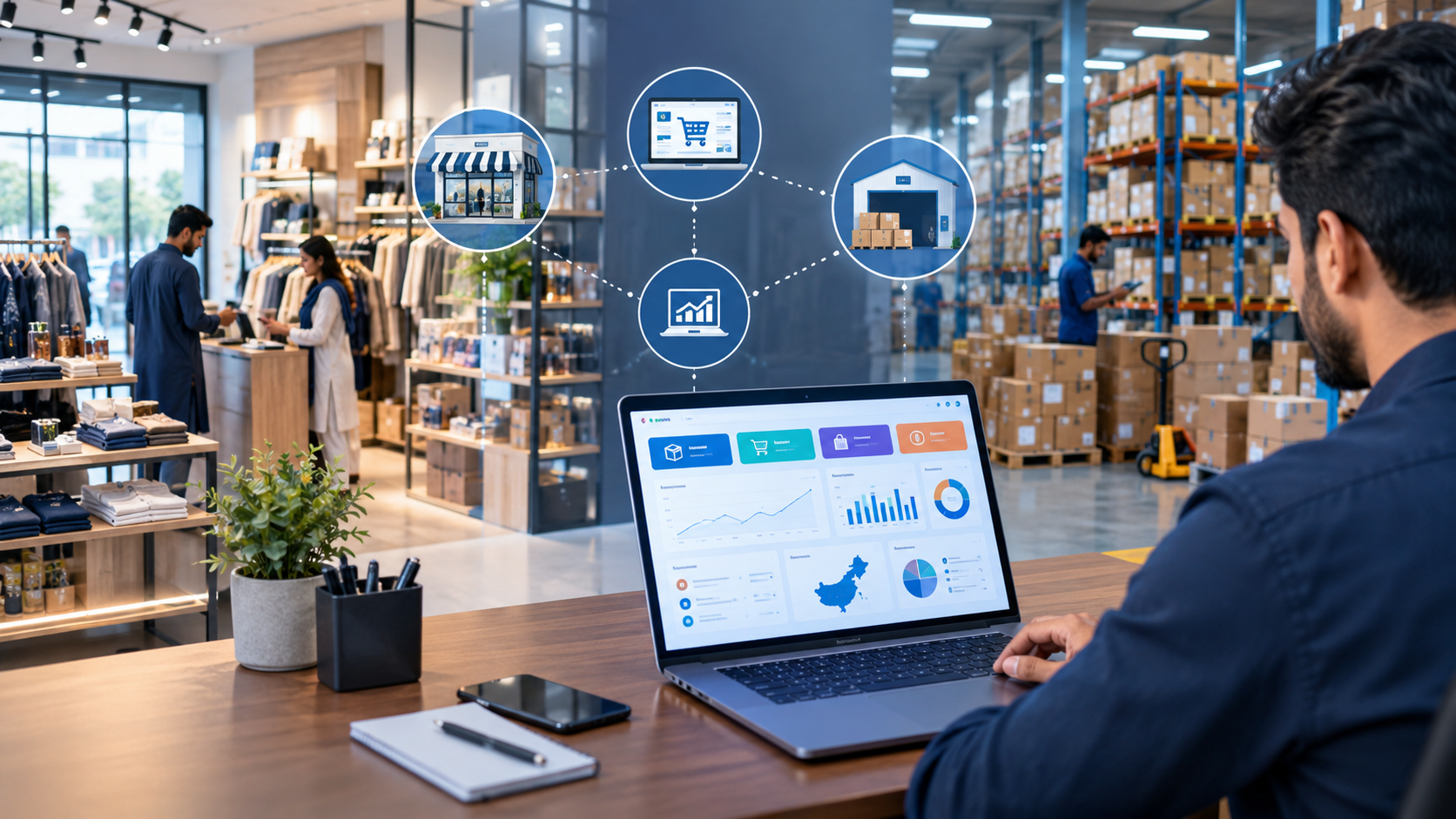
ERP sits in the middle. The POS, website, marketplaces and warehouse all report into it, and it holds the stock, payment and accounting results of every sale.
A Realistic Example
A website order and a store sale draw from the same stock pool, and a connected ERP shows what remains and where. Take a clothing retailer with a central warehouse and two stores. On Saturday morning a customer orders a jacket online. An hour later someone buys the same jacket at a store counter. With a connected setup, the business sees what is left and whether a store needs a transfer from the warehouse. Without it, the jacket may be sold twice.
The two core flows look like this:
POS Sale → Inventory Update → Payment → Accounting
Customer Order → Stock Check → Order Processing → Picking → Dispatch → Payment/COD → Delivery → Return/RTO if applicable → Reconciliation → Accounting
How quickly these updates happen depends on the integrations and platforms involved. Some connections update continuously, others on a schedule. Confirm this before you commit to any system.
POS, Inventory Software, E-commerce Platform and ERP: What Is the Difference?
A POS handles the counter sale, inventory software tracks stock, an e-commerce platform runs the online store, and an ERP ties all of them to purchasing and accounting.
- POS: Billing, discounts and receipts at the counter.
- Inventory software: Stock quantities and movements.
- E-commerce platform: Storefront, cart and checkout. Shopify and WooCommerce are examples.
- ERP: Inventory, sales, purchasing, payments and accounting in one data model.
An ERP does not always replace the rest. A sensible setup for many businesses is an e-commerce platform, a POS, an ERP and an accounting integration working together, with the ERP as the shared backbone. Whether you use the ERP's own POS or connect an existing one depends on what your stores already run.
How Does ERP Manage Inventory Across Stores, Warehouses and Online Channels?
It treats stock as a single pool with different locations and statuses, instead of one list per channel. The question changes from "what does the POS say?" to "what do we actually have, and what is already promised?"
Stock Views That Matter
Stock should be split into warehouse, store, reserved, available, online, in-transit and returned, because each answers a different question.
- Warehouse stock: Goods in central or regional warehouses
- Store stock: What each branch holds
- Reserved stock: Items promised to confirmed orders that have not shipped
- Available stock: What can still be sold, which is physical stock minus reserved
- Online stock: The quantity exposed to the website or marketplaces
- In-transit stock: Goods moving between locations or arriving from a supplier
- Returned stock: Items waiting for inspection or restocking
The reserved and available split is where many businesses get caught. A product can sit on a warehouse shelf and still be spoken for by an online order. If the system only knows the physical count, a store will happily sell it again.
Transfers, Replenishment and Product Detail
ERP handles stock transfers, low-stock alerts and replenishment rules, plus variants and batch or serial tracking where your products need them. Size and colour variants matter for apparel and footwear. Batch or serial tracking matters for electronics or expiry-sensitive goods.
A Note on Syncing
No, real-time sync with every platform is not automatic. It depends on the integrations available and how they are configured. Some updates run continuously, some in batches, and some need a manual step.
How Does ERP Connect POS With Inventory and Accounting?
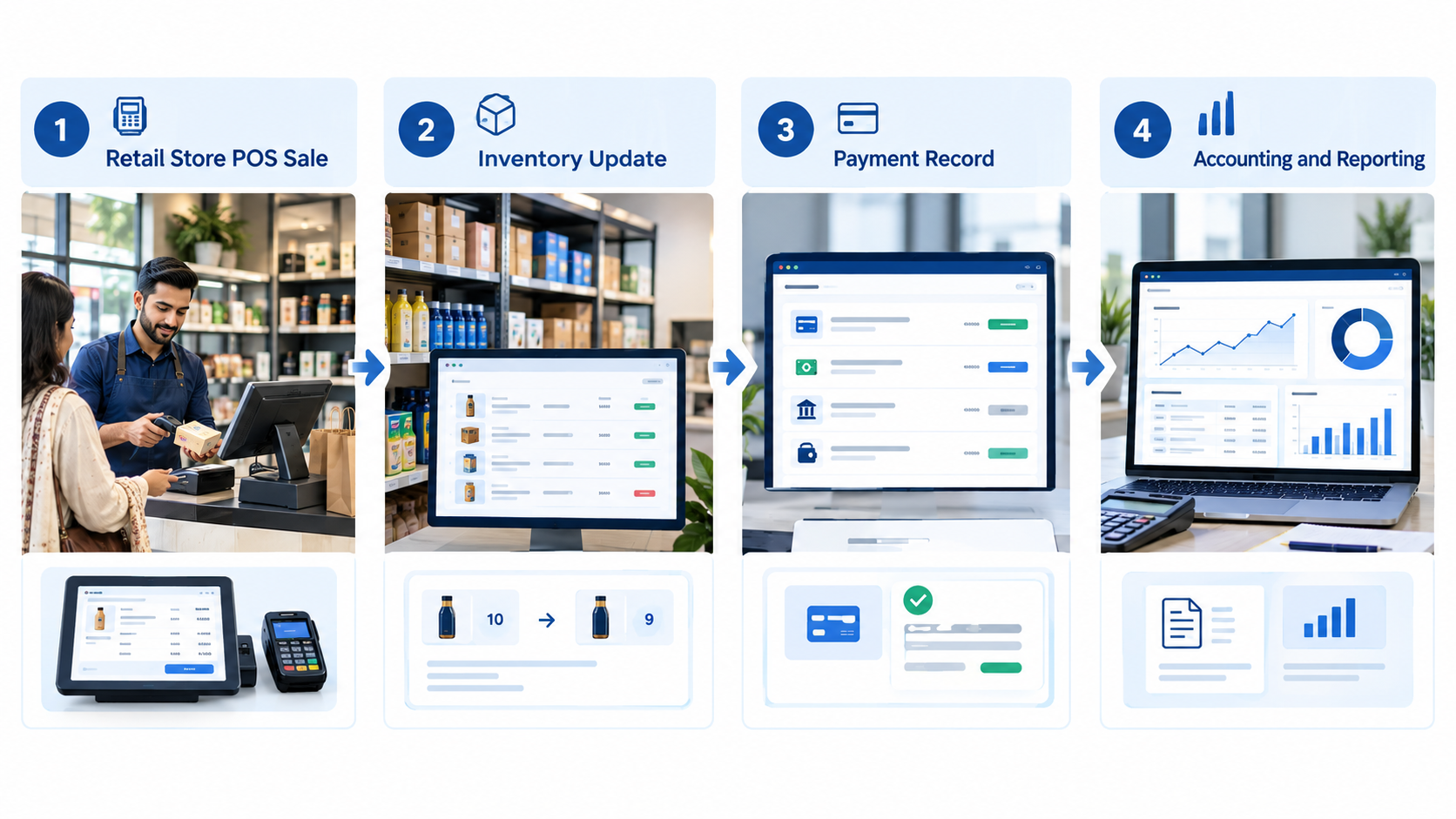
Once connected, every sale at the counter reduces stock, records the payment and creates the accounting entry without anyone typing it twice. The flow is:
POS Sale → Stock Deduction → Payment Record → Accounting Entry → Reporting
Payment Methods
A connected POS can record cash, card, bank transfer and other local methods, depending on the system. Support differs between products, so write down the methods your stores actually accept before you compare options.
What Connected POS Data Gives You
It cuts duplicate entry and gives you day-end cash summaries, stock by store and traceable discounts. A store manager sees the cash summary without rebuilding it. The owner sees sales by store without calling anyone. Returns can be traced to a cashier or location, and store-level permissions mean staff only see what they need.
Invoicing and Sales Tax
Support for FBR-related invoicing and sales tax depends on the ERP and may need configuration or an integration. Confirm what your ERP supports during requirements analysis and ask a qualified tax professional about compliance questions.
How Does ERP Manage E-commerce Orders?
ERP pulls online orders into one record, checks and reserves stock, then follows the order through fulfilment to payment. The standard flow is:
Order → Stock Check → Confirmation → Picking → Packing → Dispatch → Delivery → Payment/Reconciliation
From Checkout to Doorstep
Orders enter through an integration, connector or API (or manually), reserve stock, then move through picking, packing and dispatch. Reserving stock stops the same unit being sold twice. The warehouse works from pick lists, and dispatch details and tracking references are saved against the order. Customer details and order history stay in one place, and invoices link back to the original order.
WhatsApp and Social Media Orders
WhatsApp and social media orders can be entered as manual sales orders so they join the same stock and accounting flow. Many Pakistani sellers still take a good share of orders this way, and without an entry point they disappear into chat threads.
The exact workflow depends on the e-commerce platform and how it is integrated, so map it before configuration starts.
How Does ERP Handle COD Reconciliation in Pakistan?
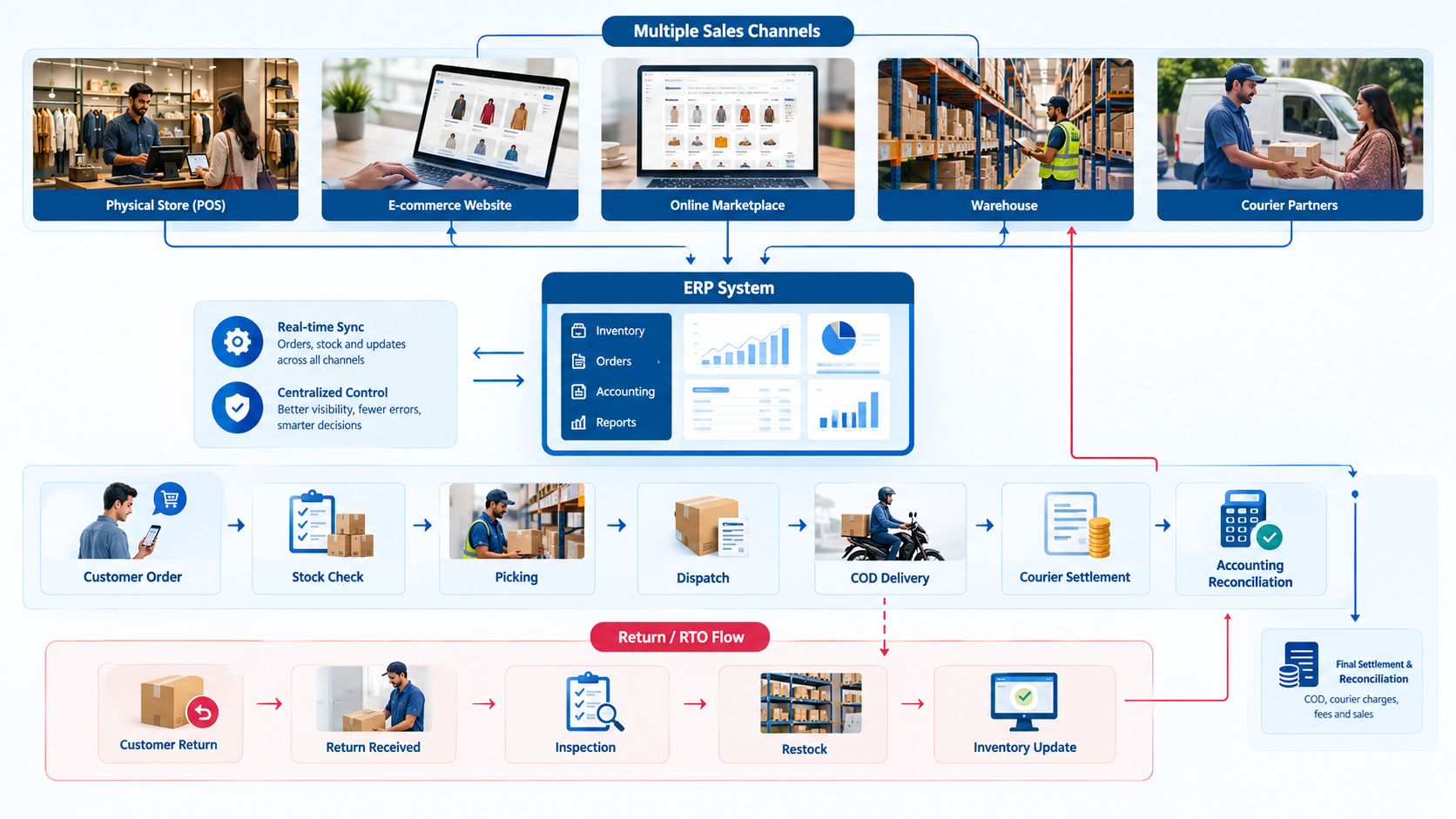
COD reconciliation means matching what customers owed on cash-on-delivery orders against what the courier actually collected and paid out. An ERP helps by linking each order to its delivery status, collected amount, courier charges, returns and final settlement in your books.
The flow is:
Order Value → Delivery → COD Collection → Courier Settlement → Accounting Reconciliation
Why Order Value Is Not the Bank Deposit
Because delivery outcomes, returns, RTOs, courier charges, collection timing, settlement adjustments and refunds all sit between order value and the final payout. Each one needs a record, or the difference becomes an unexplained shortfall.
A Practical COD Example
A COD batch reconciles by matching each order's status and expected amount against the courier's settlement statement. Say a business ships a batch in one week. Most orders are delivered, a few are refused at the door, and one is returned two days later. If the ERP holds each order's status and expected amount, finance can find short-paid or missing orders and post courier fees correctly. Without that record, the same job means scrolling through a spreadsheet and guessing.
Courier and Payment Integrations
How automatic this is depends on the courier or payment integration available. Some couriers provide data through APIs or downloadable reports. Others may need file imports or manual matching. Don't assume a particular courier connects out of the box, and ask what data it actually provides.
How Does ERP Manage Returns and RTOs?
ERP records returns and RTOs as stock, financial and customer events, not only service problems. One returned parcel can change inventory, order status, revenue, refunds, courier charges and COD reconciliation at the same time.
Customer Return
A customer return is an order that was delivered and later sent back. It normally involves a return request, a refund or exchange decision, inspection of the item and an adjustment to revenue and stock.
RTO (Return to Origin)
An RTO is an order that never reached the customer and comes back to the seller. The customer may have been unreachable or refused delivery. Revenue may never have been earned, but shipping costs were still paid and the COD amount will not arrive.
What Happens to the Returned Stock
Returned items should be sorted by condition before they go back on sale:
- Resalable: Returns to available stock
- Damaged: Moved to a separate location or written off
- Needs inspection: Held until someone checks it
- Requires repackaging: Reworked, then restocked
A returned COD order needs stock to come back, the customer record to note it and the money side to be corrected. If those three updates happen in three different places, something usually gets missed.
Can ERP Integrate Daraz, Shopify and WooCommerce?
Potentially, yes, through available integrations, connectors or APIs. The scope varies by ERP, platform and project, so treat it as something to verify rather than assume.
What May Be Synchronized
An integration may sync products and variants, inventory levels, orders, customers, order status, pricing and shipping information. Few setups cover all of these in both directions.
What Not to Assume
Don't assume integrations are native, two-way or complete. Some rely on third-party connectors or custom development. Data may flow one way, for example orders coming in automatically while stock goes out on a schedule. Marketplace access also depends on what the marketplace allows, including API options and seller account permissions.
Shopify ERP integration and WooCommerce ERP setups are commonly built through connectors or APIs. A Daraz ERP integration depends on what Daraz makes available to sellers and how your account is set up. Confirm the exact scope during requirements analysis, before anything is promised.
How Does ERP Manage Purchasing and Replenishment?
ERP uses stock levels, sales history and supplier records to help decide what to buy and when. It shows what is running low, what is moving fast and which purchase orders are still open.
A Typical Purchasing Flow
It runs from a reorder alert to a purchase order, goods receipt, supplier invoice and payment. Reorder points flag items falling below a set quantity. Sales velocity shows how quickly products sell, which informs how much to order. Goods are checked against the order when they arrive, and the supplier invoice is matched before payment.
What Forecasting Can and Cannot Do
ERP improves the inputs to purchasing decisions but cannot predict demand perfectly. Eid rushes, promotions and supplier delays still need human judgment.
What Retail & E-commerce ERP Features Matter Most?
The ones that fix the problems you actually have. Grouped by problem, here is what to look at and why.
Inventory
Multi-location stock, transfers, adjustments and replenishment are the foundation. If these numbers cannot be trusted, nothing built on top of them can be either. Batch or serial tracking only matters if your products need it.
Retail
POS, pricing, discounts, store management and cash control matter most at the counter. The counter is where store data starts, so weak controls here create leakage that is hard to trace later.
E-commerce
Order management, website and marketplace integration, shipping and customer records. Online orders arrive in volume and need a consistent path from checkout to delivery.
Finance
Sales, purchases, receivables, payables and reconciliation. Retail accounting software in Pakistan is most useful when it reflects what operations did, rather than a monthly rebuild from spreadsheets.
Reporting
Sales by channel and by store, product performance, returns and profitability. These reports let owners compare channels fairly and decide where to spend.
Retail ERP vs Separate POS, Inventory and Accounting Software
Separate software is not wrong. Many small businesses run well on a POS and an accounting package. The trouble arrives when you start gluing several tools together by hand.
Where Disconnected Stacks Struggle
They struggle with duplicate data, manual reconciliation, mismatched stock and delayed reports. Imagine POS plus Excel plus accounting software plus Shopify plus a courier portal. The same product gets entered in more than one place. Staff spend hours matching sales, couriers and bank entries. Each tool shows a different stock number, and nobody is sure which figure is right.
When Connecting Through ERP Makes Sense
It makes sense when the effort of keeping tools aligned costs more than integrating them. If your current tools already talk to each other and volume is manageable, there is no urgent reason to change.
Does Every Retail or E-commerce Business Need Full ERP?
No. Plenty of retailers and online sellers do fine without one.
When Simpler Software May Be Enough
Simpler software is usually enough for one store, a small product range, mostly cash sales, simple inventory and simple accounting. The same goes for a small online shop with limited orders and few integrations.
When ERP Becomes More Relevant
ERP becomes relevant with multiple stores, a large catalog, several warehouses, or a mix of website, marketplace and physical sales. COD complexity, heavy return or RTO volume, complicated purchasing and the need for consolidated reporting all push in the same direction.
There is no magic employee count or revenue figure that triggers the need. A better test is whether your team spends more time reconciling than selling.
Ready-Made vs Configured vs Custom ERP
Start with your requirements, then choose the lightest option that covers them.
Ready-Made ERP
A ready-made ERP is a standard product used largely as it comes, with standard retail and e-commerce workflows. It is usually quicker to adopt and works well when your processes are fairly conventional.
Configured or Customized ERP
This is an established ERP adapted through workflows, fields, reports, integrations and business rules. It suits businesses with a few specific needs, such as local courier handling or particular reports, without building from scratch.
Custom ERP
Custom ERP is purpose-built functionality, justified only when existing systems cannot meet important requirements. It can fit exactly, but it also means more to build, maintain and depend on.
Platforms Worth Evaluating
Odoo, ERPNext and Zoho are examples of established platforms, and none is the right answer for everyone. Fit depends on your requirements, integrations, budget and who will support it.
LumenAI's Requirements-First Approach
We start with your workflow, not with a product. LumenAI Consultancy reviews your existing POS, e-commerce and accounting setup and evaluates established ERP platforms. We configure where that is enough, integrate what already works, and customize or build only where there is a real gap. You can read more about our ERP and CRM solutions for Pakistani retailers and e-commerce businesses.
How Much Does Retail & E-commerce ERP Cost in Pakistan?
It depends on scope, and anyone quoting one universal number without seeing your setup is guessing.
What Drives the Cost
The main drivers are users, stores, warehouses, modules and POS terminals, plus the e-commerce, marketplace, courier and payment integrations you need. Data migration, customization, training, hosting, support and reporting needs all add to it.
Four Parts of Total Cost
Total cost splits into software, implementation, integration and customization, and ongoing support.
- Software cost: Licences or subscriptions, where they apply
- Implementation cost: Setup, configuration and rollout
- Integration and customization cost: Connecting platforms and adapting workflows
- Ongoing support cost: Maintenance, updates and help after go-live
Compare total cost of ownership rather than the first quote. For a deeper breakdown, see our guide to ERP software cost in Pakistan.
How to Implement ERP for a Retail or E-commerce Business
Treat it as a sequence of steps with testing before anything goes live.
Typical Implementation Steps
Implementation usually runs through 14 steps, from requirements discovery to post-go-live support.
- Requirements discovery: Map how orders, stock, payments and returns actually flow.
- Existing systems audit: List current POS, store, e-commerce, courier and accounting tools.
- Inventory and data cleanup: Fix duplicate SKUs, missing barcodes and inconsistent names.
- ERP configuration: Set up products, locations, taxes, pricing and permissions.
- POS setup: Configure terminals, payment methods and store rules.
- E-commerce integration: Connect the website for products, stock and orders.
- Marketplace, courier and payment integrations: Add the channels you need.
- Data migration: Move cleaned products, customers, suppliers and balances.
- Testing: Run each workflow end to end, including returns and COD.
- UAT: Let the people who will use the system confirm it works for them.
- Staff training: Train store, warehouse and finance teams on their own tasks.
- Pilot or phased rollout: Start with one store or channel where practical.
- Go-live: Switch over with a clear fallback plan.
- Post-go-live support: Fix issues as real usage reveals gaps.
Timelines
Timelines depend on scope and data quality, so be wary of fixed promises. For more on the process, read our guide to ERP implementation in Pakistan.
What Should Pakistani Retailers and Online Sellers Check Before Choosing ERP?
Check the ERP against your real workflows, not a polished demo. Take this list into every vendor conversation:
- Can it manage multiple stores and multiple warehouses?
- Can it connect POS with inventory?
- Can it connect website orders?
- Can it integrate with the marketplaces you use?
- Can it handle COD reconciliation?
- Can it track returns and RTO?
- Can it manage stock transfers?
- Can it support the payment methods you accept?
- Can it integrate with your accounting?
- Can it produce the reports you need?
- What data needs migration?
- Which integrations are required, and are they native, connector-based or custom?
- What customization is actually needed?
- What happens when you add another store or sales channel?
- What support is available after go-live?
- What is the total cost of ownership?
Get the answers in writing, and ask for your key workflows to be demonstrated with your own sample data.
Common Retail & E-commerce ERP Mistakes
Most of these mistakes are about process rather than the software itself.
1. Treating Online and Offline Inventory Separately
Separate stock lists for the website and the stores turn the ERP into a third list. The whole point is one pool of stock.
2. Choosing Software Before Mapping Workflows
A demo can look impressive and still not match how your orders, returns and settlements actually move. Map the workflow first, then judge the tool against it.
3. Ignoring COD Reconciliation
A system that handles sales well but cannot match courier settlements leaves finance doing the same manual work as before. In Pakistan, this is often where money quietly goes missing.
4. Ignoring RTO and Returns
Unrecorded returns make stock counts drift and revenue look higher than it is. Courier costs on failed deliveries also disappear from view.
5. Migrating Poor-Quality Product Data
Duplicate SKUs, missing barcodes and inconsistent names move straight into the new system. Clean the catalog before migration, not after.
6. Over-Customizing the ERP
Every custom change has to be maintained and tested again after upgrades. Customize where the business truly needs it and use standard workflows everywhere else.
7. Not Testing Integrations
An integration that works for one test order may fail on variants, partial shipments or cancellations. Test the awkward cases before go-live.
8. Ignoring Store-Level Permissions
A cashier does not need access to purchase prices or other branches' stock. Set roles early, because retrofitting them is harder.
9. Not Training Staff
A well-configured system still produces poor data if the people using it were never shown how. Train each team on its own tasks.
10. Failing to Plan for Business Growth
A setup that suits two stores may strain at five. Ask early how the system handles a new store, warehouse or sales channel.
FAQs
What Is ERP Software for Retail Businesses?
It is software that connects core retail operations such as inventory, POS, purchasing, sales, payments and accounting in one system, so teams work from the same data.
How Does ERP Help E-commerce Businesses in Pakistan?
It brings online orders, stock, shipping, payments and accounting together. It can also help track COD collections, returns and RTOs, depending on the integrations and configuration.
Can ERP Connect POS With Inventory?
Yes. A POS sale can reduce stock and create payment and accounting records, either through the ERP's own POS or an integrated one. The exact behaviour depends on the setup.
Can ERP Integrate Shopify With Accounting and Inventory?
Often yes, through connectors or APIs. Confirm what syncs, such as products, stock, orders and customers, and how often, for your specific ERP and store.
Can ERP Integrate Daraz With Inventory?
It may be possible, depending on what Daraz offers to sellers and the integration approach used. Verify the scope during requirements analysis rather than assuming it.
How Does ERP Handle COD Reconciliation?
It links each order to its delivery status, COD amount, courier charges, returns and settlement, so finance can match what was expected against what was received. How automatic this is depends on the courier data and integrations available.
Can ERP Track RTO and Returns?
Yes. ERP can record both, update inventory, handle refunds and flag the condition of returned stock. The level of detail depends on configuration.
Is ERP Suitable for a Small Retail Business?
Sometimes. A very small business with one store and simple needs may do well with POS and accounting software. ERP becomes more useful as channels, locations and complexity grow.
How Much Does Retail ERP Cost in Pakistan?
It depends on users, stores, modules, integrations, migration, customization, training and support. Ask for a scoped quote rather than relying on a generic figure.
Should an E-commerce Business Use ERP or Inventory Software?
Inventory software is enough if you only need stock tracking. If you also need purchasing, accounting, multi-channel orders, COD reconciliation and returns in one place, ERP is worth evaluating.
Can ERP Manage Multiple Retail Stores?
Yes, many ERPs support multiple stores with separate stock, users and reporting. Confirm store-level permissions and transfer handling.
Should I Choose Custom or Ready-Made ERP?
Start with ready-made or configured options. Move to custom only when important requirements cannot be met any other way.
Conclusion
Retail and e-commerce ERP earns its place when a business needs one connected view of inventory, stores, online orders, purchasing, payments, returns and accounting. If your stock numbers disagree across channels and COD money takes days to untangle, that is usually the sign. If you run one store with simple needs, you may not need it yet.
A good first step is to write down how an order, a sale and a return actually move through your business today. LumenAI Consultancy can help you review those workflows, look at what existing ERP platforms can do, and work out how much configuration, integration or customization you really need.