Website vs Web App vs Mobile App: What Does Your Business Need?
12 min read
On this page
- Website vs web app vs mobile app at a glance
- What is a website?
- What is a web app?
- Website or web app? The login test
- What is a mobile app?
- Progressive web apps: the middle road
- What changes when your customers are in Pakistan
- Which one does your business need? A 6-question checklist
- Start here, add later: the staged path
- Which one for your business type
- The costs after launch
- How Lumen helps
- Frequently asked questions
- Is a web app better than a website?
- Can a website work like an app?
- Should a small business in Pakistan build a mobile app?
- What is a progressive web app (PWA)?
- Can I turn my website into a web app or mobile app later?
- Which is cheaper to build and run: a website, web app or mobile app?
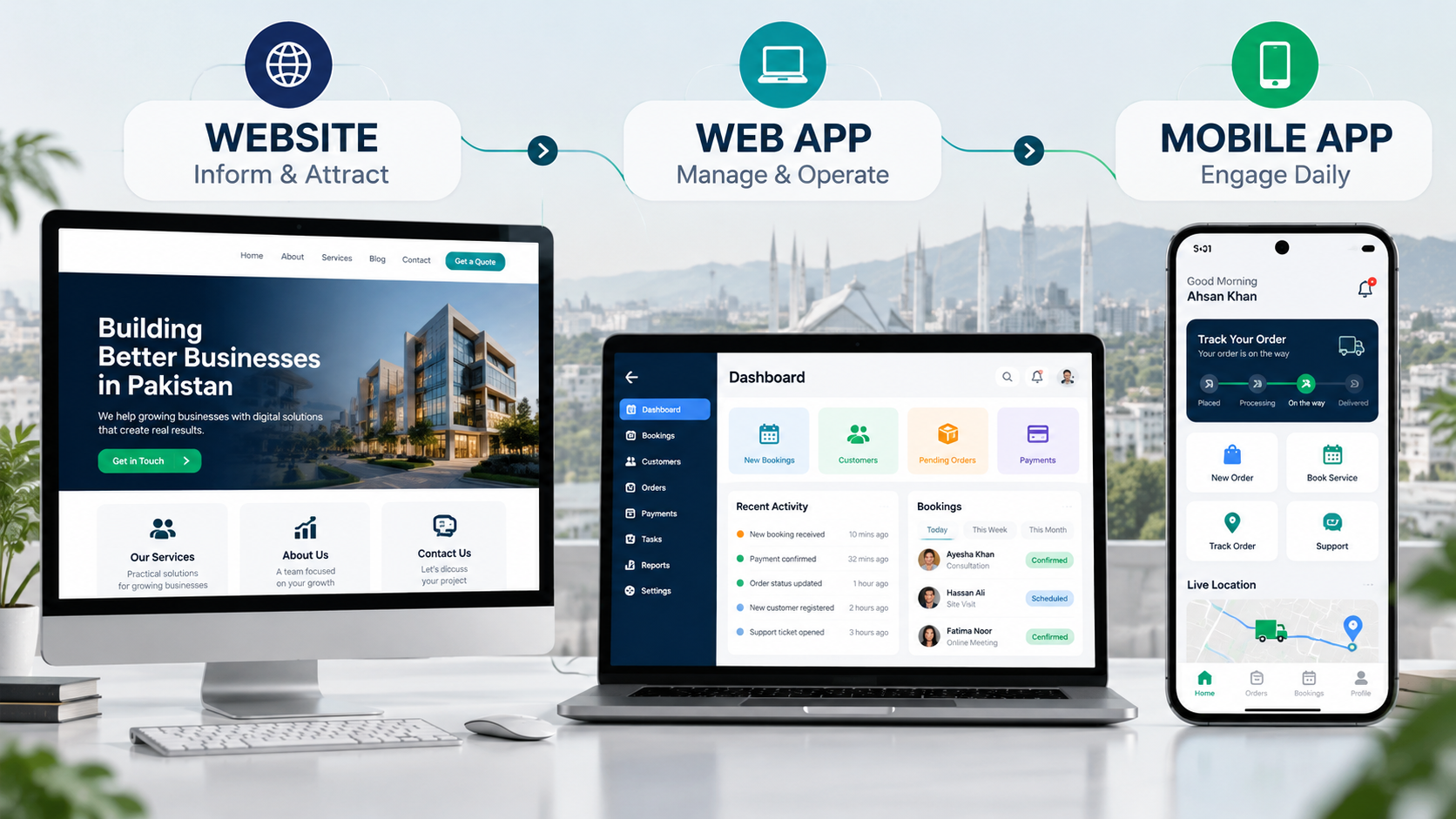
A website tells people about your business. A web app lets them do something with your business after they log in. A mobile app lives on their phone for things they do every day. For most businesses in Pakistan, the right order is a website first, then a web app when customers or staff need their own accounts, and a mobile app only when people use it daily. If you already know you need a portal, dashboard or booking system, that is custom web app development, not a website project.
The confusion is understandable. All three open on a phone, all three can look modern, and every agency seems to recommend the one it sells. This guide compares them side by side, shows what changes when your customers are in Pakistan, and gives you a 6-question checklist to decide. If you already know a web app is the answer, our guide on how to build a web app for your business covers the next steps.
Website vs web app vs mobile app at a glance
A website is for being found and trusted, a web app is for getting work done in the browser, and a mobile app is for daily use on the phone. The table below compares them on the points that usually decide the budget.
|
Website |
Web app |
Mobile app |
|
|---|---|---|---|
|
Main job |
Inform and get enquiries |
Let users do tasks: book, order, track, manage |
Daily use, alerts, phone features |
|
User login |
Usually no |
Yes, each user sees their own data |
Yes |
|
How people open it |
Browser link or Google search |
Browser link, no install |
Install from Play Store or App Store |
|
Found on Google |
Yes, this is its strength |
Public pages only; logged-in screens are not |
No, app stores have their own search |
|
Works offline |
No |
Limited, unless built as a PWA |
Yes, if designed for it |
|
Phone features (camera, GPS, push alerts) |
No |
Some, through the browser |
Full access |
|
Typical build time |
Weeks |
1 to 4 months |
3 months or more |
|
Relative cost |
Lowest |
Medium |
Highest, more if iOS and Android are built separately |
|
Ongoing costs |
Hosting, domain, small updates |
Hosting, maintenance, new features |
Store accounts, OS updates, often two codebases |
|
Best for |
Service firms, brands, lead generation |
Portals, booking, dashboards, internal tools |
Daily-use products, delivery, loyalty |
Exact prices depend on features, so we keep them in a separate guide: what a web app costs in Pakistan.
What is a website?
A website is a set of public pages that tell visitors who you are, what you offer and how to reach you. Everyone sees the same content, nobody needs to log in, and Google can read every page. That makes a website the cheapest and fastest way to be found and trusted online.
Common examples:
- A company site for a clinic, law firm or construction company
- A portfolio for a designer or architect
- A blog or resource hub that brings in search traffic
A website is enough when your goal is to get found, look credible and collect enquiries through a form, call or WhatsApp button. If every customer conversation still ends on the phone, you probably do not need more than this yet.
What is a web app?
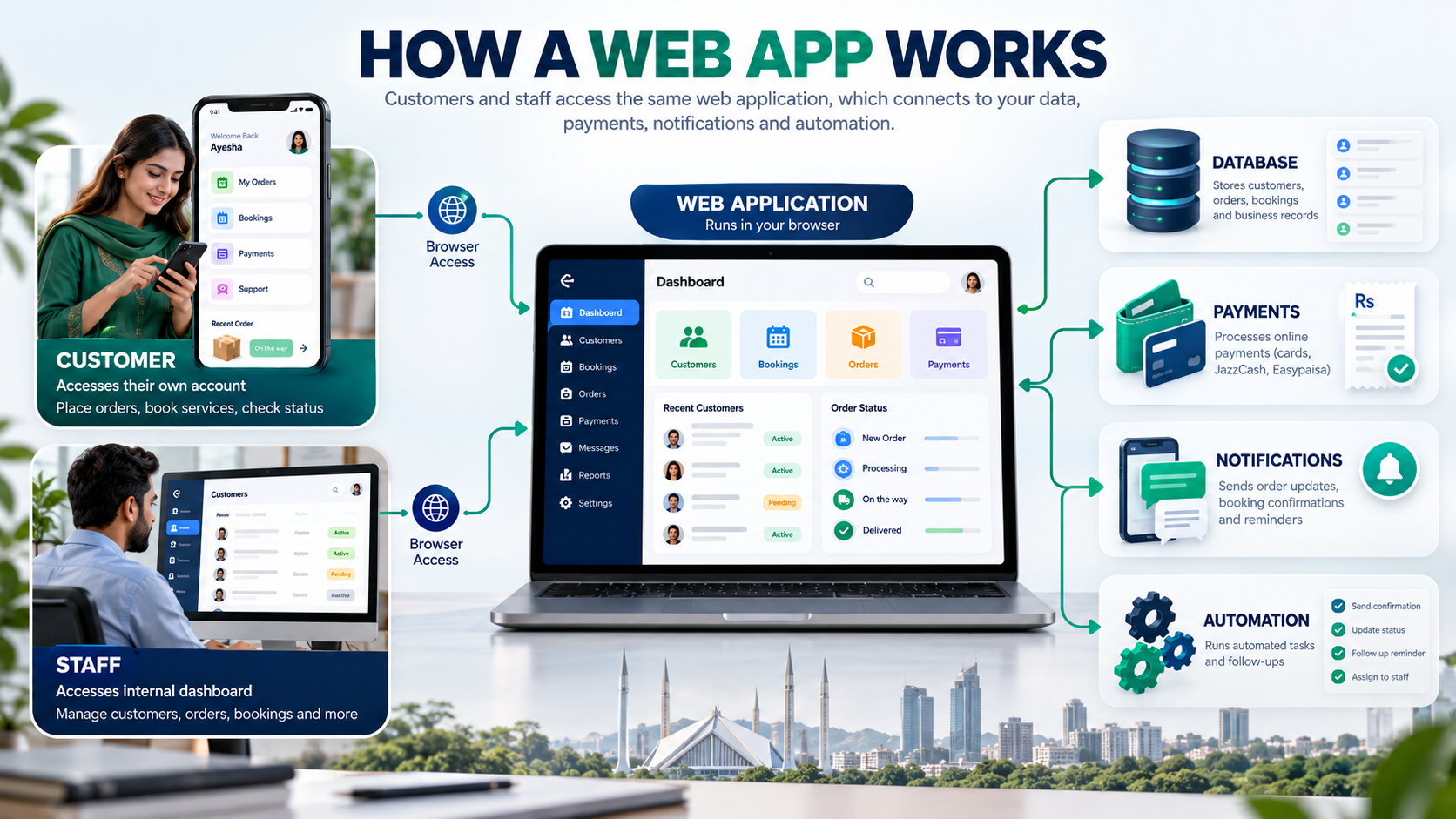
A web app is software that runs in the browser, where each user logs in and sees their own data. Nothing needs to be installed, and it works on a laptop or phone through a link. Customers place orders, book slots or check status, and staff manage records from a dashboard.
Examples businesses in Pakistan build every day:
- A school portal where parents check fees, results and attendance
- A booking system for a clinic, salon or consultant
- A dealer portal where distributors place orders and see stock
- An admin dashboard that replaces a stack of Excel sheets
- A customer portal for invoices, delivery tracking or support tickets
Many of these also connect to automation, such as reminders, order confirmations and follow-ups. Our guide to AI automation for businesses in Pakistan shows where that fits.
Website or web app? The login test
Ask one question: does each user need their own account? If yes, you need a web app, even if it looks like a website from the outside. If everyone sees the same pages, it is a website. A site with a contact form and a blog is still a website; a site where customers log in to see their orders is a web app.
What is a mobile app?
A mobile app is software installed from the Google Play Store or Apple App Store that runs directly on the phone. It can use the camera, GPS, contacts and push notifications, and it can work offline. That power costs more to build and maintain than a website or web app, so it should be earned by daily use.
A mobile app earns its cost when:
- Customers open it several times a week, like food delivery, ride booking or a loyalty card
- Push notifications are central to the service, for example order updates or appointment reminders
- The job needs the camera, GPS or offline access, like field sales staff visiting shops with weak signal
If people will use it once a month, most will not install it. A mobile-friendly web app serves them better.
Progressive web apps: the middle road
A progressive web app (PWA) is a web app that people can add to their home screen from the browser, with no app store involved. On Android it can send push notifications and keep working on a weak connection. You build one product for laptop and phone, skip store approval, and update it instantly. Google's guide to progressive web apps explains the technical side. For many Pakistani SMEs, a PWA gives most of the app experience at web app cost.
What changes when your customers are in Pakistan
In Pakistan, the case for a web app or PWA is stronger than in most markets. Android runs on roughly 9 out of 10 phones, many users have budget handsets with little storage, mobile data can be slow outside big cities, and local payment methods matter more than card billing. Each of these shifts the decision.
Android dominates. Android held 90.71% of Pakistan's mobile market in August 2026, according to StatCounter. If you build a native app, building for iPhone first, or for both at once, means paying double to reach under 10% more users. Launch on Android or as a PWA, then add iOS when the numbers justify it.
Storage is tight. Many customers in Karachi, Lahore or Faisalabad use phones where every app competes for space, and rarely used apps get deleted. A web app needs no install, so there is nothing to delete.
Data can be slow. Design for patchy 4G: light pages, compressed images, and key screens that still load on a weak signal.
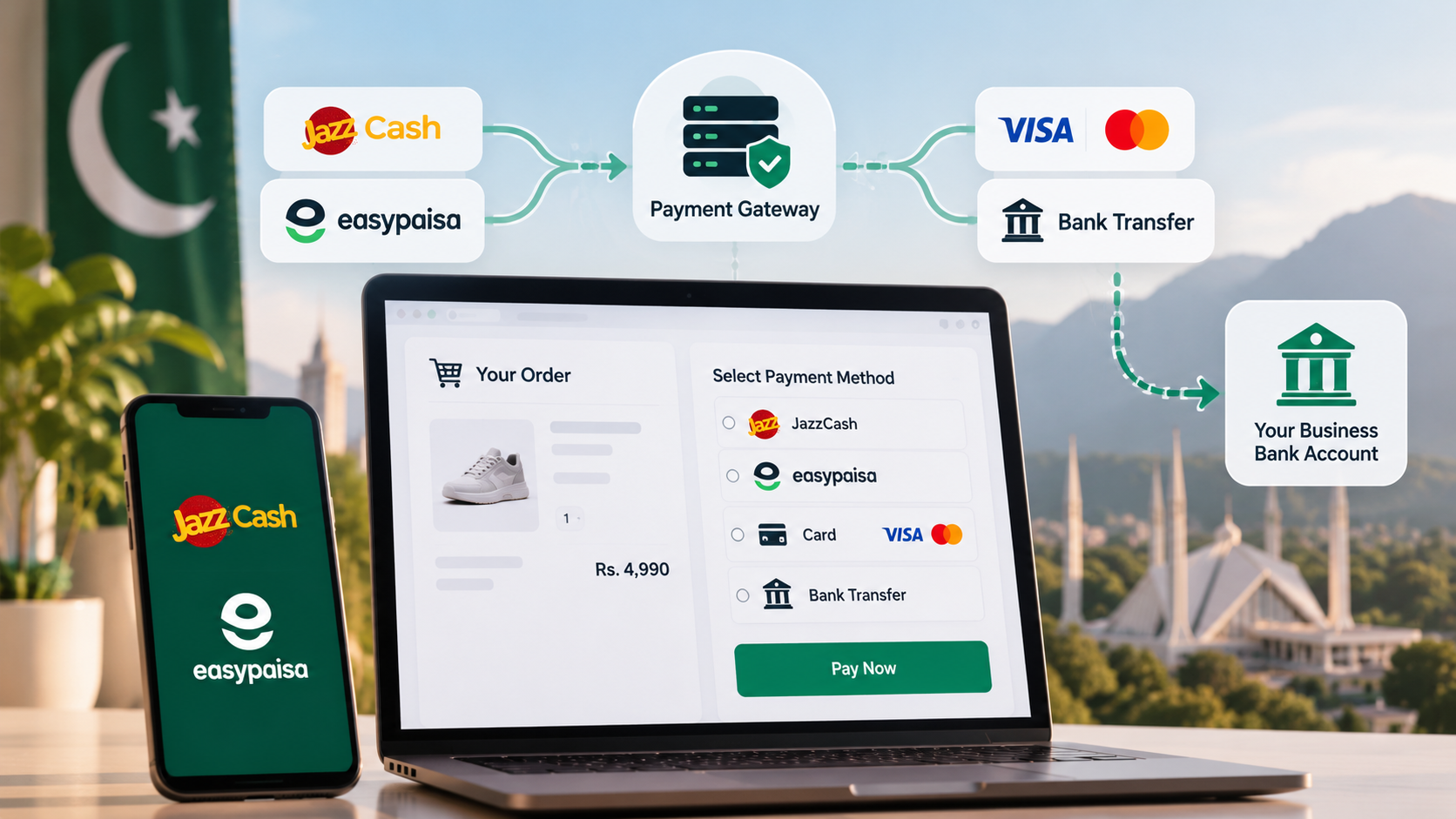
Local payments come first. Customers expect JazzCash, Easypaisa and bank cards at checkout. These are straightforward to add to a website or web app. If you sell online, it also helps to automate order confirmations and follow-ups so the store does not depend on someone replying to every WhatsApp message.
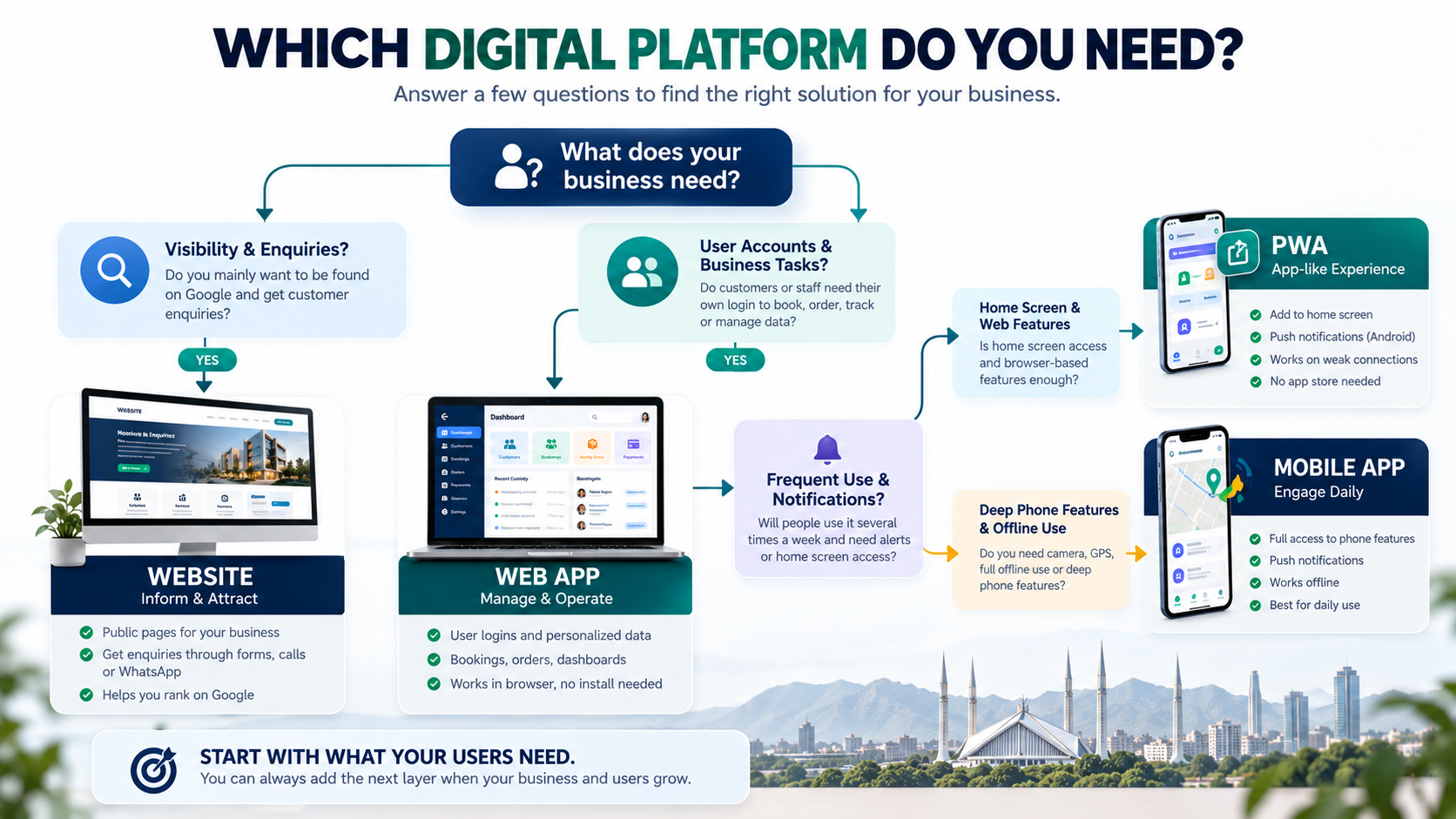
Which one does your business need? A 6-question checklist
Answer these six questions in order and stop at the first clear answer. Most Pakistani small businesses end at question 2 or 3, which means a website or a web app, not a mobile app.
- Is your main goal to be found on Google and get enquiries? If yes, and nothing else on this list applies, build a website.
- Do customers or staff need their own login? If yes, you need a web app: a portal, booking system or dashboard.
- Will people use it several times a week? If no, stay with a web app. If yes, keep going.
- Do you need push alerts, the camera, GPS or offline use? If push alerts on Android are enough, a PWA covers it. If you need deep phone features or full offline use, plan a mobile app.
- Is the budget limited for the first version? If yes, start with a web app or PWA and add a native app once usage proves the need. Our guide to AI automation cost in Pakistan helps if you are also budgeting automation alongside the build.
- Do you need it live within about 6 weeks? Only a website, or a small web app with a tight scope, fits that window.
Start here, add later: the staged path
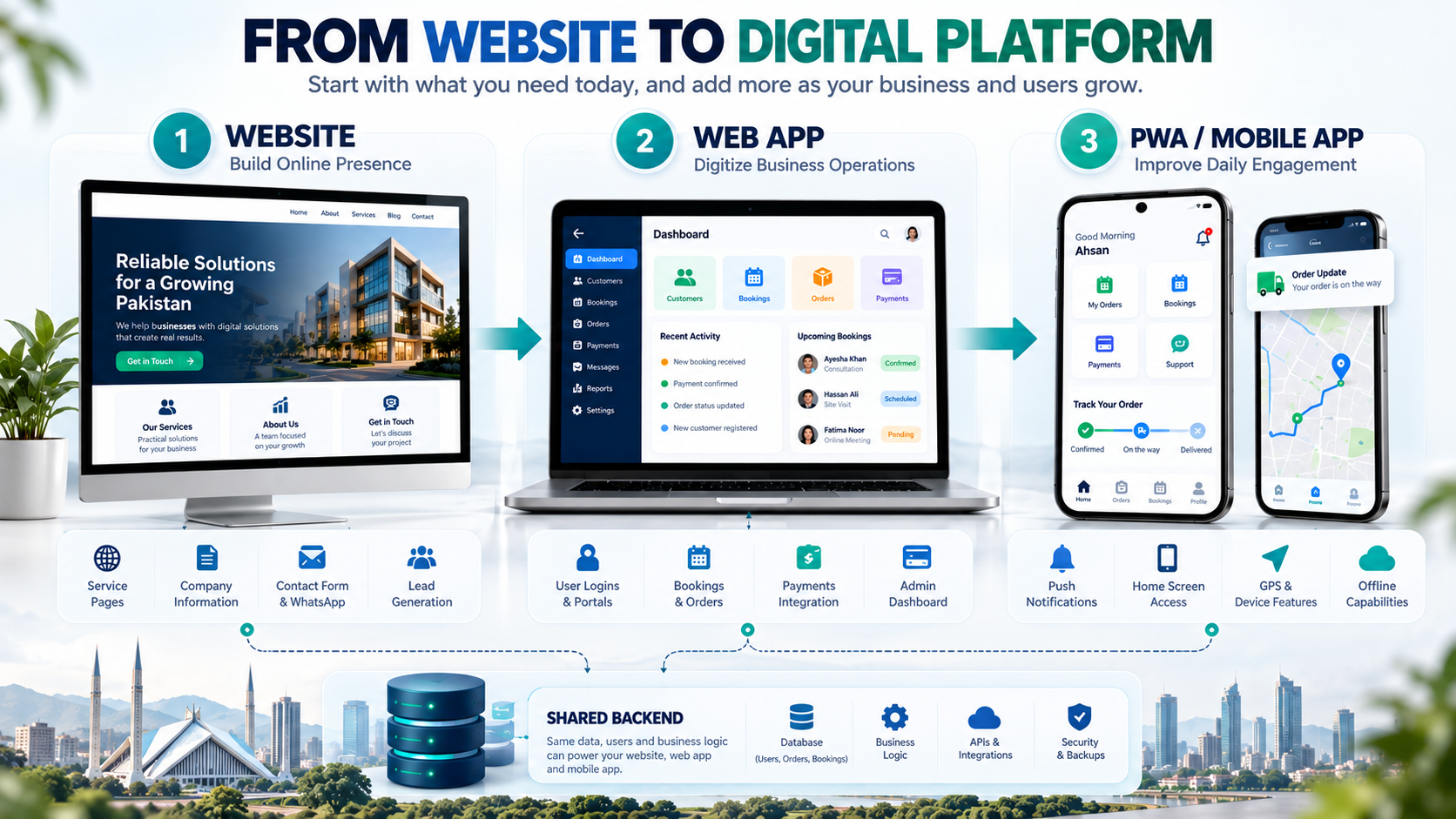
You rarely need all three on day one. Build the layer your business needs now, and add the next one when a clear trigger appears. Done well, nothing is wasted: the backend behind a web app can later power a mobile app too.
|
Stage |
What you build |
Move to the next stage when |
|---|---|---|
|
1. Website |
Service pages, contact form, WhatsApp button, blog |
Customers keep asking to check orders, bookings or balances, or staff juggle the same data across Excel sheets |
|
2. Web app or portal |
Logins, dashboard, bookings or orders, payments |
Customers use it several times a week and ask for alerts or a home-screen icon |
|
3. PWA or mobile app |
Home-screen access, push alerts, offline screens |
Not needed for most SMEs; scale and polish from here |
A school in Lahore is a good example. It starts with a website for admissions. When parents keep calling about fees and results, it adds a parent portal. Only if parents open that portal every day does an app with push alerts make sense, and even then a PWA may be enough.
Which one for your business type
The right first build depends on how often your customers interact with you. Businesses with one-off or occasional customers rarely need an app; businesses with daily, repeat use often do.
|
Business |
Start with |
Add later |
Why |
|---|---|---|---|
|
Clinic or salon |
Website with online booking (a small web app) |
Reminder alerts through WhatsApp or a PWA |
Patients book a few times a year, not daily |
|
School or academy |
Website |
Parent and student portal |
Parents check fees and results weekly |
|
Restaurant |
Website with menu and ordering |
Mobile app only for a large delivery base |
Most orders come through delivery platforms or WhatsApp |
|
Distributor or dealer network |
Website |
Dealer ordering portal (web app) |
Dealers place repeat orders and need stock visibility |
|
Ecommerce store |
Online store (website plus checkout) |
Mobile app once repeat buyers are a large share of sales |
Apps pay off for loyalty, not first purchases |
|
Service company (agency, consultancy, contractor) |
Website |
Client portal for reports or project tracking |
Clients want status without calling |
The costs after launch
Build cost is only the start. Every option has running costs, and they grow from website to web app to mobile app.
- Website: hosting, domain renewal, security updates and occasional content changes.
- Web app: stronger hosting, backups, bug fixes, and new features as users ask for them.
- Mobile app: everything a web app needs, plus a Google Play developer account (a one-time US$25 fee), an Apple Developer account (US$99 a year), updates for each new Android and iOS release, and two codebases if the apps are built natively.
Budget for upkeep from the start. A web app or app that nobody maintains slowly breaks as browsers and phones update.
How Lumen helps
Lumen AI Consultancy builds web apps, portals and automation for growing businesses. We start by scoping what you actually need, so you do not pay for an app when a portal will do, or for a portal when a website will do. Then we build that layer so it can grow into the next one.
If you are weighing the options, talk to our web app team or book a free scoping call and we will map your users, features and budget in one session.
Frequently asked questions
Is a web app better than a website?
A web app is not better than a website, it does a different job. A website helps people find and trust you, while a web app lets logged-in users complete tasks like booking or ordering. Many businesses need a website first and add a web app once customers need their own accounts.
Can a website work like an app?
Yes, a website can work like an app if it is built as a web app or progressive web app. Users can log in, save data and even add it to their home screen. It still runs in the browser, so it cannot use every phone feature a native app can.
Should a small business in Pakistan build a mobile app?
Most small businesses in Pakistan should not start with a mobile app. Unless customers use your service several times a week, a website or web app reaches them faster and costs less. Build an app once daily use, push alerts or offline access clearly justify it.
What is a progressive web app (PWA)?
A progressive web app is a web app that users can install from the browser onto their home screen. On Android it can send push notifications and work on a weak connection. It skips app store approval and fees, which makes it a practical middle step for many businesses.
Can I turn my website into a web app or mobile app later?
Yes, you can add a web app or mobile app later without starting over. Your website can stay as the public front, while the web app adds logins behind it. If the web app is built with a proper backend, a mobile app can reuse the same data and logic.
Which is cheaper to build and run: a website, web app or mobile app?
A website is the cheapest to build and run, a web app costs more, and a mobile app costs the most. Mobile apps add app store fees, updates for each new phone OS release, and often two separate codebases for Android and iPhone.