When Should a Business Move from Excel to CRM or ERP?
10 min read
On this page
- Is Excel Still Enough for Your Business?
- 10 Signs Your Business Has Outgrown Excel
- When Should You Move from Excel to CRM?
- When Should You Move from Excel to ERP?
- CRM vs ERP: Which One Should Replace Excel?
- Does Your Business Need CRM, ERP, or Both?
- Can You Keep Using Excel After Implementing CRM or ERP?
- How Do You Move from Excel Without Losing Your Data?
- CRM or ERP for Small Businesses in Pakistan
- How Much Does It Cost to Replace Excel?
- FAQs
- Conclusion
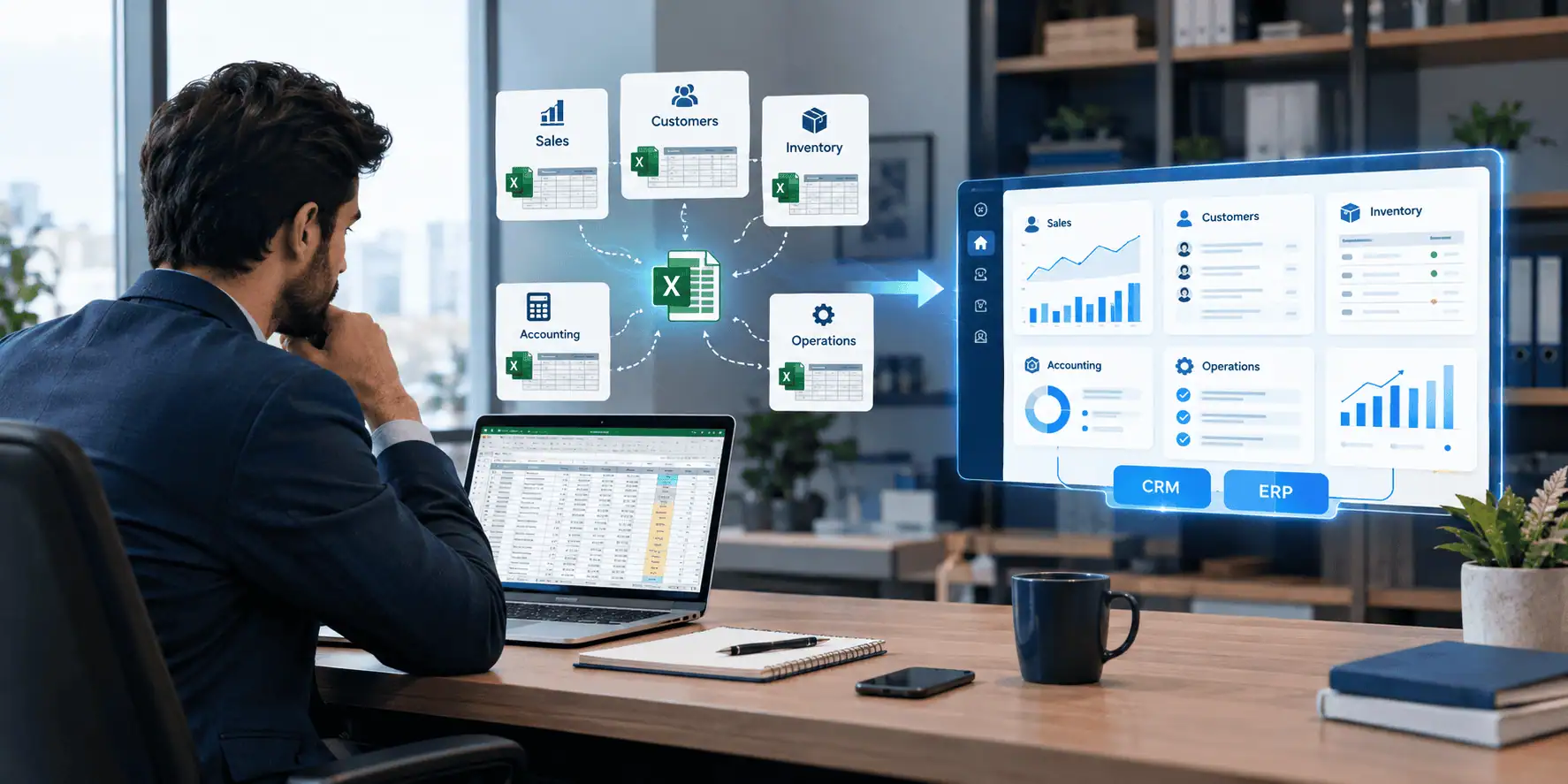
There is no fixed employee count, revenue level, or spreadsheet row count that tells you it is time to move from Excel to ERP. The real signal is different: Excel has quietly become the system responsible for business critical processes, and it is starting to create problems with shared data, duplicate entry, reporting, inventory, follow ups, approvals, permissions, or cross department workflows.
Excel is not a bad tool. For a small team running simple processes, it can work perfectly well for years. The trouble begins when a spreadsheet becomes the unofficial system of record for several departments at once.
Two broad paths tend to open up once that happens. Customer and sales complexity usually points toward CRM. Broader operational complexity, spanning inventory, finance, and multiple departments, usually points toward ERP. Some businesses eventually need both, connected to the same underlying data.
Is Excel Still Enough for Your Business?
Yes, for many businesses it still is.
Excel remains a sensible choice when your team is small, your processes are simple, and your data volume is limited. If only one or two people edit the same file, if reporting needs are basic, and if you are not trying to automate a workflow across departments, a well organized spreadsheet can serve you well.
Not every small business needs dedicated software. The signs below are meant to help you recognize when Excel has genuinely become a constraint, not to suggest that growth automatically requires new systems.
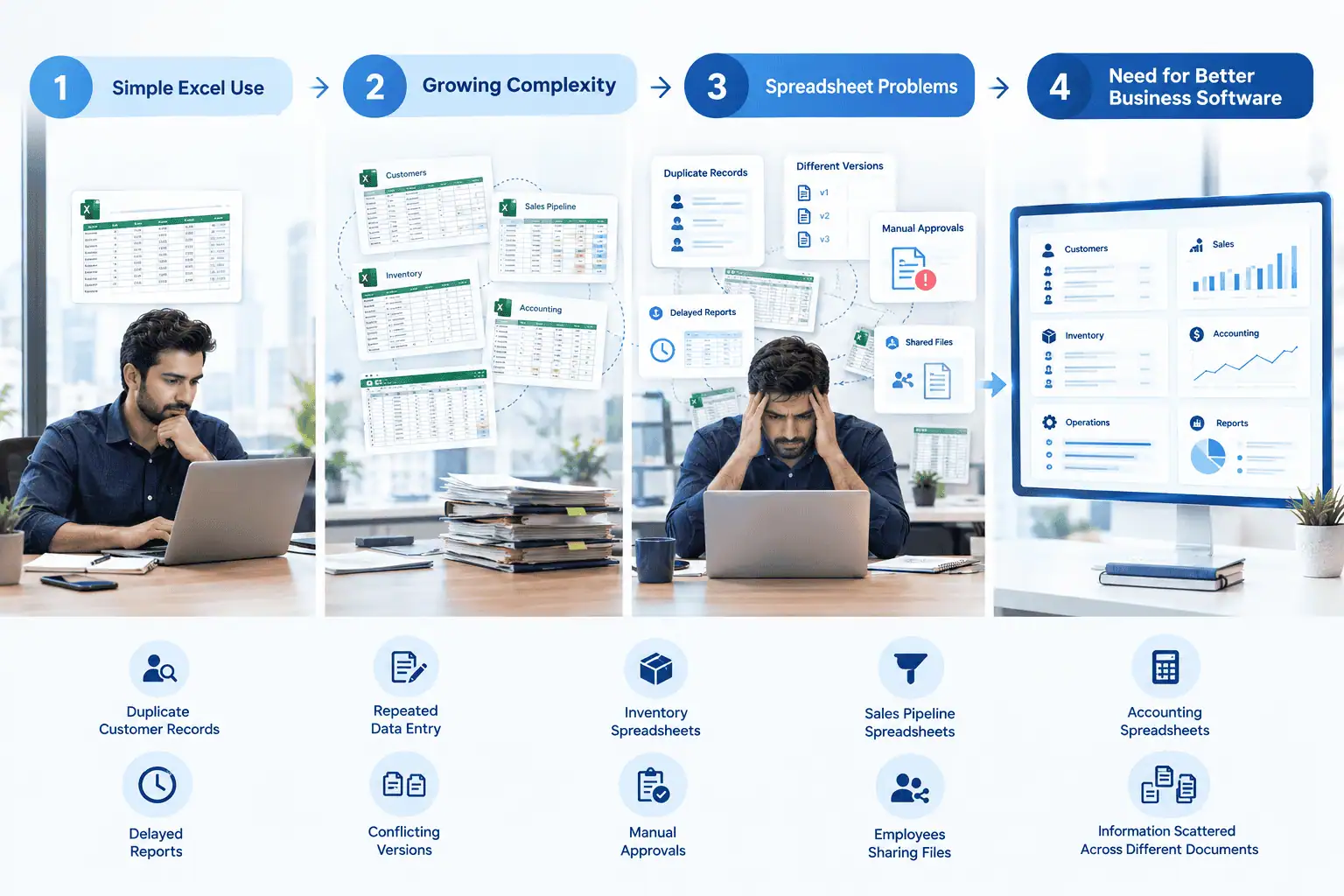
10 Signs Your Business Has Outgrown Excel
- Multiple versions of the same spreadsheet circulate by email or WhatsApp, and nobody is sure which is current.
- Employees repeatedly enter the same information into different sheets or systems.
- Nobody can confidently say which file contains the latest, correct data.
- Sales follow ups get missed because leads sit untouched in a shared sheet.
- Inventory records in the spreadsheet do not match what is actually on the shelf.
- Reports require someone to manually pull numbers from several files and combine them.
- Management waits days for basic figures because someone has to prepare them by hand.
- An important process depends entirely on one employee who understands the spreadsheet.
- Approvals happen informally through messages or email instead of a tracked workflow.
- Excel is being used to manually connect information across departments, such as sales, inventory, and finance.
One sign on its own does not automatically mean you need ERP. It is worth paying attention to how many of these apply, and how often they cause real disruption, before deciding on a system.
When Should You Move from Excel to CRM?
You should consider CRM when the main problem is customer facing work, not internal operations.
CRM becomes relevant once lead management, the sales pipeline, follow ups, customer records, quotations, sales activities, communication history, sales reporting, or customer ownership start breaking down in a spreadsheet.
A typical sales workflow looks like this: lead, follow up, quotation, negotiation, sale, customer. When one salesperson manages this in Excel, it can work. Once several salespeople need to manage the same pipeline, Excel starts to struggle. Leads get duplicated, follow ups fall through, and there is no shared, reliable view of where each deal stands. A CRM gives every salesperson and manager the same live picture, with reminders, ownership, and history attached to each customer.
When Should You Move from Excel to ERP?
You should consider ERP when the problem extends beyond customers into broader business operations.
ERP becomes relevant once finance, inventory, purchasing, procurement, sales orders, warehousing, HR, payroll, reporting, multi branch operations, or cross department workflows are being coordinated manually through spreadsheets.
A typical operational workflow looks like this: purchase, inventory, order, fulfillment, invoice, payment. In a small operation, one person might manage this chain end to end in Excel without much trouble. As the business grows, these steps start involving different people and departments, each keeping their own version of the data. ERP becomes more relevant once employees are the ones manually connecting these steps, chasing updates between departments, and reconciling numbers that should already match.
CRM vs ERP: Which One Should Replace Excel?
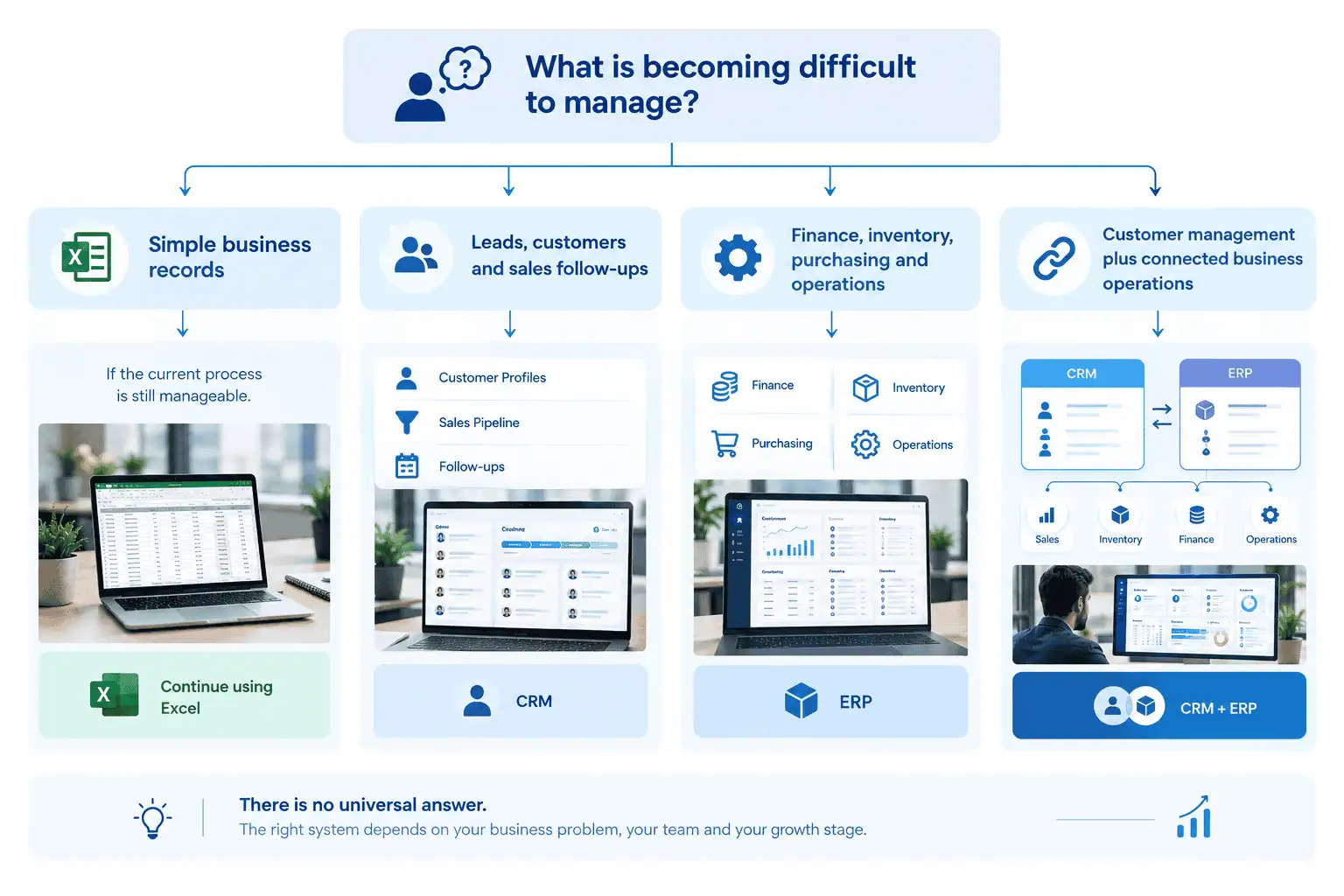
Here is a short practical decision framework, not a rigid rule.
| Main problem | More relevant system |
|---|---|
| Leads and follow ups | CRM |
| Customer management | CRM |
| Sales pipeline | CRM |
| Inventory and purchasing | ERP |
| Finance and accounting workflows | ERP |
| Warehouse operations | ERP |
| Multiple connected departments | ERP |
| Customer and operational workflows together | CRM and ERP |
Use this as a starting point for your own situation, not a fixed formula. Many businesses find their real challenge sits across more than one row.
Does Your Business Need CRM, ERP, or Both?
This is often the most important question to get right.
CRM only. If sales and customer management are your main problems, and your operations, inventory, and finance are already reasonably under control, a CRM alone may be enough for now.
ERP only. If your operational, financial, and inventory processes are the main source of disruption, but your sales process is simple or low volume, ERP alone may solve the core problem.
CRM and ERP together. If customer facing workflows and internal operations both need to run from the same connected data, so that a sale automatically reflects in inventory, and a fulfillment update is visible to the sales team, you likely need both systems working together rather than in isolation.
This is where working with a team that can implement ERP software in Pakistan makes a practical difference, since the two systems need to be configured to share data rather than operate as separate silos.
Can You Keep Using Excel After Implementing CRM or ERP?
Yes.
Implementing a CRM or ERP does not mean every spreadsheet in your business has to disappear. Excel remains genuinely useful for analysis, forecasting, temporary calculations, scenario planning, and ad hoc reporting.
The important distinction is what kind of data lives where. Business critical records and workflows, the ones multiple people rely on and act on, should not depend on uncontrolled spreadsheets once your business needs centralized data, permissions, approvals, and traceability. Excel can still sit comfortably alongside CRM or ERP for the lighter, exploratory work it is genuinely good at.
How Do You Move from Excel Without Losing Your Data?
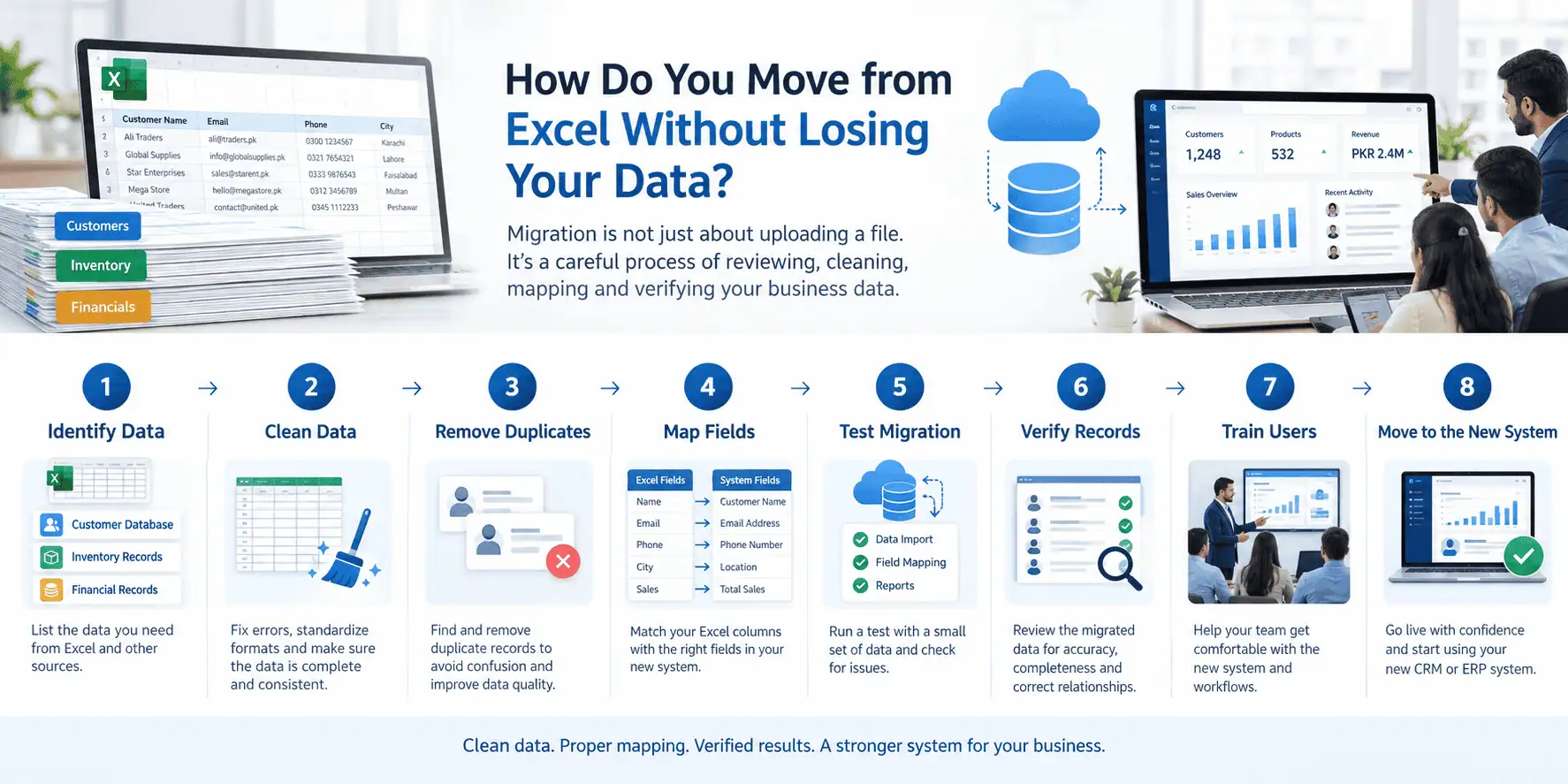
A careful migration protects the data you already have.
- Identify every spreadsheet currently being used for the process you are replacing.
- Identify who owns each dataset and who actually updates it.
- Remove duplicate records before anything else.
- Clean up inconsistent formatting, spellings, and categories.
- Decide what data genuinely needs to move into the new system.
- Map spreadsheet fields to the corresponding fields in the new system.
- Test the migration with a small sample of data first.
- Verify that migrated records match the source data.
- Train the people who will use the new system day to day.
- Move the live workflow over once the data and the team are ready.
There is no universal timeline for this process, and it does not always make sense to migrate every historical record. What matters most is that the data your team relies on for current decisions is accurate and complete in the new system.
CRM or ERP for Small Businesses in Pakistan
The Pakistani context has some patterns worth thinking through.
Many growing teams manage customer communication largely through WhatsApp, which can make a CRM's communication tracking especially useful if it can capture that history rather than leaving it scattered across personal phones.
Inventory is often tracked in Excel alongside separate accounting software that does not talk to it, which means stock and financial figures can drift apart over time. Quotations and invoices are frequently prepared manually for each customer, which is manageable at low volume but becomes time consuming as order numbers grow.
Wholesale and distribution businesses, retail and e-commerce operations, import and trading businesses, and companies running multiple branches each face their own version of these challenges. Not every business in Pakistan operates this way, and it would be inaccurate to assume all of them share the same setup. The point is simply that these patterns come up often enough to be worth checking against your own operations.
How Much Does It Cost to Replace Excel?
Cost depends on several factors: the number of users, the modules you need, the platform chosen, configuration and customization requirements, integrations with existing tools, data migration effort, training, and ongoing support.
Because these factors vary so much from one business to another, it is not useful to quote a fixed number here. For a more detailed breakdown, see this guide on ERP software cost in Pakistan.
FAQs
When should a small business stop using Excel?
There is no fixed point at which every business should stop using Excel. It is time to consider a change when Excel is causing recurring problems with duplicate data, missed follow ups, inaccurate inventory, or manual reporting across departments.
Is Excel better than ERP for a small business?
It depends. For a small business with simple processes and limited data, Excel can be perfectly adequate. Once operations involve multiple departments or require automated workflows, ERP typically becomes more effective.
When should a business move from Excel to CRM?
When the main challenge is managing leads, sales follow ups, customer records, or a sales pipeline shared across more than one salesperson, a CRM usually solves these problems more reliably than Excel.
When should a business move from Excel to ERP?
When challenges extend into inventory, finance, purchasing, or coordination across departments, and employees are manually connecting these processes through spreadsheets, ERP becomes the more relevant option.
Can CRM and ERP replace Excel completely?
No, not entirely. CRM and ERP typically replace the spreadsheets used for business critical, shared data, but Excel often remains useful for analysis, forecasting, and one off calculations.
Can a business use Excel with CRM or ERP?
Yes. Many businesses continue using Excel for lighter, exploratory tasks even after implementing CRM or ERP for their core workflows.
How do I migrate Excel data to ERP?
Start by identifying and cleaning your existing spreadsheets, mapping fields to the new system, testing with sample data, and verifying accuracy before moving the full workflow over and training your team.
Does every growing business need ERP?
No. Growth alone does not automatically mean a business needs ERP. What matters is whether operational complexity, such as inventory, finance, or multi department coordination, has outgrown what a spreadsheet can reliably manage.
Conclusion
The decision to move away from Excel should not be based on company size alone. The more useful question is whether Excel is still genuinely helping your business operate, or whether your employees have quietly become the connection layer between sales, customers, inventory, finance, and operations.
If that connection work is starting to slow you down, it may be worth exploring CRM vs ERP in more depth, or speaking with LumenAI about which combination of systems fits your business as it stands today.