ERP Software for Growing Businesses in Pakistan: When Should You Upgrade?
19 min read
On this page
- What Changes When a Business Starts Growing?
- 10 Signs Your Business Has Outgrown Its Current Software
- When Should a Growing Business Move to ERP?
- What Should ERP Handle as Your Business Grows?
- ERP for Different Stages of Business Growth
- Should You Buy an ERP or Customize One?
- How Much Does ERP Cost for a Growing Business?
- How to Upgrade to ERP Without Disrupting the Business
- How to Choose ERP Software for a Growing Business
- ERP Software for Growing Businesses in Pakistan: What Should You Consider?
- ERP Software for Growing Businesses FAQs
- Conclusion
A distributor in Lahore starts with an Excel sheet for stock, a desktop accounting package for invoices, and a WhatsApp group where the sales team confirms orders. It works well at 20 orders a day. At 200, the cracks show. Sales promises stock that the warehouse sold yesterday. Finance re-types orders into the accounting system. The owner asks for last month's profit by product and waits three days for an answer that nobody fully trusts.
This is the moment many owners start asking about ERP software. But growth alone is not the reason to buy one. Plenty of businesses grow steadily on simple tools. The real question is whether your current systems are becoming a constraint: whether they can still keep finance, inventory, sales and purchasing accurate and connected.
So, when should a growing business in Pakistan upgrade to ERP software? When the complexity that comes with growth starts causing errors, delays and blind spots that your current tools cannot fix. If that has not happened yet, waiting can be the smarter decision. This guide explains how to tell the difference, what to plan for, and how to upgrade without disrupting daily operations.
What Changes When a Business Starts Growing?
As a business grows, the number of things that must stay in sync grows faster than revenue does. A process that one person could hold in their head becomes a process that five people touch, and each handoff is a chance for the data to drift apart.
Here is what typically changes:
- More customers and orders. Each order needs quoting, confirming, dispatching, invoicing and collecting. Tracking this through chat messages and spreadsheets gets harder with every added customer.
- More inventory. More SKUs, more warehouses, and more stock movement mean more chances for counts to diverge from reality.
- More suppliers. Purchase orders, delivery schedules, payment terms and price changes need to be visible to buyers and finance at the same time.
- More employees. Once several people need different levels of access, a shared file stops being safe or practical.
- More sales channels. A business selling through a shop, a website, a marketplace and WhatsApp orders has four sets of orders to reconcile.
- More branches. Each branch keeps its own records unless there is one shared system, and head office ends up chasing figures.
- More reporting demands. Banks, investors, auditors and tax filings all ask for clean, consistent numbers.
- More coordination. Finance, sales and operations need the same version of the truth, not three slightly different ones.
None of this is a failure of your team. Tools built for a small operation simply were not designed to coordinate this many moving parts.
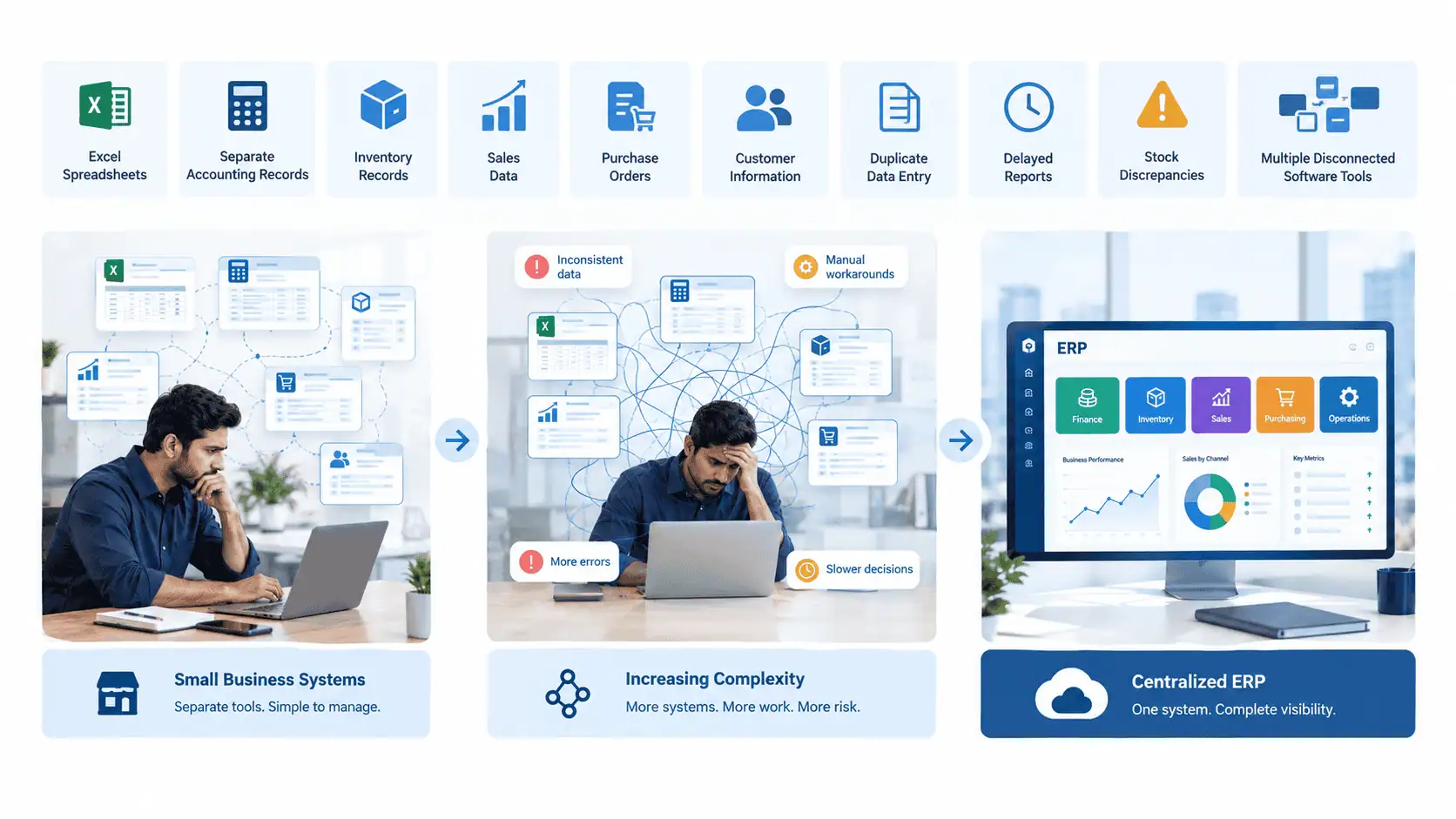
10 Signs Your Business Has Outgrown Its Current Software
Several of these signs appearing together, and causing real cost or delay, is a much stronger signal than any single one. Treat this list as a diagnostic, not a checklist that automatically ends in "buy ERP."
1. Too much dependence on Excel. Critical processes live in spreadsheets that only one or two people fully understand. If a key file is corrupted or its owner leaves, operations suffer.
2. Duplicate data entry. The sales team records an order in one place, and finance enters the same order again for invoicing. As volume rises, this creates more opportunities for mismatched records, wrong amounts and missed invoices.
3. Inventory numbers are difficult to trust. The system says 400 units, the shelf says 350, and nobody is sure which is right. Staff start double-checking stock by phone before confirming orders.
4. Financial reporting takes too long. Month-end closing requires collecting files from several people and reconciling them by hand. Management decisions are made on figures that are already weeks old.
5. Sales and finance use separate information. Sales sees an order as closed while finance sees the payment as outstanding, and neither view is complete. Credit limits are hard to enforce because nobody sees the full customer picture.
6. Employees cannot easily access current business data. Getting a simple answer, such as a customer's outstanding balance, means calling someone or asking for a fresh export.
7. Supplier and purchasing processes are becoming difficult to manage. Reorder decisions are based on memory or guesswork, purchase orders are tracked in chat threads, and it is unclear what has been ordered, received or paid.
8. Multiple branches need separate tracking. Each branch runs its own files or its own copy of the software, and consolidating them is a manual exercise every month.
9. Management lacks a single view of operations. The owner cannot see sales, stock, receivables and payables together without asking several people for separate reports.
10. Manual processes are slowing growth. The business turns down new channels, new branches or larger customers because the back office could not cope with the extra load.
If you recognize two or three of these mildly, better discipline and improved use of your current tools may be enough. If you recognize five or six, and they are costing you money or customer trust, ERP is likely worth a serious look.
When Should a Growing Business Move to ERP?
A growing business should consider ERP when its existing systems can no longer keep financial, inventory, sales and operational data accurate and connected. Revenue growth alone is not a reason to implement ERP.
The distinction between business growth and business complexity caused by growth is the most useful idea in this decision. A company can double its revenue selling one product from one location to a handful of loyal customers, and a simple accounting package may still be enough. Another company can grow slowly but add branches, suppliers, product lines and sales channels, and find its tools breaking down at half the revenue. It is complexity, not size, that creates the need.
These are the triggers that most often justify moving to ERP:
- Operational complexity. Many interdependent processes, such as procurement feeding inventory, which feeds sales, which feeds invoicing.
- Rising transaction volume. Manual handling that was tolerable at low volume produces frequent errors at higher volume.
- Multiple departments. Teams that need shared data but different views and permissions.
- Multiple locations. Branches, warehouses or outlets that need central control with local visibility.
- Inventory complexity. Batches, variants, multiple warehouses, or stock moving between locations.
- Financial control requirements. Approval workflows, credit control, audit trails and cost tracking.
- A need for real-time reporting. Decisions that cannot wait for a weekly spreadsheet round-up.
- Repeated manual work. The same data typed into several systems.
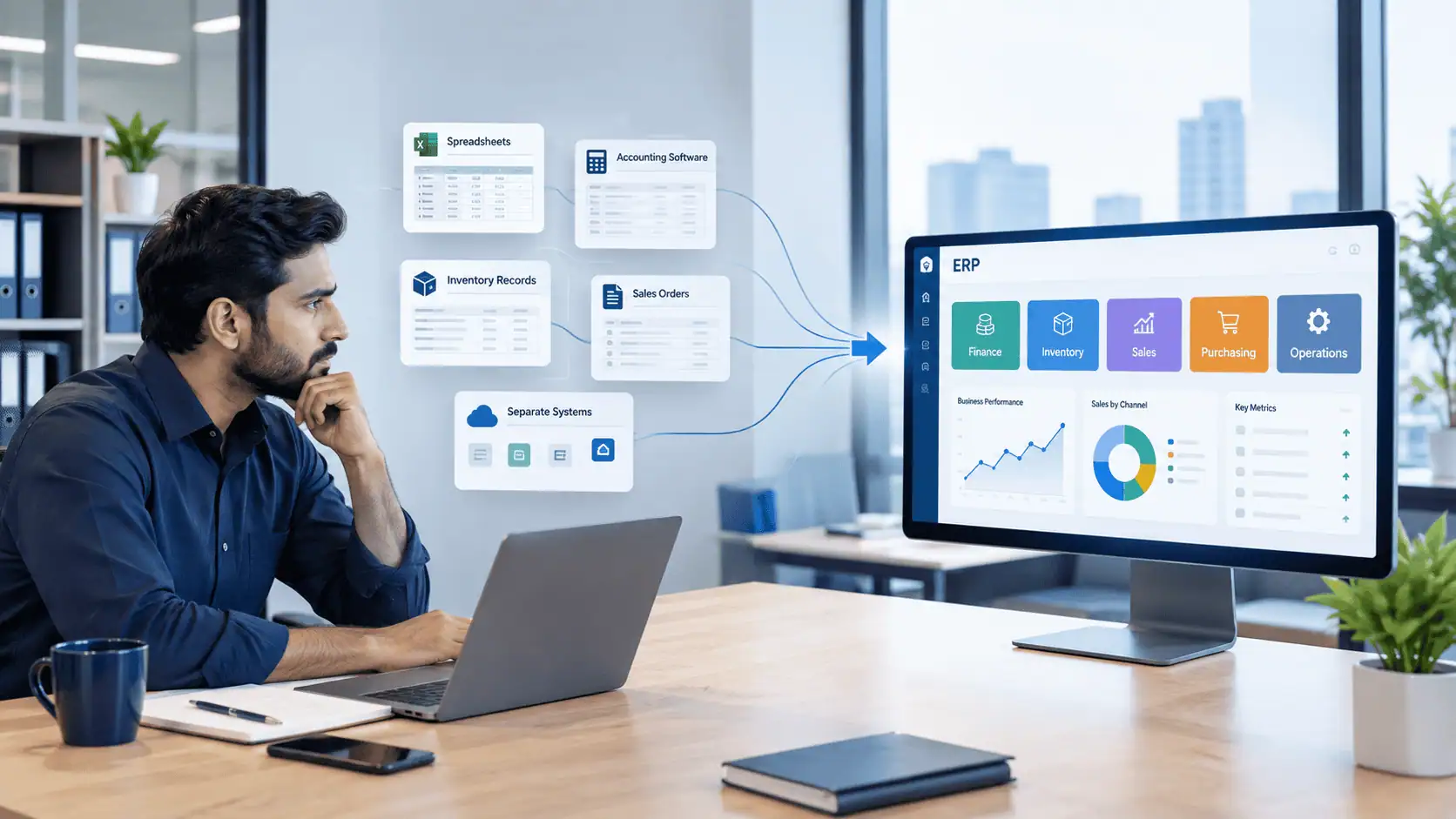
- Disconnected systems. Separate tools for accounting, sales, stock and payroll that do not talk to each other.
- Management visibility problems. Leaders who cannot see the state of the business without chasing people.
It also depends on timing. If your business is in the middle of a crisis, such as a cash flow squeeze or a major restructuring, an ERP project may add strain. Implementation takes attention from the same people who run daily operations. In that case, stabilizing first and implementing later can be the better call.
What Should ERP Handle as Your Business Grows?
An ERP should bring your core business processes into one connected system so that an action in one area updates everything that depends on it. The value is in the connections, not in any one module.
The main areas an ERP may cover:
- Finance and accounting. Ledgers, receivables, payables, bank reconciliation, cost tracking and financial statements, updated as transactions happen rather than re-entered later.
- Sales. Quotations, orders, pricing, discounts and invoicing tied directly to stock and customer records.
- CRM. Customer history, leads and follow-ups, linked to orders and payments.
- Inventory. Stock levels by item and location, movements between warehouses, and reorder alerts.
- Purchasing and procurement. Purchase requests, approvals, purchase orders and supplier records connected to what has actually been received.
- Warehouse operations. Receiving, picking, dispatch and stock counts.
- HR and payroll. Employee records, attendance and salary processing, where the business wants these connected to the rest of operations.
- Reporting and analytics. Management reports drawn from live data instead of manually assembled files.
Consider what this looks like in practice. When a salesperson confirms an order, the system reserves the stock, the warehouse sees the dispatch task, and finance sees the invoice and the expected payment. No one re-types anything. If stock is short, the purchasing team sees it before the customer complains.
As a business grows, sales, finance, inventory and operations often start relying on separate tools. CRM and ERP systems can connect these workflows so that teams are working from the same business data.
Not every business needs every module on day one. A sensible approach is to start with the areas causing the most pain, usually inventory, sales and accounting, and add others as the business needs them.
Many owners also ask whether they need a CRM, an ERP, or both. The short answer is that it depends on where your problems are: customer relationships, back-office operations, or both. Our comparison of CRM vs ERP covers that question in detail.
ERP for Different Stages of Business Growth
Businesses do not all need the same ERP setup. What suits a five-person trading company will be too light for a multi-branch manufacturer, and the reverse would be too heavy. The stages below are general examples, not rigid rules.
Early-Stage Business
A business with a small team, one location and a modest number of orders can often operate with accounting software, spreadsheets and simple tools. The priority is discipline: consistent records, regular stock counts, and clean bookkeeping. Buying a full ERP too early can add cost and process weight that the business does not yet need.
Growing Business
Once volumes rise, the gaps between accounting, inventory, sales and purchasing start to matter. At this stage, better integration is the main need. That might mean an ERP with a small number of modules, focused on connecting stock, orders and finance.
Multi-Department Business
When several departments depend on the same data, you need centralized workflows, role-based permissions, approval chains and consistent reporting. Automation becomes valuable here, for example routing purchase approvals or flagging overdue receivables automatically.
Multi-Branch Business
Multiple outlets or warehouses need centralized data with branch-level visibility and controls. Head office wants consolidated numbers, while each branch manager needs to see and manage their own stock, sales and staff. This is one of the strongest cases for ERP, because separate records per branch are hard to reconcile any other way.
A company can also sit between stages, or have the complexity of one stage in one department and another stage elsewhere. Use these as a guide for the questions to ask, not as a verdict.
Should You Buy an ERP or Customize One?
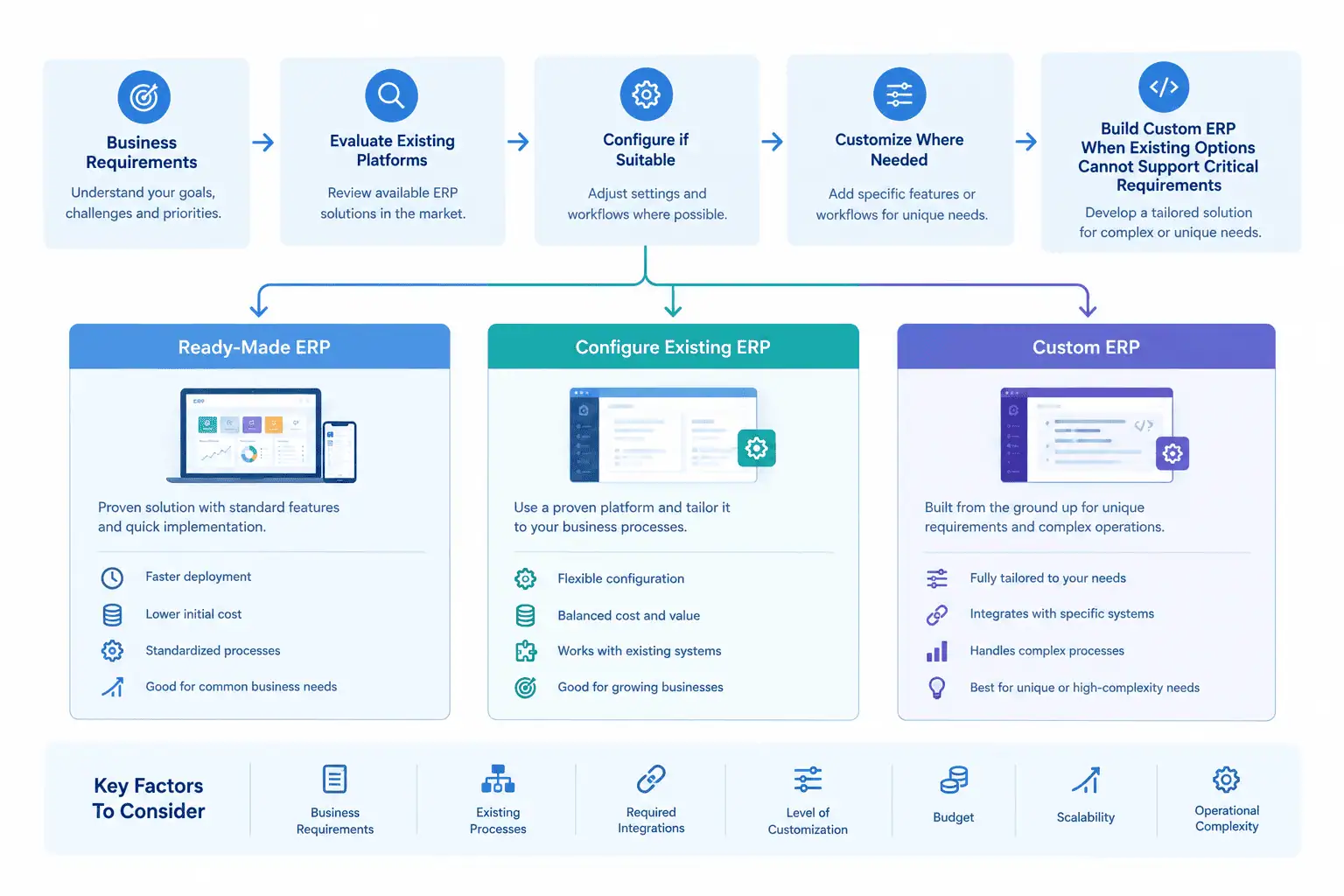
It depends on how standard your processes are. If your workflows are fairly conventional, a ready-made or configured ERP is usually the more sensible route. Customization or a fully custom build makes sense only when your processes cannot be supported any other way.
There are four broad approaches:
- Ready-made ERP. You adopt an existing product largely as it is and adjust your processes to fit. This is typically the fastest and most economical route, and it works well when your operations are conventional.
- Configured ERP. You use an existing platform but set up its modules, fields, workflows, permissions and reports to match how you work. Most growing businesses end up here.
- Customized ERP. You extend an existing platform with custom modules, integrations or workflows where the standard product falls short.
- Fully custom ERP. You build a system from scratch around your specific processes. This offers the most control, and it also carries the highest cost, the longest timeline and ongoing responsibility for maintenance.
Custom is not automatically better. More control comes with more cost, more risk and more dependence on whoever built it. Customization may make sense when:
- Existing platforms cannot support important workflows
- Your process is a genuine competitive advantage that a standard system would flatten
- Integrations require significant customization to work with your other systems
- Limitations in existing ERPs are creating operational problems that configuration cannot solve
Configuring an existing platform may be more sensible when your workflows are close to industry standards, when you want a faster and lower-risk implementation, or when you would rather rely on a product with a wide user base and an established support ecosystem.
This is how LumenAI Consultancy approaches it. The company does not recommend custom development simply because it is possible. It can evaluate existing platforms and configure them where appropriate, and custom development can be considered when the business actually needs it. Sometimes the right answer is to configure an existing platform rather than build something from scratch.
How Much Does ERP Cost for a Growing Business?
There is no single price, because ERP cost depends on the size and shape of your business and the approach you choose. Anyone quoting a fixed figure without understanding your requirements is guessing.
The main factors that influence cost:
- Number of users. Many platforms charge per user, or have tiers based on team size.
- Modules. A finance and inventory setup costs less than a full suite with HR, CRM and warehouse management.
- Customization. Standard configuration is generally cheaper than custom workflows or modules.
- Integrations. Connecting to e-commerce platforms, banks, payment providers or existing accounting software adds work.
- Data migration. Cleaning and moving historical data takes time, especially if the existing data is inconsistent.
- Implementation. Requirements analysis, setup, testing and project management.
- Training. Your team needs to actually learn the system for it to deliver value.
- Support and maintenance. Ongoing fixes, updates and help after launch.
- Hosting or infrastructure. Cloud subscription or your own servers and their upkeep.
- Existing systems. What you already run affects how much needs to be replaced, connected or retired.
One point deserves attention: the cheapest software is not automatically the lowest-cost option. A low-priced system that cannot handle your inventory logic or reporting needs may force expensive workarounds, or a second migration, a year or two later.
For a deeper breakdown of what drives pricing, see our guide to ERP software cost in Pakistan.
How to Upgrade to ERP Without Disrupting the Business
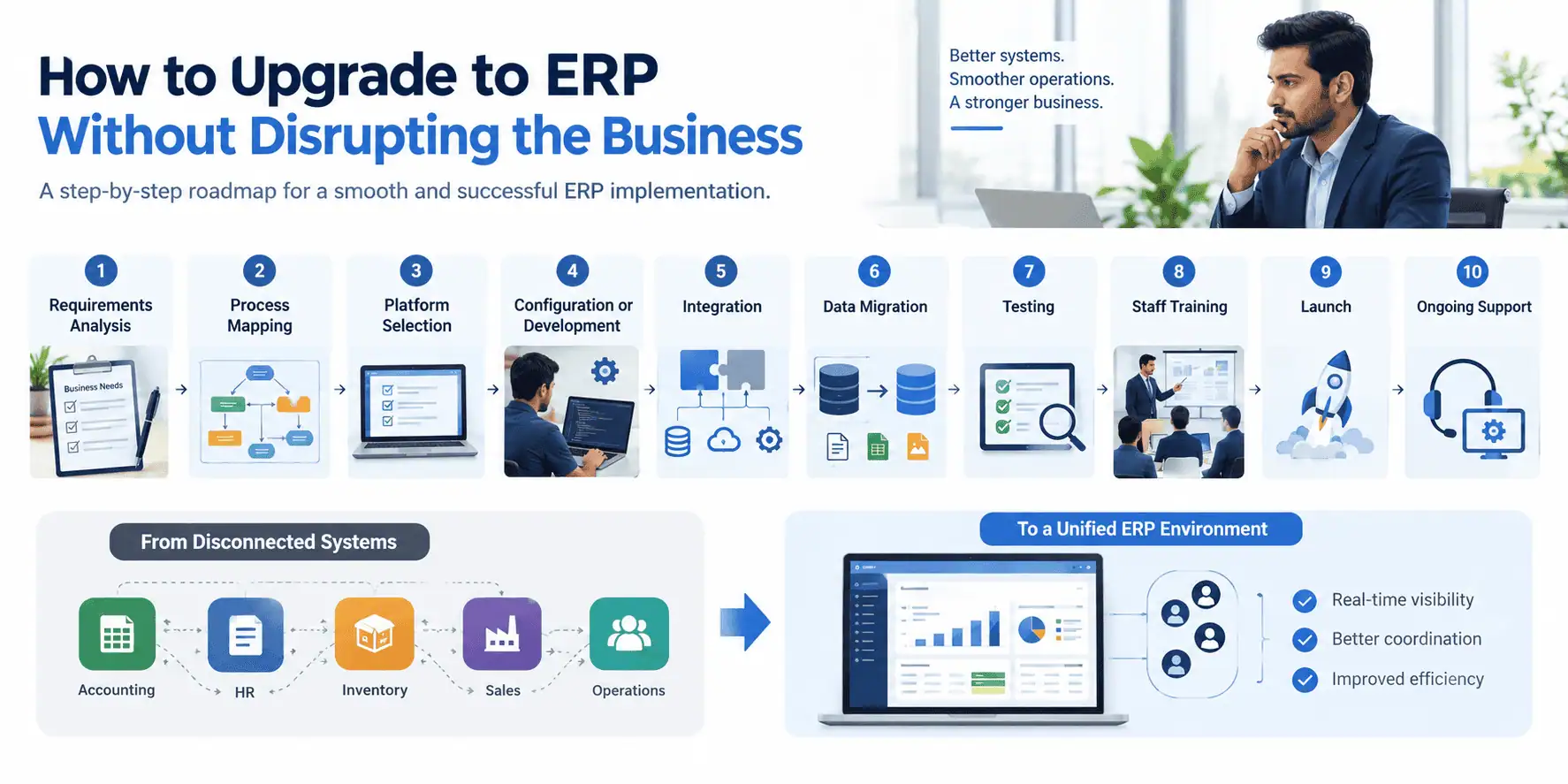
The safest way to upgrade is in stages, starting with the workflows that matter most, rather than switching everything overnight. A phased approach protects daily operations while the new system proves itself.
A practical process looks like this:
- Requirements analysis. Define what the business needs the system to do, and which problems it must solve.
- Process mapping. Document how work actually flows today, including the informal steps that live in people's habits.
- Platform selection or evaluation. Decide whether to adopt, configure, customize or build, based on the requirements.
- Configuration or development. Set up or build the system around the agreed workflows.
- Integration planning. Decide how the ERP will connect with accounting tools, e-commerce platforms, banks and other systems that stay in place.
- Data cleanup. Fix duplicate customers, outdated items and inconsistent naming before moving anything.
- Data migration. Move the cleaned data into the new system, and verify it.
- Testing. Run real scenarios, such as a full order-to-cash cycle, before going live.
- Staff training. Train each team on the workflows they will actually use.
- Launch. Go live, ideally in a lower-risk period, and where possible run in phases or by branch.
- Post-launch support. Expect questions and adjustments in the first weeks, and plan for them.
Do not attempt to migrate everything blindly. Historical data of little value, duplicate records and abandoned products only carry old problems into the new system. Before implementation, identify the critical workflows, such as invoicing, stock movement, purchasing and payroll, and make sure those are tested and stable first. Less critical processes can follow later.
How to Choose ERP Software for a Growing Business
Choose the ERP that fits your workflows, your growth path and your team's ability to use it, rather than the one with the longest feature list. A practical checklist helps keep the evaluation grounded:
- Does it support your current workflows? Test it against your real processes, not a generic demo.
- Can it scale with the business? Consider more users, more branches, more transactions and new modules.
- Can it integrate with your existing systems? Check accounting software, e-commerce platforms, banking and communication tools.
- Can your data be migrated? Ask how historical records will be imported and validated.
- Does it support the modules you need? Both now and in the next two or three years.
- Can users access the information they need? Different roles should see the right data without asking someone else to export it.
- Are your reporting requirements supported? Especially the reports management and finance use regularly.
- What level of customization is available? And what does it cost in time and money to change later?
- What support is available? Consider response times, local availability and who fixes problems after launch.
- What happens if you later change platforms? Check that you can export your data in a usable form.
Different platforms represent different approaches. Some are open-source and highly configurable, some are cloud suites sold as a set of connected apps, and some are large enterprise systems built for complex organizations. Each approach suits different needs, and no single choice is right for every business.
ERP Software for Growing Businesses in Pakistan: What Should You Consider?
Pakistani businesses should choose ERP software that fits local processes, accounting practices and tools they already use. A system that works well elsewhere may need adaptation to match how business is actually done here.
Points worth checking during evaluation:
- Local business processes. Credit terms, dealer and distributor arrangements, and cash-heavy or mixed payment cycles are common. Check that the ERP handles them naturally.
- Accounting requirements. Your chart of accounts, reporting formats and audit needs should be supported. Involve your accountant early.
- Tax and invoicing. Sales tax and invoicing rules can change, and requirements differ by business type. Confirm current requirements with your accountant or tax advisor, and ask any vendor how their system handles them and how updates are managed.
- Local payment methods. If you accept bank transfers, cheques, cash on delivery or online payments, check that they can be recorded and reconciled properly.
- Banking workflows. Consider how bank statements, payments and reconciliation fit into the system.
- Inventory management. Multiple warehouses, batches, unit conversions and stock transfers between branches are common needs in Pakistan's trading and distribution sectors.
- Supplier management. Local and import suppliers, varying payment terms and purchase tracking need to be clear.
- Multi-branch operations. If you operate across cities, branch-level controls and consolidated reporting matter.
- Local staff training. Teams need to be comfortable with the system. Consider training in a format your staff can follow, and ask whether interfaces or support can accommodate your team's language preferences.
- Data migration. Many businesses have years of records in Excel or older desktop software, often with inconsistent formats that need cleaning.
- Existing accounting software. You may want to keep it for a while, so check what integration options exist.
- E-commerce integrations. If you sell online, orders, stock and payments should sync with the ERP.
- WhatsApp and communication workflows. Many Pakistani businesses take orders and follow up with customers through WhatsApp. Ask whether the ERP or CRM can integrate with it, or capture that information in a structured way.
ERP Software for Growing Businesses FAQs
When should a small business start using ERP software?
When disconnected tools start causing errors, delays or a lack of visibility that affect decisions. Size alone is not the trigger. If your spreadsheets and accounting software still keep inventory, sales and finance accurate, you may not need ERP yet.
How do I know if my business has outgrown Excel?
You may have outgrown Excel when multiple people maintain separate files, reports take too long to prepare, inventory numbers are difficult to trust, or employees repeatedly enter the same information into different systems. If Excel errors are causing stock discrepancies, billing mistakes or delayed decisions, it is time to look at alternatives.
Is ERP suitable for growing businesses in Pakistan?
Yes, provided the system fits local processes and the business has enough complexity to justify it. Distributors, retailers, manufacturers, importers and multi-branch businesses often benefit, especially when local accounting, invoicing and inventory practices are handled properly.
Should a growing business use a ready-made or custom ERP?
It depends on how unusual your processes are. Most growing businesses are well served by a configured existing platform. Custom development becomes worth considering when existing platforms cannot support important workflows or integrations.
Can ERP software handle multiple branches?
Yes. Multi-branch operation is one of the most common reasons to adopt ERP. It typically allows centralized data with branch-level visibility, permissions and reporting, so head office can see the whole business while each branch manages its own work.
Can ERP integrate with existing accounting or e-commerce software?
Often, yes, though the effort depends on the tools involved. Many ERPs offer integrations or APIs for accounting packages, online stores and payment services. Confirm the specific integrations you need before choosing a platform.
How much does ERP software cost in Pakistan?
It varies widely based on users, modules, customization, integrations, data migration, training and support. Fixed prices without a requirements review should be treated cautiously. A scoping conversation is the best way to get a realistic estimate.
Conclusion
A business does not need ERP simply because it is growing. ERP becomes worth considering when growth creates enough operational complexity that disconnected tools, manual processes and limited visibility start causing problems: stock you cannot trust, reports that arrive late, and teams working from different versions of the truth.
If you recognize several of the signs in this guide, the next step is not to buy software. It is to map your processes, identify the workflows that matter most, and decide whether configuring an existing platform, customizing one, or building something custom fits your situation.
If you would like a second opinion, LumenAI Consultancy can review your current systems and workflows with you and help you weigh the options honestly, including the option of waiting. There is no obligation, and the right answer depends on your business.