CRM vs ERP: What Is the Difference and Which Does Your Business Need?
15 min read
On this page
- CRM vs ERP at a Glance
- What Is CRM Software?
- What Is ERP Software?
- CRM vs ERP: What Is the Real Difference?
- CRM vs ERP: A Real Business Workflow Example
- When Does a Business Need CRM?
- When Does a Business Need ERP?
- When Does a Business Need Both CRM and ERP?
- CRM and ERP Integration: Why It Matters
- CRM vs ERP for Different Businesses in Pakistan
- CRM or ERP: Which Should You Implement First?
- CRM vs ERP Cost: What Should Businesses Consider?
- CRM vs ERP FAQs
- Conclusion
A customer messages your sales team on WhatsApp asking about an order. Sales knows the customer, but not whether the order has shipped. Finance has the invoice, but nobody told them the customer paid a partial advance last week. Inventory says the item is out of stock, except the warehouse just received a new batch that hasn't been entered into the system yet. So the customer waits, someone makes a phone call to "check with the warehouse," and the whole thing gets sorted out an hour later, if you're lucky.
This is not a technology problem in the way most people assume. It's a visibility problem. Different parts of the business are holding different pieces of the same story, and nothing connects them.
CRM and ERP exist to solve exactly this, but they solve different halves of it. CRM keeps track of customers, leads and sales conversations. ERP keeps track of what you sold, what you have, what you owe and what's owed to you. Confusing the two, or assuming you only need one when you actually need both, is where a lot of software decisions in Pakistan go wrong.
This article walks through what each system actually does, how they're different in practice (not just in definition), and how to figure out whether your business needs CRM, ERP, or both working together.
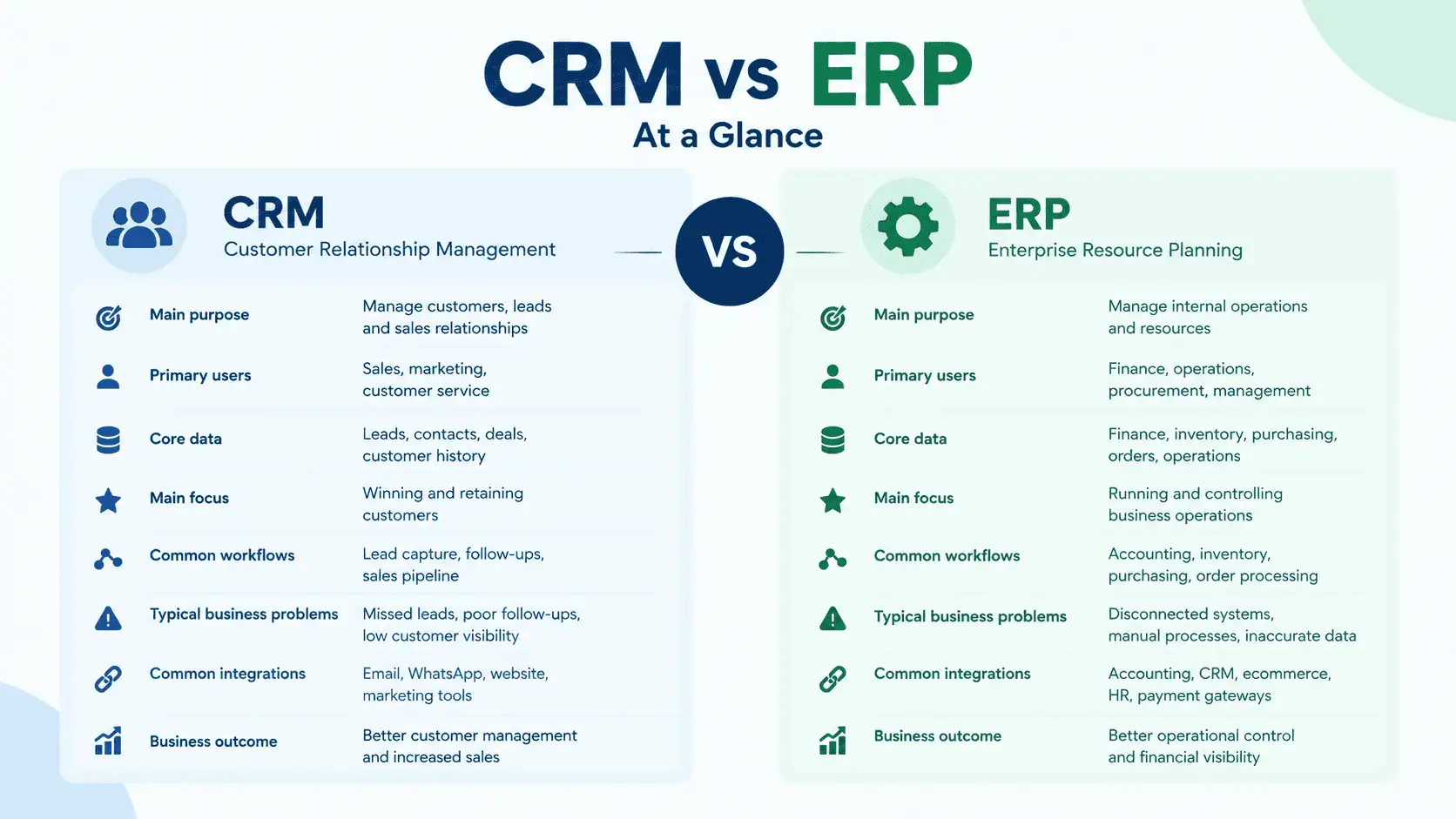
CRM vs ERP at a Glance
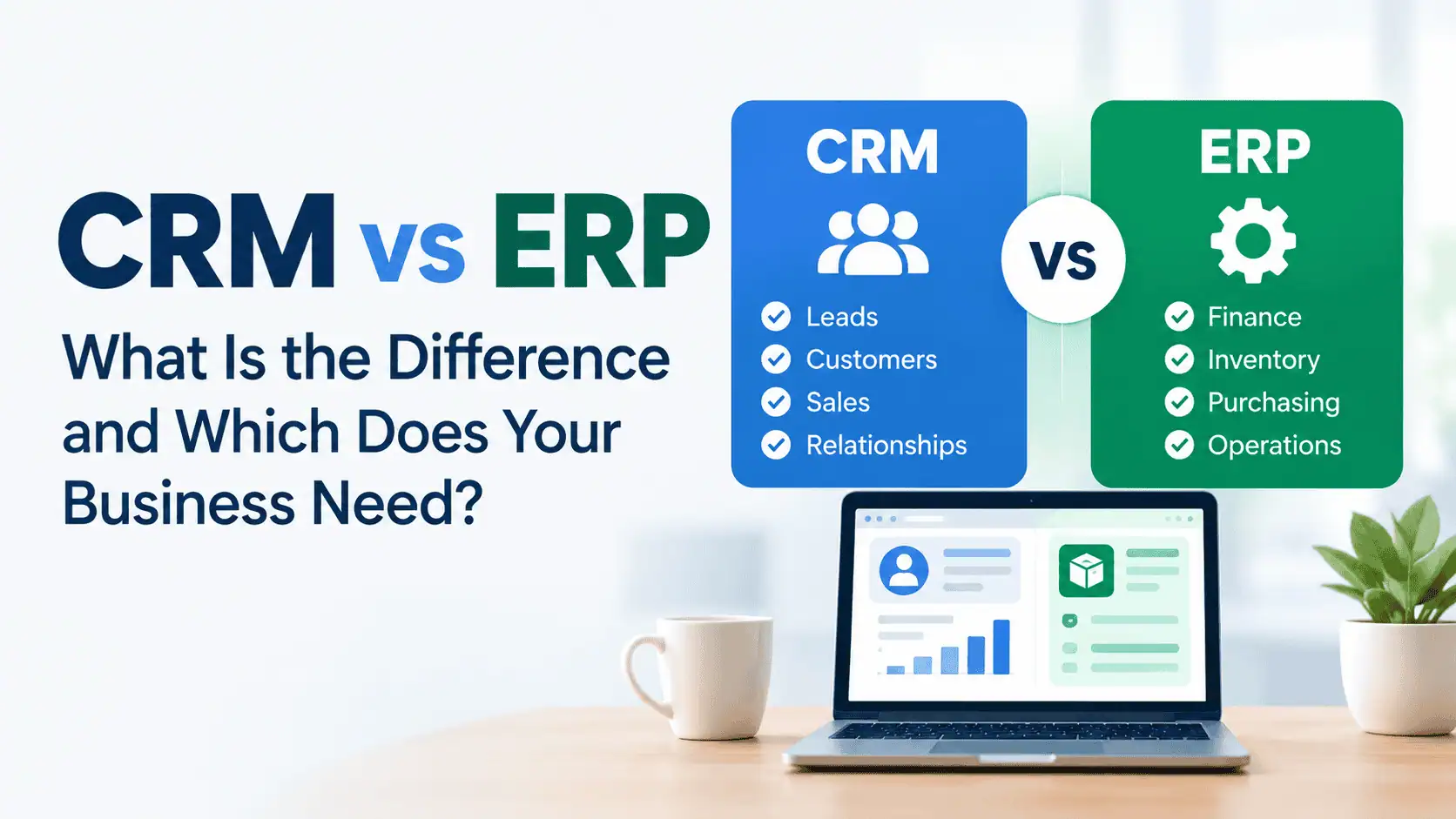
| CRM | ERP | |
|---|---|---|
| Main purpose | Manage customers, leads and sales activity | Manage internal operations and resources |
| Primary users | Sales, marketing, customer support | Finance, inventory, procurement, operations |
| Core data | Contacts, leads, deals, communication history | Orders, stock levels, invoices, ledgers |
| Main focus | Front office: the customer relationship | Back office: how the business runs day to day |
| Common workflows | Lead capture, follow-ups, quotes, pipeline tracking | Purchasing, inventory updates, invoicing, financial reporting |
| Typical problems it solves | Missed follow-ups, scattered customer history, no pipeline visibility | Mismatched stock counts, manual data entry, unclear financial position |
| Common integrations | Email, WhatsApp Business, marketing tools, ecommerce storefronts | Accounting software, POS systems, warehouse and shipping tools |
| Business outcome | Better conversion, fewer dropped leads, informed sales decisions | Accurate numbers, tighter control over stock and cash, cleaner operations |
The table looks tidy, but real businesses rarely fall cleanly on one side. A distributor might need CRM the moment they have more than two salespeople. A retailer with three branches might need ERP before they ever think about a formal sales pipeline. The point of this comparison isn't to pick a winner. It's to help you see which problems belong to which system.
What Is CRM Software?
CRM stands for Customer Relationship Management, but the name undersells what it actually does day to day. A CRM is where your business keeps a record of every person who has shown interest in buying from you, and everything that's happened since.
In practical terms, that includes:
- Lead management - capturing enquiries from your website, Facebook page, WhatsApp, or walk-ins, so nothing sits in someone's personal notebook or gets forgotten in a chat thread.
- Contact and customer records - one place to see a customer's full history: past orders, past conversations, complaints, preferences.
- Sales pipeline - a visual or structured way to see which deals are at the enquiry stage, which are being quoted, and which are close to closing.
- Follow-ups - reminders so a lead who asked about pricing two weeks ago doesn't just disappear.
- Quotes and proposals - generating and tracking what's been sent to a customer, and whether they responded.
- Sales activity and reporting - how many leads came in this month, what converted, and where deals are getting stuck.
None of this is complicated on its own. What CRM actually does is take activity that would otherwise live in someone's head, a notebook, or scattered WhatsApp chats, and put it somewhere the whole sales team, and management, can see. That's the real value: not the software itself, but the visibility it creates over how customers move from "interested" to "paying."
What Is ERP Software?
ERP stands for Enterprise Resource Planning, which is a fairly dry name for what is really a system that ties your operations together so different departments aren't working off different numbers.
Where CRM is customer-facing, ERP is mostly internal. It typically covers:
- Finance and accounting - ledgers, receivables, payables, and financial reporting that reflects what's actually happening, not what someone remembers.
- Inventory and warehouse management - stock levels that update automatically when something is sold or received, instead of being counted manually at month-end.
- Purchasing and procurement - purchase orders, supplier records, and tracking what's been ordered versus what's arrived.
- Sales orders - converting a confirmed sale into an order that inventory and finance can both see, without someone re-typing the same information twice.
- Operations and multi-branch reporting - a consolidated view of how each branch or warehouse is performing, rather than pulling separate reports from separate systems.
- HR and payroll - in some ERP platforms, though this varies a lot by vendor.
The pattern here is consistency of data. A sale recorded in one place should reduce stock in another and eventually show up correctly in the accounts, without anyone manually reconciling three spreadsheets to make the numbers agree. That's what ERP is built for.
For businesses evaluating CRM and ERP systems for the first time, this is usually the point where the real question comes into focus: is the problem how you manage customers, or how you manage operations? Often it's both, just at different stages of growth.
CRM vs ERP: What Is the Real Difference?
Here's the simplest way to put it: CRM asks "who are our customers, what are they interested in, and what should our sales team do next?" ERP asks "what did we sell, what do we have, what do we owe, what do customers owe us, and how are our operations performing?"
One is about relationships. The other is about resources and records. CRM lives in the world of leads, conversations and deals. ERP lives in the world of stock counts, invoices and ledgers.
You'll sometimes hear this described as front office versus back office. Front office is everything customer-facing: sales conversations, follow-ups, quotes. Back office is everything that keeps the business running once a sale happens: fulfilling the order, updating stock, recording the payment, reporting on the numbers. CRM sits in the front office. ERP sits in the back office.
That said, the line isn't as clean in practice as it is on paper. Some ERP platforms, like Odoo or Microsoft Dynamics, include built-in CRM modules, so a business running ERP might already have basic customer tracking without a separate tool. Other businesses run a dedicated CRM (HubSpot, Zoho CRM, Salesforce) alongside a separate ERP or accounting system, and connect the two. Neither approach is automatically right. It depends on how deep your sales process needs to be, and how complex your operations are.
CRM vs ERP: A Real Business Workflow Example
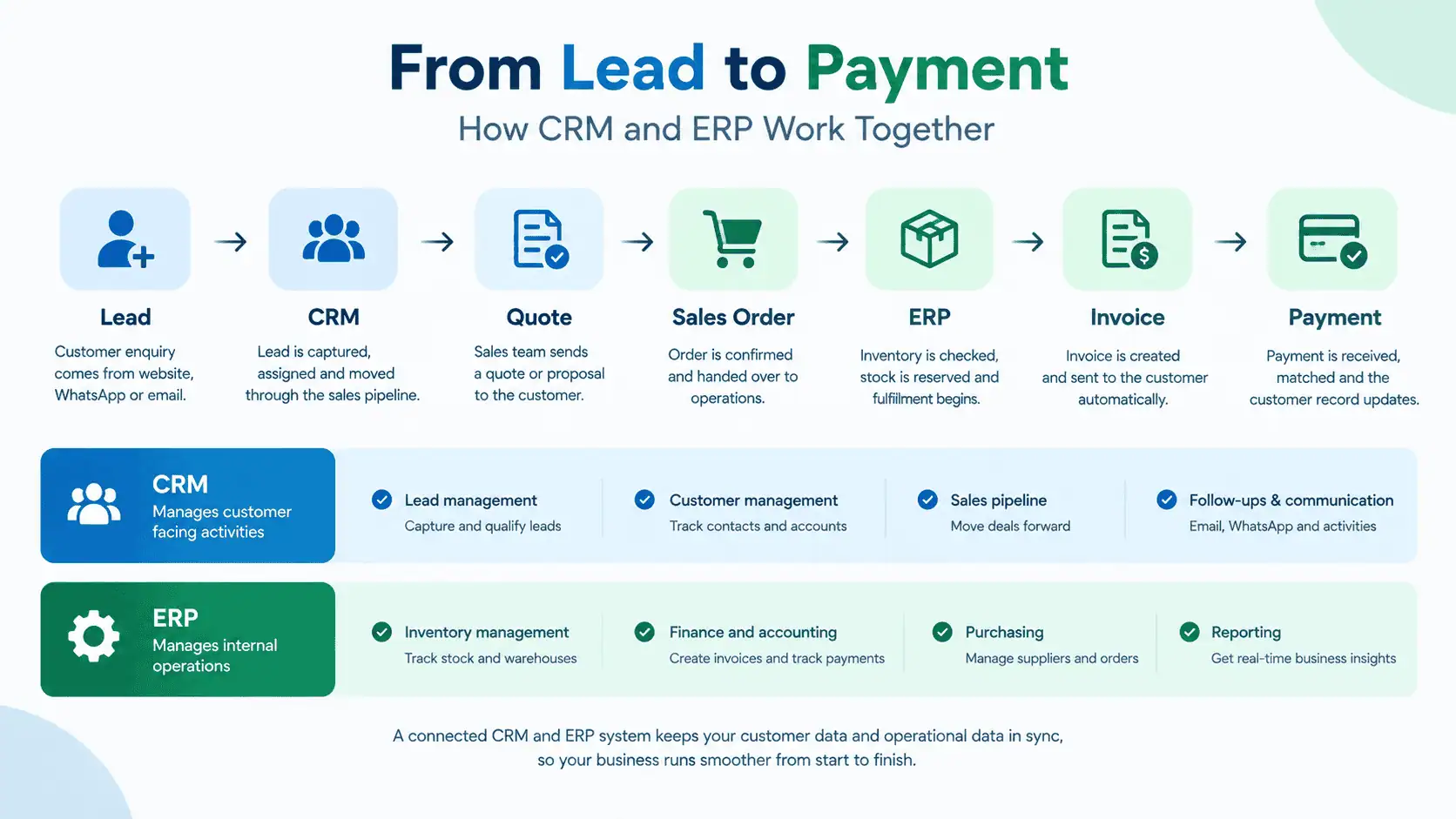
It helps to see how a single sale actually moves through both systems, rather than talking about CRM and ERP as separate abstract categories.
- Lead → a prospective customer enquires through your website or WhatsApp.
- CRM → the enquiry is logged, assigned to a salesperson, and tracked through follow-ups.
- Quote → the salesperson sends pricing, still tracked inside the CRM. Sales order → the customer confirms. This is usually the handoff point.
- ERP → the confirmed order enters the operational system.
- Inventory → stock is reserved or deducted for that order.
- Invoice → generated based on the order, feeding into accounts receivable.
- Payment → recorded against the invoice, closing the loop.
Notice where the handoff happens: the moment a lead becomes a confirmed sale. Up to that point, it's a CRM conversation. After that point, it's an operational transaction that ERP needs to track accurately. Businesses that only have CRM tend to lose visibility right at that handoff, they know a sale happened, but stock and finance don't reflect it cleanly. Businesses that only have ERP tend to lose visibility before it, they can process an order once it exists, but they have no structured way of managing the leads and follow-ups that got them there.
When Does a Business Need CRM?
CRM is usually the right starting point when your core problem is on the sales and customer side. A few signs this is where you're losing money or time:
- Leads come in from multiple channels (website, WhatsApp, Facebook, referrals) and there's no single place tracking them.
- Salespeople are using personal spreadsheets or notebooks to track prospects.
- Follow-ups get missed because there's no reminder system beyond memory.
- Management has no real visibility into the sales pipeline, how many deals are open, how many are close to closing.
- Customer history is scattered across different people's phones and inboxes.
- Sales reporting takes hours of manual compilation instead of being available on demand.
- Enquiries from different channels are hard to consolidate into one customer record.
If most of this sounds familiar and your operations, meaning inventory, accounting, purchasing, are relatively simple or already under control, CRM is likely the more urgent fix.
When Does a Business Need ERP?
ERP tends to be the priority when the pain is operational rather than sales-related. Common symptoms:
- Inventory counts don't match what's actually in the warehouse.
- Finance and operations are working from separate systems that don't talk to each other.
- Purchasing is done manually, with no structured tracking of what's ordered versus received.
- Multiple branches need to report into one consolidated view, and currently don't.
- Management can't get a reliable number for stock value, receivables, or cash position without waiting for someone to compile it.
- Sales orders require the same information to be typed into two or three different places.
- Accounting numbers and inventory numbers regularly disagree.
- Spreadsheets that used to work have become too large and too error-prone to manage reliably.
If your sales process is relatively straightforward, a small team, a manageable number of deals, but your operations are the part that feels chaotic, ERP is probably the more pressing need.
When Does a Business Need Both CRM and ERP?
Some businesses reach a point where both sides need attention at the same time, or where connecting the two creates value that neither system delivers alone.
Growing distributor.
CRM manages the leads and sales opportunities coming from different regions or sales reps. ERP manages the resulting orders, inventory allocation, invoicing and payment tracking. Without both, either sales visibility or fulfilment accuracy suffers.
Ecommerce business.
CRM manages customer relationships, repeat buyer tracking, and support conversations. ERP manages order processing, inventory across warehouses, accounting, and fulfilment. As order volume grows, doing this manually or through disconnected tools stops scaling.
Multi-branch business.
CRM keeps customer relationships consistent across branches, so a customer isn't treated like a stranger at branch two after buying at branch one. ERP centralizes inventory and finance so management gets one true picture instead of three separate ones.
In each case, the value isn't just having two systems. It's connecting the customer-facing side to the operational side wherever that connection actually matters to the business, and not forcing integration where it doesn't.
CRM and ERP Integration: Why It Matters
Once a business runs both, the natural next question is whether they should be connected, and it usually helps.
CRM typically holds customer, lead, quote and opportunity data. ERP typically holds order, inventory, invoice and payment data. When these are integrated, a confirmed deal in the CRM can automatically create a sales order in the ERP, instead of someone re-entering the same customer and product details a second time. That reduces duplicate work and, more importantly, reduces the chance of the two systems disagreeing about what actually happened.
Without integration, you end up with two versions of the truth: the CRM says a deal closed, but the ERP has no record of the order until someone manually creates it, and there's always a lag where things fall through. Setting up CRM and ERP integration properly means the handoff between "sale confirmed" and "order fulfilled" happens with far less manual effort. This is a big enough topic that it deserves its own dedicated breakdown, but the short version is: integration matters most exactly at the point where sales hands off to operations.
CRM vs ERP for Different Businesses in Pakistan
Different business types tend to lean toward one system first, though this depends on how the specific business actually operates.
| Business type | Often leans toward |
|---|---|
| Professional services (agencies, consultancies, clinics) | CRM first, since the challenge is usually leads and client relationships, not inventory |
| Wholesale and distribution | ERP earlier, since inventory accuracy and purchasing directly affect cash flow |
| Manufacturing | ERP first, given the complexity of raw materials, production and finished goods |
| Retail with POS | ERP-style inventory and finance tracking early, CRM as loyalty programs grow |
| Ecommerce | Both fairly early, since order volume and customer relationships scale together |
| Multi-branch businesses | ERP for consolidated reporting, CRM once cross-branch customer experience matters |
None of this is a rule. A two-person consultancy and a fifty-person consultancy can have very different needs depending on how they actually sell and deliver their services.
CRM or ERP: Which Should You Implement First?
A practical way to decide:
Start with CRM when the main problem is sales, leads, follow-ups and customer visibility. If you're losing deals because nobody followed up, or management has no idea what's in the pipeline, fixing that first usually has the fastest, most visible payoff.
Start with ERP when the main problem is finance, inventory, purchasing and operations. If stock counts are wrong, financial reporting takes days to compile, or purchasing is chaotic, that's where the immediate cost is being felt.
Consider both when customer and operational information genuinely need to move through one connected workflow, and doing it manually has become the bottleneck. This is usually a sign of a business that has outgrown ad hoc tools on both sides at once.
The honest answer for most growing businesses is that they need both eventually. The real question is sequencing: which gap is costing you more right now, and which one can reasonably wait another six months.
CRM vs ERP Cost: What Should Businesses Consider?
Costs for both CRM and ERP vary widely, and there's no single number that applies across the board. What actually drives the cost includes:
- Number of users who need access
- Which modules or features are required
- How much customization the business needs
- Whether integration with existing tools (accounting software, ecommerce platforms, WhatsApp Business) is needed
- Data migration from spreadsheets or older systems
- Implementation time and complexity
- Staff training
- Ongoing support and maintenance
CRM pricing is often simpler to estimate since it's typically priced per user per month. ERP costs tend to be harder to pin down upfront, since they depend heavily on how many modules a business actually needs and how much customization the workflows require. For a closer look at what shapes ERP pricing specifically, see our breakdown on ERP software cost in Pakistan.
CRM vs ERP FAQs
Can ERP replace CRM?
Not fully, unless the ERP includes a genuine CRM module. Some platforms like Odoo or Dynamics include basic CRM functionality, but a dedicated CRM usually offers deeper pipeline management and follow-up automation than a bundled module.
Can CRM replace ERP?
No. CRM has no concept of inventory, accounting or purchasing. It manages the relationship and sales process, not the operational and financial side of the business.
Do small businesses need both CRM and ERP?
Not necessarily, and not usually at the same time. Most start with whichever solves their most urgent problem, and add the other as the business grows.
Which is easier to implement, CRM or ERP?
CRM is generally faster, since it mainly involves configuring pipelines, fields and user access. ERP implementations take longer because they touch multiple departments and require migrating existing data.
Can CRM and ERP be integrated?
Yes. Most modern platforms support integration, either natively or through connectors, so confirmed orders flow from CRM into ERP without manual re-entry.
Is CRM part of ERP?
Sometimes. Certain ERP platforms bundle in a CRM module, but whether that's sufficient depends on how complex your sales process is.
Should a Pakistani business choose CRM or ERP first?
It depends on where the pain actually is. If leads and follow-ups are falling through the cracks, start with CRM. If inventory, purchasing or financial reporting are the daily headache, start with ERP.
Conclusion
CRM and ERP aren't competing solutions to the same problem. They manage different halves of the business. CRM focuses on customers: leads, conversations, deals and the sales pipeline. ERP focuses on operations: inventory, finance, purchasing and the numbers that tell you how the business is actually performing.
Some businesses need one to start. Others reach a point where both are necessary, and where connecting them removes the manual work of moving information between customer-facing and operational teams. The goal isn't to buy the biggest system available. It's to solve the actual problem in front of you and make sure whatever you choose can support the business as it grows into its next stage.
If you're trying to work out whether CRM, ERP, or both make sense for your business, Lumen AI Consultancy can walk through your current workflows and help you figure out where the actual gaps are, before recommending a system to fix them.