Custom CRM vs Ready-Made CRM: Which Is Right for Your Business?
13 min read
On this page
- What Is the Difference Between Custom CRM and Ready-Made CRM?
- When Is a Ready-Made CRM the Better Choice?
- When Does a Business Actually Need a Custom CRM?
- Should You Configure an Existing CRM Before Building One?
- Custom CRM vs Ready-Made CRM: Cost Comparison
- Which CRM Gives You More Flexibility?
- What About WhatsApp, Website and Other Integrations?
- Custom CRM vs Ready-Made CRM for Small and Growing Businesses
- How Long Does Custom CRM Development Take Compared With Ready-Made CRM?
- Who Owns and Maintains a Custom CRM?
- Custom CRM vs Ready-Made CRM for Pakistani Businesses
- How to Decide Which CRM Approach Fits Your Business
- Common Mistakes Businesses Make When Choosing a CRM
- FAQs
- Conclusion
Choosing between a custom CRM and a ready-made CRM is not a question with one correct answer. It depends on how standard your sales process is, how many workarounds your team already relies on, and how much control you actually need over the system. This guide breaks down custom CRM vs ready-made CRM using a practical, three-path framework so you can make the decision based on your actual workflow, not on marketing claims from either side.
What Is the Difference Between Custom CRM and Ready-Made CRM?
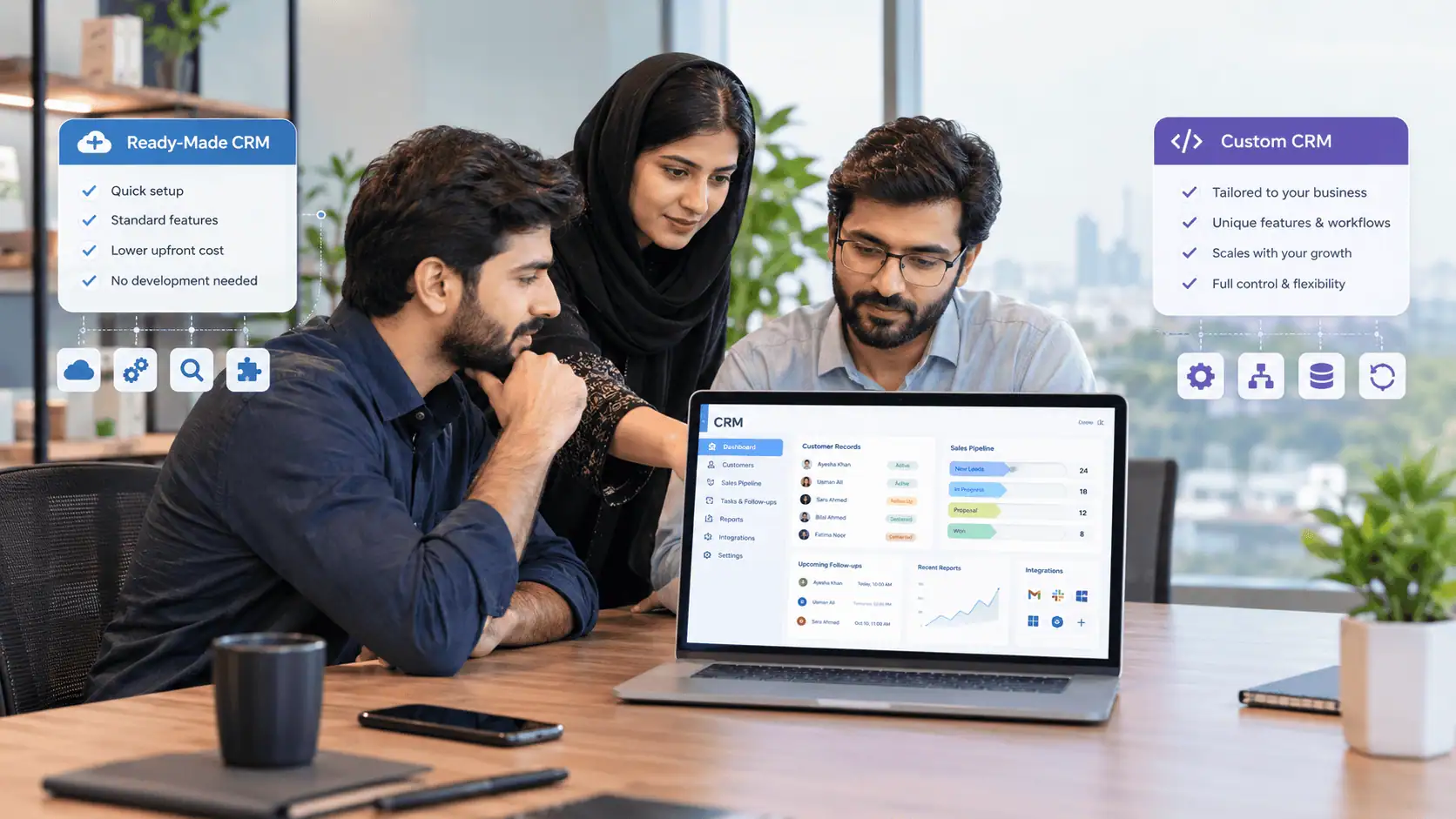
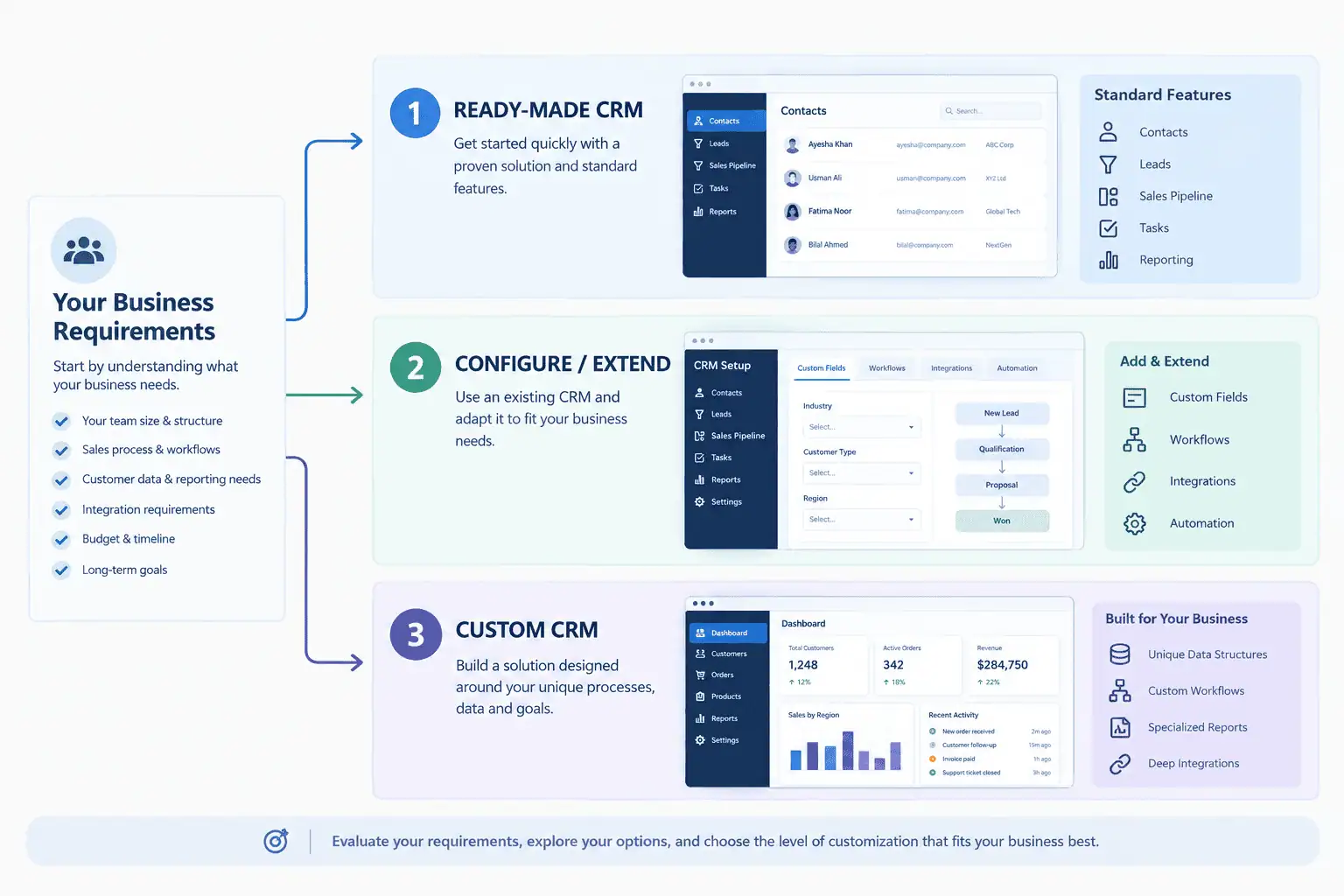
A ready-made CRM is a pre-built platform (like Zoho, HubSpot, or Odoo) that you configure and use as-is. A custom CRM is software built specifically around your workflows, data structures, and reporting needs. Between these two extremes sits a third option that most comparisons skip entirely: configuring or extending an existing CRM.
In practice, there are four levels to consider:
- Ready-made CRM – used largely out of the box, with minor settings changes
- Configured CRM – customized within the platform's existing tools (custom fields, pipelines, permissions)
- Extended CRM – the base platform plus custom modules, integrations, or scripts built on top of it
- Custom CRM – software built from the ground up around your specific requirements
Most build-vs-buy comparisons frame this as a two-way choice. It is more useful to think of it as a path:
Buy → Configure/Extend → Build
Most businesses should move through these stages in order, and stop as soon as their real requirements are met. Jumping straight to "build" is usually a sign that the workflow was never properly mapped in the first place.
When Is a Ready-Made CRM the Better Choice?
A ready-made CRM is usually the right choice when your sales and customer-management process is fairly standard and you need to get running quickly. If your team's process looks like most other businesses in your industry, a packaged CRM will likely cover it without any custom development.
Ready-made CRM software fits well when you have:
- A standard sales process (lead, qualify, quote, close)
- Common contact and lead management needs
- Reporting requirements that fit built-in dashboards
- Integration needs that match the platform's existing connectors
- Limited internal technical resources
- A preference for vendor-managed updates and security patches
- A need for a predictable, subscription-based cost
If none of your workflows are genuinely unusual, building custom software adds cost and maintenance responsibility without adding real value. Many businesses assume they need something custom simply because their process "feels" unique, when in reality a configured off-the-shelf CRM would handle it without issue.
When Does a Business Actually Need a Custom CRM?
A business needs a custom CRM when core workflows, data structures, or integrations cannot be handled cleanly by configuring or extending an existing platform. This is not about company size or ambition. It is about whether your actual operational requirements exceed what a packaged CRM can reasonably do.
Signs that point toward genuine custom CRM development:
- Unique approval workflows that don't map to standard pipeline stages
- Industry-specific data entities that generic CRMs don't support
- Unusual customer journeys with multiple branching paths
- Deep integrations with internal systems that have no existing connector
- Custom reporting that goes well beyond dashboard customization
- Special user roles or permission structures tied to your business model
- Automation that is business-critical and not achievable through the platform's workflow builder
Growth alone is not a reason to go custom. A growing business with a standard sales process still fits a ready-made or configured CRM. What matters is whether the workflow itself, not the company's size, has outgrown what configuration can deliver.
Should You Configure an Existing CRM Before Building One?
Yes, and this step is where most CRM decisions go wrong. Before considering a fully custom CRM, configure the existing platform as far as it will go, then look at whether targeted extensions or integrations close the remaining gap.
The practical order looks like this:
- Configure first. Custom fields, pipeline stages, automation rules, and permission settings solve a large share of "unique" requirements without a single line of code.
- Extend if necessary. If configuration alone doesn't cover a specific workflow, a custom module, script, or API integration built on top of the existing platform can often close the gap.
- Go fully custom only when the remaining gap justifies it. If, after configuration and extension, core parts of your business still cannot run properly on the platform, custom development becomes the reasonable choice.
Rebuilding functionality that a mature CRM platform already provides, such as contact management, pipeline tracking, or basic reporting, from scratch is usually unnecessary work. It adds development time upfront and ongoing maintenance responsibility later, for capability you could have had by configuring an existing system.
Custom CRM vs Ready-Made CRM: Cost Comparison
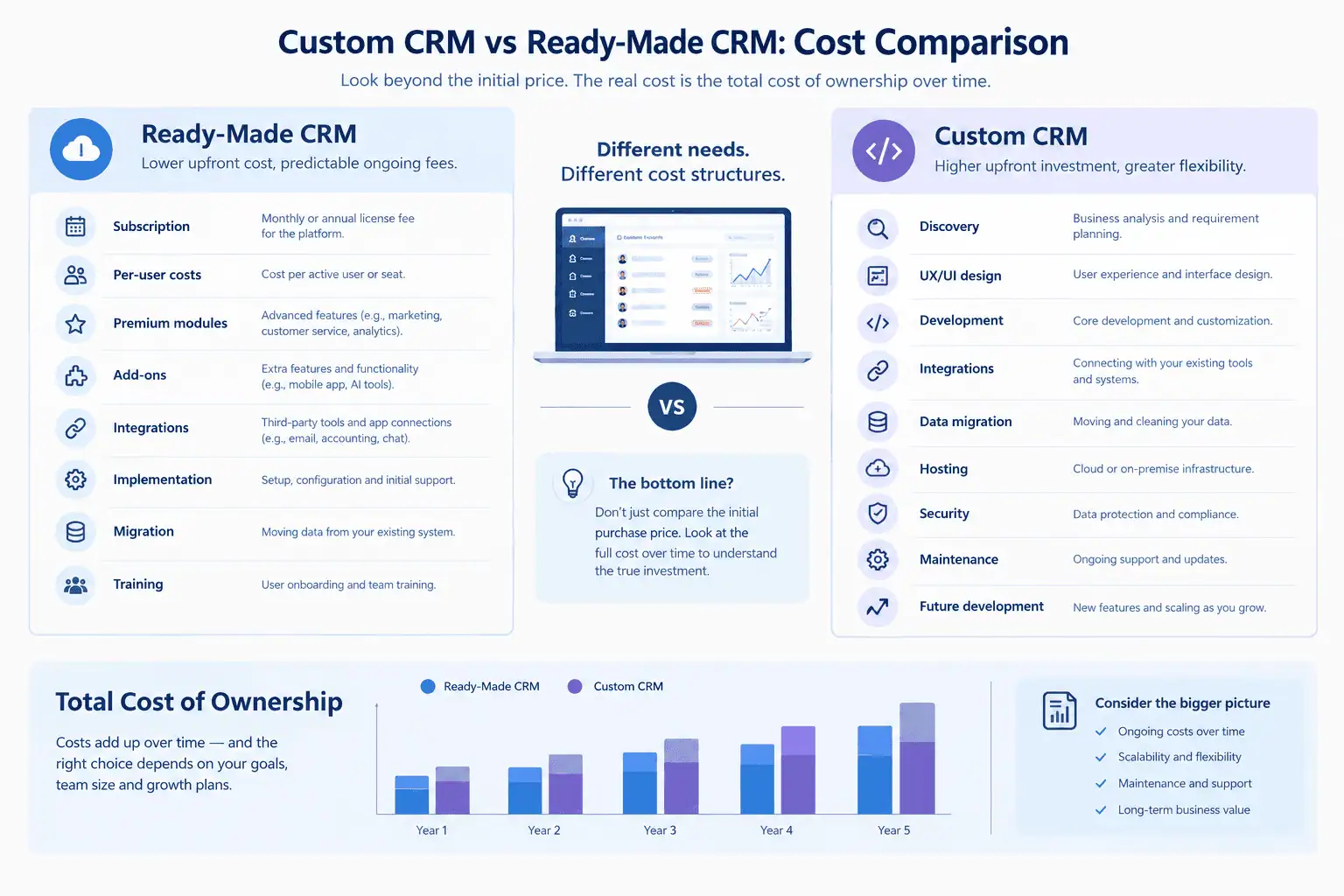
Cost comparisons that only look at the sticker price miss most of what actually determines total spend. A proper comparison has to include implementation, migration, training, and ongoing maintenance on both sides.
| Cost Area | Ready-Made CRM | Custom CRM |
|---|---|---|
| Initial cost | Usually lower | Usually higher |
| Subscription | Recurring | Depends on hosting/support model |
| Per-user cost | May apply | Depends on architecture |
| Customization | Platform-dependent | Built around requirements |
| Integrations | Built-in or paid/additional | Developed as required |
| Maintenance | Vendor-managed core | Business/development team responsibility |
| Migration | Additional implementation work | Additional implementation work |
| Long-term cost | Depends on users, modules and usage | Depends on development and maintenance |
Neither option is universally cheaper. A ready-made CRM with several premium modules and a growing number of seats can end up costing more over a few years than expected. A custom CRM can be cost-effective long-term if it removes recurring per-user fees, but only if the business is genuinely prepared to fund ongoing development and maintenance.
Which CRM Gives You More Flexibility?
Flexibility depends more on how far you push configuration than on whether the CRM is custom or ready-made. Modern platforms like Zoho, HubSpot, and Odoo offer significant configurability across workflows, data structures, user roles, and automation, often enough to match what many businesses would otherwise consider building from scratch.
Areas where flexibility should be compared:
- Workflow and pipeline structure
- Custom fields and data structures
- User roles and permission granularity
- Reporting and dashboard customization
- Automation rules and triggers
- Native and third-party integrations
- User interface customization
- Customer-facing portals
- Industry-specific processes
A custom CRM has no platform ceiling, but that flexibility comes with the responsibility of building and maintaining every feature yourself. A ready-made CRM's flexibility is real, but it stops where the platform's configuration options end.
What About WhatsApp, Website and Other Integrations?
Integration needs are often the deciding factor for businesses in Pakistan, where WhatsApp, website forms, and social media are common lead sources. Not every CRM supports every integration natively, so it's worth understanding the three levels of integration before assuming a platform will or won't work.
- Native integration – built into the platform, no extra setup beyond connecting an account
- Third-party connector – available through a marketplace app or middleware tool like Zapier or Make
- API/custom integration – built specifically for your systems when no native or third-party option exists
Common integration points for Pakistani businesses include website forms, WhatsApp, email, social media lead sources, accounting software, ERP systems, e-commerce platforms, payment gateways, and SMS. Before assuming you need a custom CRM to connect these systems, check whether a native or third-party connector already covers it. Many "we need custom development" conversations end once someone checks the integration marketplace.
Custom CRM vs Ready-Made CRM for Small and Growing Businesses
Company size should not be the main factor in this decision. A small business can have a genuinely unusual workflow that justifies custom development, while a large business can run perfectly well on a standard, ready-made platform.
What should actually drive the decision:
- Process complexity, not headcount
- Number of users and how permissions need to scale
- Integration requirements specific to your systems
- How unusual your workflow genuinely is
- Reporting depth required for decision-making
- Available budget for build vs subscription
- Internal technical capacity to maintain custom software
- Long-term appetite for owning the software lifecycle
If you're a small business evaluating your options in more detail, this guide to CRM software for small businesses in Pakistan covers the decision at that scale specifically.
How Long Does Custom CRM Development Take Compared With Ready-Made CRM?
Ready-made CRM implementation is generally faster because the core software already exists. Custom CRM development takes longer because the system itself has to be designed, built, and tested before anyone can use it.
Ready-made CRM implementation typically involves:
- Initial setup and account configuration
- Configuration of fields, pipelines, and permissions
- Data migration from existing tools
- Integration setup
- Team training
- Launch
Custom CRM development typically involves:
- Discovery and requirements gathering
- UX/UI design
- Development
- Testing
- Integration development
- Data migration
- Team training
- Launch
- Ongoing iteration after launch
Neither timeline is fixed, and both depend heavily on scope. But custom development inherently requires more upfront planning, since every feature has to be specified and built rather than configured within an existing structure.
Who Owns and Maintains a Custom CRM?
With a custom CRM, you typically own the source code, which gives you control over hosting, security, and future changes. That control comes with responsibility. Someone has to manage backups, apply updates, fix bugs, build new features, maintain integrations, and keep documentation current.
Ownership doesn't mean maintenance disappears. It means the responsibility shifts from the CRM vendor to you or whoever you contract to maintain the system. If you don't have an internal team or a reliable development partner for ongoing support, "owning" your CRM can turn into a liability rather than an advantage. This is worth weighing seriously before choosing custom development purely for the sake of control.
Custom CRM vs Ready-Made CRM for Pakistani Businesses
Pakistani businesses face a specific set of practical considerations when choosing between custom and ready-made CRM software. Several factors come up repeatedly across industries.
- WhatsApp-heavy lead generation. Many sales processes start on WhatsApp rather than a website form, which affects what kind of integration you actually need.
- Excel-based records. Teams often maintain customer data in spreadsheets because the current system, or the lack of one, doesn't support their process.
- Local sales teams. Field sales and in-person follow-ups may need mobile-first CRM access.
- Multiple branches. Businesses operating across cities need role-based visibility and branch-level reporting.
- Accounting and e-commerce integration. Connecting a CRM to local accounting tools or e-commerce platforms is often necessary for real workflow value.
- PKR-based budgeting. Recurring, foreign-currency subscription costs for ready-made platforms should be weighed against a one-time or phased development cost for custom software.
- Local implementation and support. Working with a team that understands the local business context, rather than a generic international vendor, often affects how smoothly implementation goes.
None of these factors alone determine whether you need custom or ready-made CRM software. They're inputs into the same three-path decision: buy, configure/extend, or build.
If your team is still tracking customers manually, it's worth first checking when to move from Excel to CRM or ERP before deciding what kind of system to invest in.
How to Decide Which CRM Approach Fits Your Business
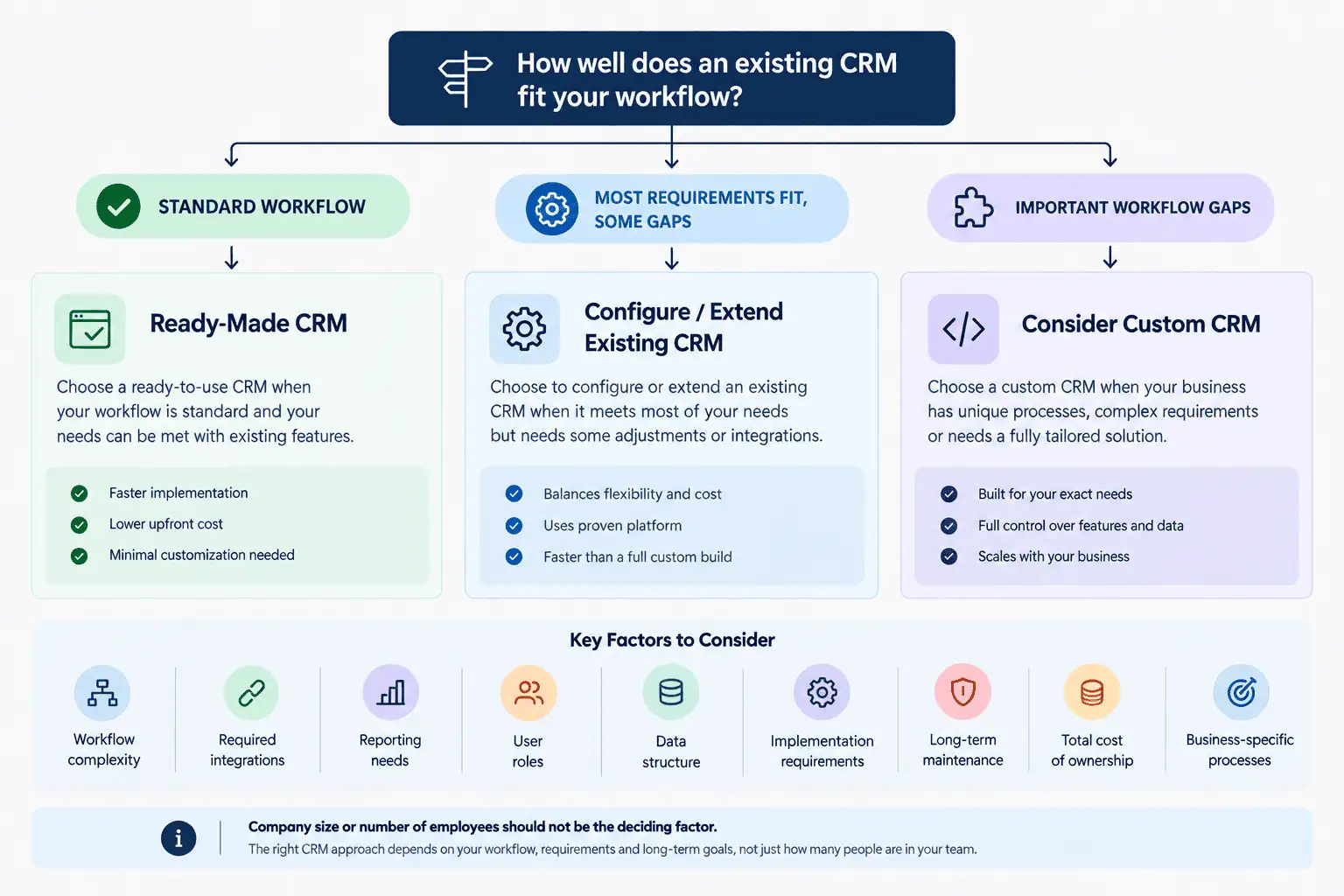
Choose a ready-made CRM when:
- Your workflow is standard for your industry
- You need to deploy quickly
- Existing features cover most of your requirements
- Existing integrations are sufficient for your lead sources and tools
- You prefer the platform vendor to manage updates and security
Configure or extend when:
- The CRM covers most of your requirements already
- Only a small number of workflows need modification
- Existing APIs or third-party connectors can solve the remaining gaps
- You want to avoid rebuilding functionality the CRM already provides
Consider a custom CRM when:
- Important workflows genuinely cannot be handled through configuration
- Manual workarounds have become real operational problems
- Your data model is structurally different from what standard CRMs assume
- Deep, business-critical integrations have no viable connector
- Custom reporting or permission structures are essential to how you operate
- Your workflow itself is part of your competitive advantage
- You are prepared to own the software lifecycle, including maintenance and support
Pakistani businesses evaluating CRM solutions for Pakistani businesses are often better served by starting with this framework rather than starting with a platform or a developer.
Common Mistakes Businesses Make When Choosing a CRM
- Choosing based only on price
- Choosing based only on feature count
- Building custom software before testing whether configuration would work
- Assuming ready-made software means zero implementation work
- Ignoring data migration until it becomes a blocker
- Ignoring integration requirements until after purchase
- Underestimating how much user adoption affects success
- Ignoring ongoing maintenance responsibilities
- Not calculating total cost of ownership over multiple years
- Choosing software before actually documenting the current workflow
The last point is the most common. Businesses often shop for CRM software before they've written down what their sales and customer-management process actually looks like, which makes it nearly impossible to evaluate whether a platform fits.
FAQs
What is the difference between custom CRM and ready-made CRM? A ready-made CRM is a pre-built platform you configure and use, while a custom CRM is software built specifically around your business's workflows and requirements.
Is custom CRM better than ready-made CRM? Neither is universally better. A custom CRM makes sense when your workflows genuinely can't be handled through configuration; otherwise, a ready-made or configured platform is usually the more practical choice.
Is custom CRM cheaper than SaaS CRM? It depends on usage. Custom CRM avoids recurring per-user subscription fees but requires upfront development and ongoing maintenance costs, which can equal or exceed SaaS costs depending on scale.
When should a business build a custom CRM? When core workflows, data structures, or integrations cannot be handled cleanly by configuring or extending an existing CRM platform.
Can a ready-made CRM be customized? Yes. Most ready-made CRMs support custom fields, pipeline configuration, automation rules, and third-party integrations, often covering what businesses assume requires custom development.
Should a small business use a custom CRM? Only if its workflow is genuinely unusual. Company size alone isn't a reason to build custom software; process complexity is what matters.
How much does custom CRM development cost in Pakistan? Costs vary widely based on scope, features, and integrations, so there's no fixed figure. A proper estimate requires a discovery phase to define actual requirements.
How long does it take to build a custom CRM? Timelines depend on scope and complexity. Custom development requires discovery, design, development, testing, and integration work before launch, which takes longer than configuring an existing platform.
Can CRM integrate with WhatsApp and ERP? It depends on the platform and the specific integration required. Some connections are native, others need a third-party connector, and some require custom API development.
Can I start with a ready-made CRM and move to custom software later? Yes. Many businesses start with a ready-made or configured CRM and only move to custom development once specific, well-defined gaps appear that configuration can't solve.
Conclusion
Do not build a custom CRM simply because customization sounds attractive. Do not choose a ready-made CRM simply because it's faster. Start with your actual workflow, identify the real gaps, evaluate configuration and extension options, and only then decide whether those gaps justify custom development. That order, not a general preference for buy or build, is what determines the right CRM approach for your business.