Custom ERP vs Ready-Made ERP: Cost, Flexibility & Implementation
18 min read

On this page
- What Is the Difference Between Custom ERP and Ready-Made ERP?
- When Is a Ready-Made ERP the Better Choice?
- When Does a Business Actually Need a Custom ERP?
- Should You Configure an Existing ERP Before Building One?
- Custom ERP vs Ready-Made ERP: Cost Comparison
- Which ERP Gives You More Flexibility?
- What About ERP Integrations?
- Custom ERP vs Ready-Made ERP for Growing Businesses
- How Long Does ERP Implementation Take?
- What Are the Risks of Custom ERP?
- What Are the Risks of Ready-Made ERP?
- Custom ERP vs Ready-Made ERP for Pakistani Businesses
- Hybrid ERP Approaches: A Third Path
- How to Choose the Right ERP Approach
- Common ERP Selection Mistakes
- FAQs
- Conclusion
The custom ERP vs ready-made ERP decision comes down to one question: does a packaged system fit the way your business actually operates? If it does, a ready-made ERP is usually the faster and more practical choice. If your core workflows are genuinely unusual and a packaged system forces constant workarounds, custom development becomes worth considering. Between those two sits a third option that many Pakistani businesses overlook: configuring or customizing an existing platform.
This guide compares all three approaches across cost, flexibility, integrations, implementation and long-term ownership. It also covers the Pakistan-specific factors that global comparison articles tend to skip, such as Excel-based processes, WhatsApp-driven sales, multi-branch operations and local accounting workflows.
What Is the Difference Between Custom ERP and Ready-Made ERP?
A ready-made ERP is software built by a vendor for many businesses, while a custom ERP is built specifically for one business and its workflows. In practice, businesses evaluate four variations, and it helps to separate them:
- Ready-made (off-the-shelf) ERP: A packaged system used largely as delivered, with standard modules for accounting, inventory, purchasing, sales and HR.
- Configured ERP: A packaged system adjusted through settings, without changing its code: custom fields, approval rules, user roles, reports and dashboards.
- Customized ERP: A packaged system extended with additional code, custom modules or modified workflows, usually through the platform's APIs and extension points.
- Fully custom (bespoke) ERP: Software designed and developed from scratch around your requirements, data model and processes.
Most businesses treat this as a two-way choice between buying and building. A more useful framework has three options: ready-made, configure/customize, or custom. Many real projects end up combining them, which we cover later in the hybrid section.
When Is a Ready-Made ERP the Better Choice?
A ready-made ERP is the better choice when your processes are reasonably standard and an established platform already covers most of what you need. If accounting, inventory, purchasing and sales in your business work in a conventional way, there is usually little reason to pay for those functions to be rebuilt from scratch.
Ready-made systems offer several practical advantages:
- Standard business processes: Common workflows such as purchase orders, invoicing, stock movements and payroll are already designed and tested.
- Faster implementation: You configure and migrate rather than design and develop, which usually shortens the path to launch.
- Proven modules: Features have been used by many companies, so common problems are often already solved.
- Existing integrations: Many platforms offer connectors for payment gateways, e-commerce stores, CRM tools and reporting systems, though this varies by platform.
- Vendor support: Documentation, community resources and vendor or partner support exist beyond your own team.
- Predictable updates: Security patches and improvements arrive through the vendor's release cycle.
- Lower initial development effort: You are not funding the design and engineering of core functionality.
Platforms such as Odoo, Zoho and ERPNext are examples of packaged options that businesses evaluate. Each has different strengths, and none is universally the best fit. The right one depends on your workflows, budget, user count and integration needs.
When Does a Business Actually Need a Custom ERP?
A business needs a custom ERP when its important workflows are genuinely unique and existing platforms cannot support them without constant workarounds. The keyword is genuinely: many processes feel unique to the people who run them but turn out to be variations of standard practice.
Custom development may be justified when you have:
- Highly unique workflows that define how you compete, not just how you happen to work today.
- Complex approval systems with layered conditions that packaged workflow engines cannot express cleanly.
- Specialized data structures that do not map to standard ERP records.
- Industry-specific processes poorly served by general-purpose platforms.
- Deep internal integrations with proprietary systems, machines or legacy software.
- Unique reporting requirements that go beyond configurable reports and dashboards.
- Business-critical automation where a workaround would create real operational risk.
- Existing ERP limitations that cannot be solved cleanly through configuration or extension.
Company size alone is not a reason to build custom software. A large company with standard processes may be well served by a packaged ERP, and a small company with an unusual operating model may genuinely need something built for it. What matters is the fit between the software and the operation.
Custom ERP also means accepting long-term ownership: maintenance, security, documentation and ongoing development become your responsibility, or the responsibility of your development partner.
Should You Configure an Existing ERP Before Building One?
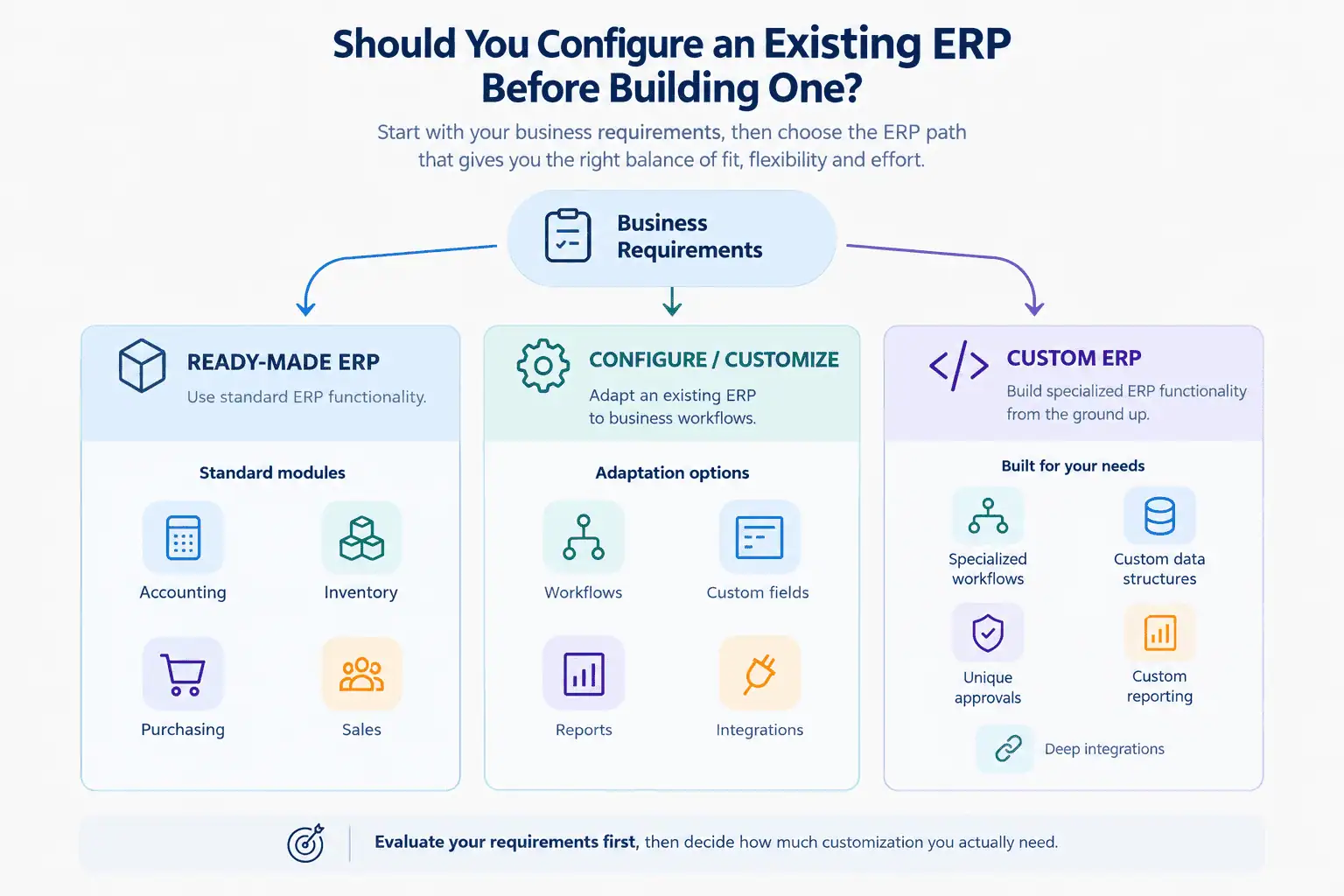
Yes, in most cases. The sensible sequence is: configure first, customize where justified, and build custom only where necessary.
Rebuilding accounting, inventory or purchasing from scratch rarely makes sense when mature platforms already handle those functions. These modules involve many edge cases (tax handling, stock valuation, reconciliation, audit trails) that established products have refined over years of use. Rebuilding them means paying to rediscover problems others have already solved.
A practical way to apply this approach:
- Map your workflows and separate standard processes from genuinely unusual ones.
- Test existing platforms against your real scenarios, not just a feature checklist.
- Configure to close as many gaps as possible using built-in settings.
- Customize only the workflows that configuration cannot handle, using supported extension points.
- Build custom only for requirements that are truly unique and strategically important.
The customization trap
Buying a ready-made ERP and then heavily customizing it can produce a system with the disadvantages of both approaches. You inherit the vendor's constraints and upgrade cycle, but you also carry the cost and maintenance burden of custom code. Every upgrade then has to be tested against your modifications, and the more you change, the harder upgrades become.
The important question is: at what point does customizing a packaged ERP become more complicated than choosing a better-fit platform or building the required workflow separately? There is no fixed percentage or universal threshold. Warning signs include upgrades that repeatedly break your changes, workarounds that outnumber standard features, and modifications to core modules instead of separate extensions. When you see these, it is time to reassess.
Custom ERP vs Ready-Made ERP: Cost Comparison
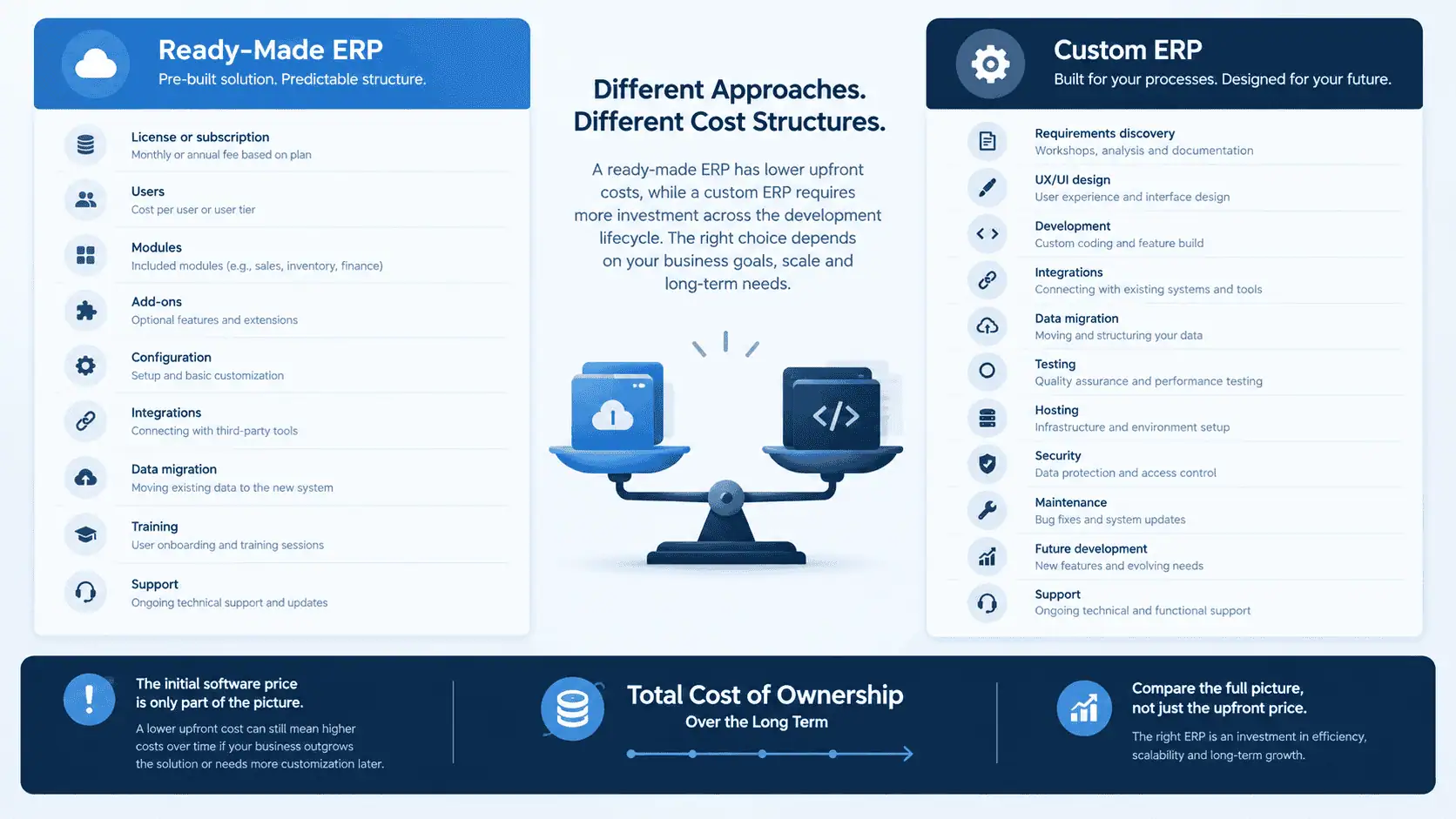
Neither option is always cheaper. Ready-made ERP usually has a lower initial investment, while custom ERP usually requires more upfront spending, but the total cost over several years depends on your requirements, user count and how much modification you need.
Comparing a subscription price against a development quote misses most of the picture. The real comparison is total cost of ownership.
| Cost Area | Ready-Made ERP | Custom ERP |
|---|---|---|
| Initial investment | Usually lower | Usually higher |
| Licensing | Subscription or license | Depends on ownership model |
| Users | May increase cost | Depends on architecture |
| Configuration | Additional implementation | Included within project scope |
| Custom development | Platform-dependent | Core development cost |
| Integrations | Existing or additional | Built as required |
| Migration | Usually additional | Usually additional |
| Training | Required | Required |
| Maintenance | Vendor + implementation partner | Business/development partner |
| Future changes | Platform-dependent | Business controls roadmap |
Ready-made ERP cost components: license or subscription, per-user fees, modules and add-ons, implementation, configuration, integrations, data migration, training, support and upgrades.
Custom ERP cost components: discovery, UX/UI design, development, integrations, migration, testing, hosting, security, maintenance, future development and support.
Two costs are commonly underestimated in both cases: data migration and ongoing change. For a deeper look at budgeting in PKR, see our guide on ERP software cost in Pakistan. Treat any figure you see online, including ours, as a starting point for scoping, not a substitute for a requirements-based estimate.
Which ERP Gives You More Flexibility?
A custom ERP offers the most flexibility because you control the design, but a ready-made ERP can be more flexible than most people expect once configuration and customization are included.
Compare the two across the areas that matter day to day:
- Workflow and approvals: Packaged ERPs typically offer configurable workflows and approval rules. Custom builds can model any logic, at development cost.
- Data model: Packaged systems allow custom fields and sometimes custom objects. Fully custom systems let you design the data model from the start.
- User roles: Most platforms support role-based permissions. Complex, unusual permission structures may need custom work.
- Reports and dashboards: Configurable reporting covers many needs. Highly specific analytics may require custom development or an external reporting tool.
- Automation: Rules and scheduled actions are common in packaged systems. Deeper automation may need custom logic.
- UI: Ready-made interfaces are consistent but limited. Custom builds allow interfaces tailored to specific roles, such as warehouse staff or field sales.
- Branches and modules: Multi-branch support varies by platform, so test it against your actual structure.
Flexibility is not free. Every custom decision adds something to build, test and maintain, and flexibility you never use is a cost with no return.
What About ERP Integrations?
ERP integration works at three levels: native integration, connector, and API or custom integration. Always check which level applies to each system you need to connect, because no ERP supports every integration you might want.
- Native integration: Built into the ERP and maintained by the vendor. Usually the simplest and most reliable option.
- Connector: A pre-built bridge, often from a marketplace or third party. Convenient, but quality and maintenance vary.
- API or custom integration: Built specifically to connect systems. Flexible, but it needs development effort and ongoing support.
Systems that Pakistani businesses commonly want to connect include:
- Accounting software
- CRM
- E-commerce stores
- Payment gateways
- Courier and delivery systems
- Websites and web forms
- WhatsApp and SMS
- HR and payroll tools
- Business intelligence and reporting tools
Before choosing an approach, list every system the ERP must talk to and confirm how each connection would work. A ready-made ERP with weak support for a critical integration may cost more in the end than a configured or custom solution built around that requirement. Integration needs should also shape any build-versus-buy analysis, since a custom system means you build every connection yourself.
Custom ERP vs Ready-Made ERP for Growing Businesses
Growth alone does not justify a custom ERP. A growing business needs a system that handles more users, transactions and complexity, and many packaged platforms are designed for exactly that.
These factors matter more than company size:
- Number of users: Affects licensing costs in packaged systems and architecture decisions in custom ones.
- Process complexity: More approval layers and exceptions increase the need for configuration or customization.
- Branches: Multi-location operations need consistent processes, stock visibility and consolidated reporting.
- Inventory volume: Larger catalogs and warehouses put more demand on stock management.
- Integrations: Growth usually adds channels, gateways and partners to connect.
- Reporting needs: Management typically wants deeper visibility as the business scales.
- Operational uniqueness: Whether your way of working is truly different or just habitual.
- Budget and technical capacity: Custom software needs funding and people to maintain it.
For a fuller walkthrough of selecting a system as you scale, read our article on ERP software for growing businesses.
How Long Does ERP Implementation Take?
Implementation time depends on scope, data quality, integrations and how quickly your team makes decisions, so no honest article can promise a fixed timeline. What can be compared is the shape of the work.
Ready-made or configured ERP:
Requirements → configuration → migration → integration → testing → training → launch
Custom ERP:
Discovery → process mapping → UX/UI → development → integrations → migration → testing → training → launch → ongoing development
Custom projects add design and development stages, and they usually continue after launch as new requirements emerge. Packaged projects are generally shorter to start, but they can run long if the business demands heavy customization or if data preparation is neglected.
Whichever route you take, implementation is more than software selection. The stages that decide success are often the least glamorous:
- Requirements and process mapping: Agree how work should happen before configuring anything.
- Data cleanup and migration: Duplicate customers, inconsistent item codes and incomplete records need fixing before they enter a new system.
- Training: Users who do not understand the system will work around it.
- Testing and pilot rollout: Run real scenarios with a small group before going company-wide.
- Go-live and support: Plan for questions, corrections and adjustments in the first weeks.
A technically good ERP can still fail to deliver value if implementation is poorly managed.
What Are the Risks of Custom ERP?
The main risks of custom ERP are cost, time and dependency: projects can grow beyond their original scope, and you carry responsibility for the system afterward. These are manageable with good planning, but they should be understood upfront.
- Scope creep: Requirements expand during development, adding time and cost.
- Development delays: Custom work is harder to predict than configuring an existing product.
- Budget expansion: Unclear requirements at the start often lead to change requests later.
- Poor requirements: If the workflows are not properly mapped, you may build the wrong thing very well.
- Vendor dependency: If one development partner holds all the knowledge, switching becomes hard.
- Maintenance responsibility: Bug fixes, updates and new features are your ongoing responsibility.
- Security: You are responsible for secure design, hosting, access control and patching.
- Documentation: Without good documentation, the system becomes difficult to maintain or hand over.
- Staff adoption: A new custom interface still requires training and change management.
Custom ERP is not a bad choice because of these risks. It is a choice that requires disciplined requirements, clear ownership and a realistic view of long-term costs.
What Are the Risks of Ready-Made ERP?
The main risks of ready-made ERP are fit and dependency: the software may not match your workflows, and you rely on the vendor's pricing, roadmap and upgrade decisions.
- Workflow limitations: Some processes may not fit without changing how the business works.
- Vendor dependency: Pricing, features and support are controlled by the vendor.
- Licensing changes: Terms and packaging can change over time.
- Per-user costs: Costs can rise as more employees need access.
- Module and add-on costs: The advertised base price may not include everything you need.
- Upgrade limitations: Upgrades can conflict with customizations.
- Workarounds: Staff may fall back on spreadsheets when the system does not fit, which defeats the purpose.
- Data migration challenges: Moving from legacy systems and Excel files takes careful planning.
- Integration limitations: Some connections may not be supported natively.
Custom ERP vs Ready-Made ERP for Pakistani Businesses
For Pakistani businesses, the right choice depends on how well an ERP handles local operating realities: accounting practices, tax-related workflows, Excel-based processes, WhatsApp-driven sales and multi-branch operations. Test these against any platform before committing, and avoid assuming that support exists.
Points worth evaluating:
- FBR-related requirements: Where relevant to your business, confirm with your accountant and your ERP provider how tax documentation and reporting requirements would be handled. Do not assume a platform covers a specific requirement without verifying it.
- Accounting workflows: Check that the chart of accounts, voucher styles, reports and reconciliation processes match how your finance team works.
- Inventory and warehouse management: Confirm support for your item structure, units, batches and warehouse layout.
- WhatsApp-based sales: Many Pakistani businesses take orders and follow up with customers through WhatsApp. Decide whether that channel needs to connect to the ERP or CRM, and how.
- Excel migration: Much business data starts in spreadsheets. Cleaning and structuring it is often the largest migration task.
- Multi-branch operations: Check branch-level stock, permissions, reporting and consolidation.
- E-commerce: If you sell online, confirm how orders, stock and customer data flow between store and ERP.
- Local payment and courier integrations: Verify the specific gateways and couriers you use, and whether the connection is native, connector-based or custom.
- PKR budgeting: Some software is priced in foreign currency, so exchange-rate movements can affect long-term costs.
- Local implementation and support: Consider whether help is available in your time zone and language, and how quickly support responds.
At LumenAI Consultancy, we evaluate requirements first, then recommend whether an existing ERP, configuration, customization, integration or custom ERP development is the right fit. Custom development is considered when it is genuinely justified. If you are weighing your options, our team offers CRM and ERP solutions for Pakistani businesses built around this requirements-first approach.
Hybrid ERP Approaches: A Third Path
You do not have to choose one approach for the entire business. A hybrid ERP approach combines the strengths of each option:
- A standard ERP for accounting, where mature functionality already exists.
- Configured modules for inventory, purchasing or sales.
- Custom workflows for the operations that are genuinely unique.
- External specialist systems connected through integrations.
This model keeps standard processes on proven software while investing custom effort only where it creates real value. It also reduces risk, because a limited custom component is easier to scope, test and maintain than an entire ERP built from scratch. The trade-off is integration complexity: the more systems you connect, the more important clean data, clear ownership and reliable APIs become.
How to Choose the Right ERP Approach
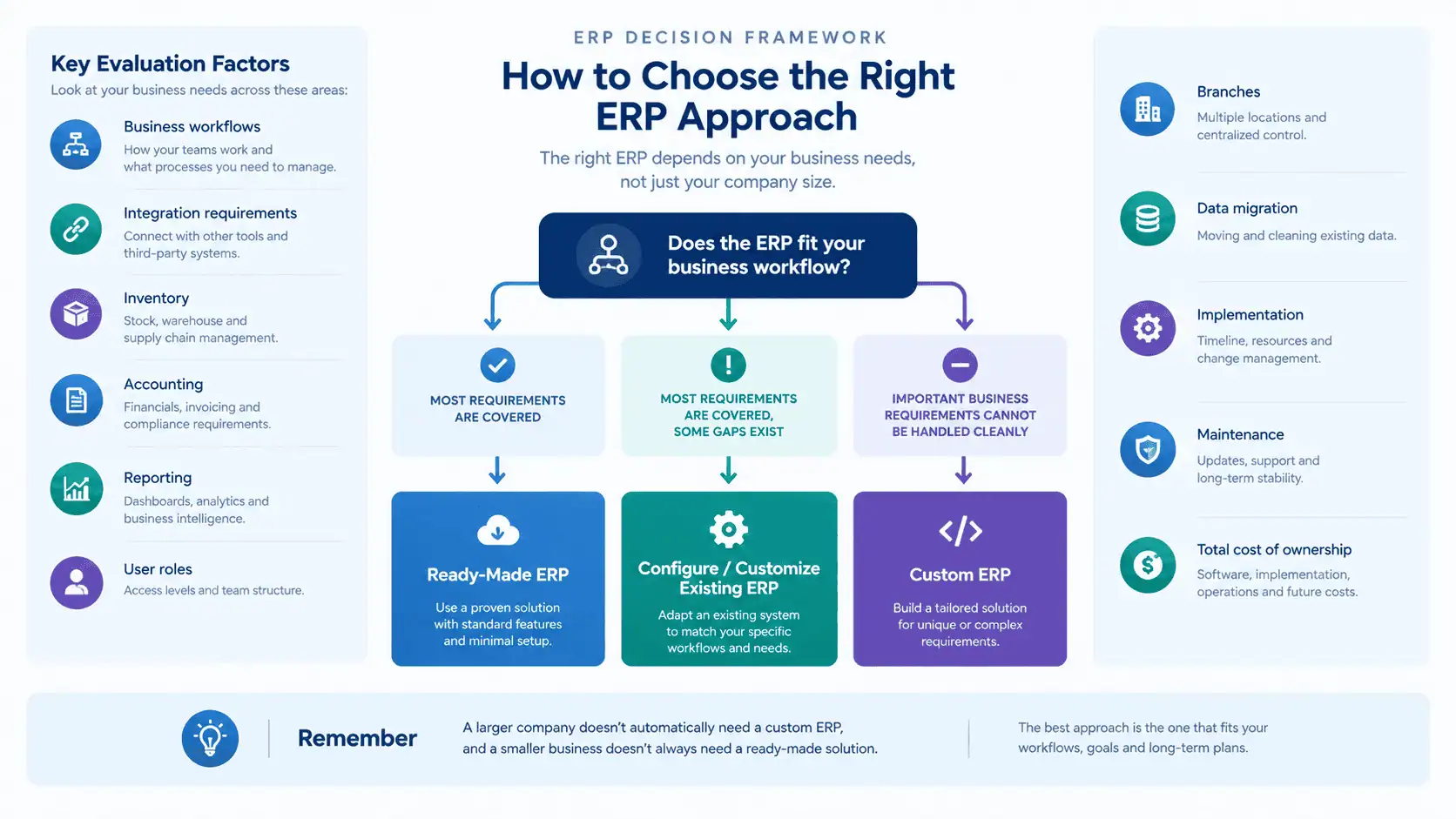
Choose by matching your requirements to the approach, not by defaulting to buy or build. Use this framework as a starting point.
A ready-made ERP may fit when:
- Your processes are standard.
- Existing modules cover most of your needs.
- Speed matters.
- You prefer vendor support.
- Existing integrations are sufficient.
Configuring or customizing an existing ERP may fit when:
- Most requirements are already covered.
- Only specific workflows need modification.
- APIs and extension points are available.
- A full custom build would duplicate existing functionality.
A custom ERP may fit when:
- Important workflows are genuinely unique.
- Existing platforms create operational workarounds.
- Your data structures are highly specialized.
- Deep integrations are business-critical.
- Your company can manage long-term ownership.
If your situation matches parts of more than one list, that is normal, and it usually points toward a hybrid approach.
Common ERP Selection Mistakes
Most failed ERP projects share a small set of avoidable mistakes:
- Choosing based only on price. The cheapest quote often excludes migration, training or integrations.
- Choosing based on feature count. More features do not mean a better fit for your workflows.
- Building custom software too early. Custom development before you understand your processes locks in assumptions.
- Over-customizing a packaged ERP. Heavy modification creates upgrade and maintenance problems.
- Ignoring data migration. Poor data quality undermines even the best system.
- Ignoring user adoption. Software people do not use delivers no value.
- Ignoring integrations. A system that cannot connect to your critical tools creates manual work.
- Not calculating total cost of ownership. Initial price is only part of the spend.
- Selecting software before mapping workflows. You cannot judge fit without knowing how work happens.
- Treating implementation as an IT-only project. Finance, operations, sales and management all need to be involved.
FAQs
Is custom ERP better than ready-made ERP?
Neither is automatically better. Custom ERP fits businesses with genuinely unique workflows, while ready-made ERP suits businesses whose processes are reasonably standard. The right answer depends on fit, budget and your ability to maintain the system.
Is custom ERP cheaper than ready-made ERP?
Not necessarily. Custom ERP usually costs more upfront, while ready-made ERP has ongoing license, user and add-on costs. Total cost depends on your requirements, number of users and how much modification you need, so compare total cost of ownership over several years.
When should a business choose custom ERP?
Consider custom ERP when key workflows are truly unique, existing platforms force costly workarounds, your data structures are specialized, or deep integrations are business-critical, and when you can manage long-term ownership.
Can a ready-made ERP be customized?
Yes. Many packaged ERPs support configuration, custom fields, workflow changes and extensions through APIs. The extent depends on the platform, and heavy customization can complicate upgrades.
What is the difference between configured and custom ERP?
A configured ERP is a packaged system adjusted through settings without changing its code. A custom ERP is software built specifically for your business. Configuration is generally faster and lower risk, while custom development offers more control.
How much does custom ERP cost in Pakistan?
The cost depends on scope, modules, integrations, migration needs and the development partner, so there is no reliable universal figure. The most dependable approach is to define your requirements and request a scoped estimate that covers development, hosting, maintenance and future changes.
How long does custom ERP development take?
It depends on the number of modules, workflow complexity, integrations and how quickly decisions are made. Custom projects include discovery, design, development, testing and rollout, and typically continue with ongoing development after launch.
Can ERP integrate with existing accounting software?
Often, yes, but it depends on both systems. Integration may be native, through a connector or through a custom API build. Confirm the specific method, data flow and maintenance responsibility before committing.
Can a business start with ready-made ERP and customize it later?
Yes, and it is a common approach. Starting with a packaged ERP and adding configuration or targeted customization as needs become clear is often lower risk than building everything at once. Plan customizations carefully so they do not make upgrades difficult.
Which ERP is better for a growing business?
The best ERP for a growing business is the one that fits its processes, user count, branches, integrations and budget. Growth alone does not require a custom ERP. Many growing businesses are well served by a configured packaged system.
Conclusion
The custom ERP vs ready-made ERP decision should not be made on assumptions. Do not choose custom ERP simply because it offers unlimited customization, and do not choose ready-made ERP simply because it is faster to deploy.
Start with your business workflows and identify the gaps. Evaluate existing platforms and configuration options, calculate total ownership cost, and then decide how much should actually be custom-built. For many businesses, the answer is a combination: proven software for standard processes, and custom development only where it earns its place.