
Restaurant POS Platform
A point of sale and management platform for dhabas, takeaway counters and small cafes: bilingual photo led ordering, a kitchen screen included as standard, billing that survives an outage, and an AI layer that sets the menu up from a photograph, tells the kitchen how much to cook tomorrow, and answers the owner's questions in Urdu over WhatsApp.
- Platforms & SaaS
- Service
The context
The restaurant software sold to small food businesses in Pakistan advertises a low monthly price and then charges for what the shop actually needs. A setup fee in the tens of thousands, an extra charge per waiter, another for the kitchen screen, another for tax compliance. A one branch restaurant with three staff and a kitchen screen commonly ends up paying somewhere between seventy and ninety thousand rupees in its first year. On top of the price, the products themselves are built for restaurant chains and handed to a man running a biryani counter who has never opened a trial balance and never will. This platform was built for that customer specifically.
What we were solving
The people using the till all day are cashiers, waiters and cooks, often with limited reading and no patience for training. An interface that needs typing, or reading a list of English item names, slows service down at exactly the busiest moment.
The power and the internet both go out, regularly, and a till that stops taking orders when the connection drops is worse than the paper book it replaced.
The numbers that actually decide whether a food business makes money, food cost per dish, waste, what sells at what hour, only exist if stock is deducted accurately on every single sale, which no one is going to do by hand during a dinner rush.
Several devices take orders at once, a counter, a second till, a waiter's phone, and when they have all been working offline separately they have to come back together without duplicating an order or reusing a bill number.
Setting the system up is where most of these shops give up. Typing eighty dishes, their Urdu names, prices and recipes into a computer is a week of evenings that a working owner does not have.
Nobody in a small kitchen is reading reports. The decisions that matter, how much to cook and what a dish really costs now, get made from memory, so food is either wasted or sold out by nine.
How we built it
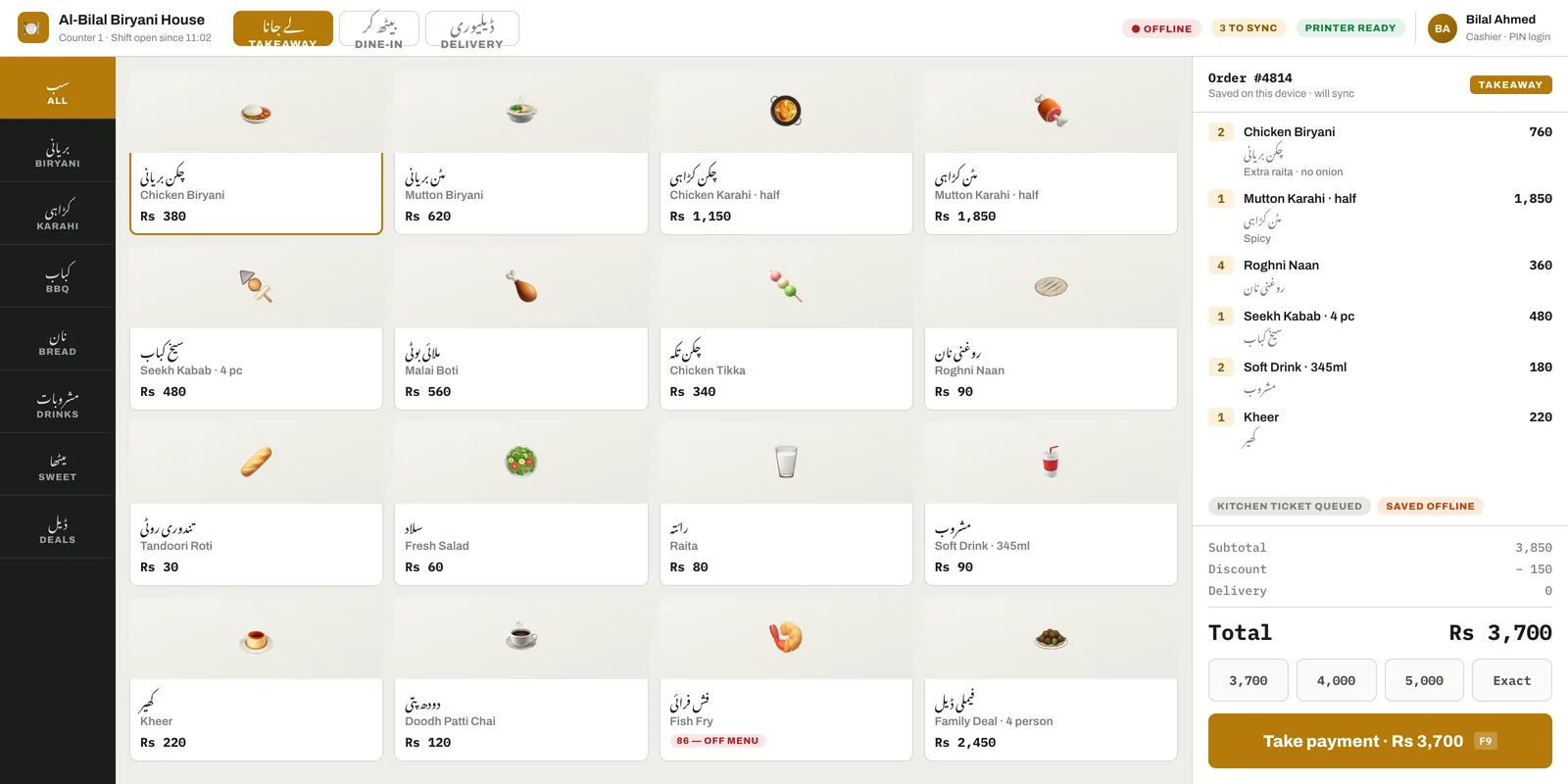
Made photographs of the real dishes the primary way to find an item, with every button carrying Urdu and English together permanently. Icons and English only labels are not readable enough for this staff, and a photo of the biryani is.
Set hard rules for the counter screen instead of aspirations: no typing anywhere on the normal path, an order placed in three taps, and a minimum touch target big enough for a thumb, enforced even in the compact layout.
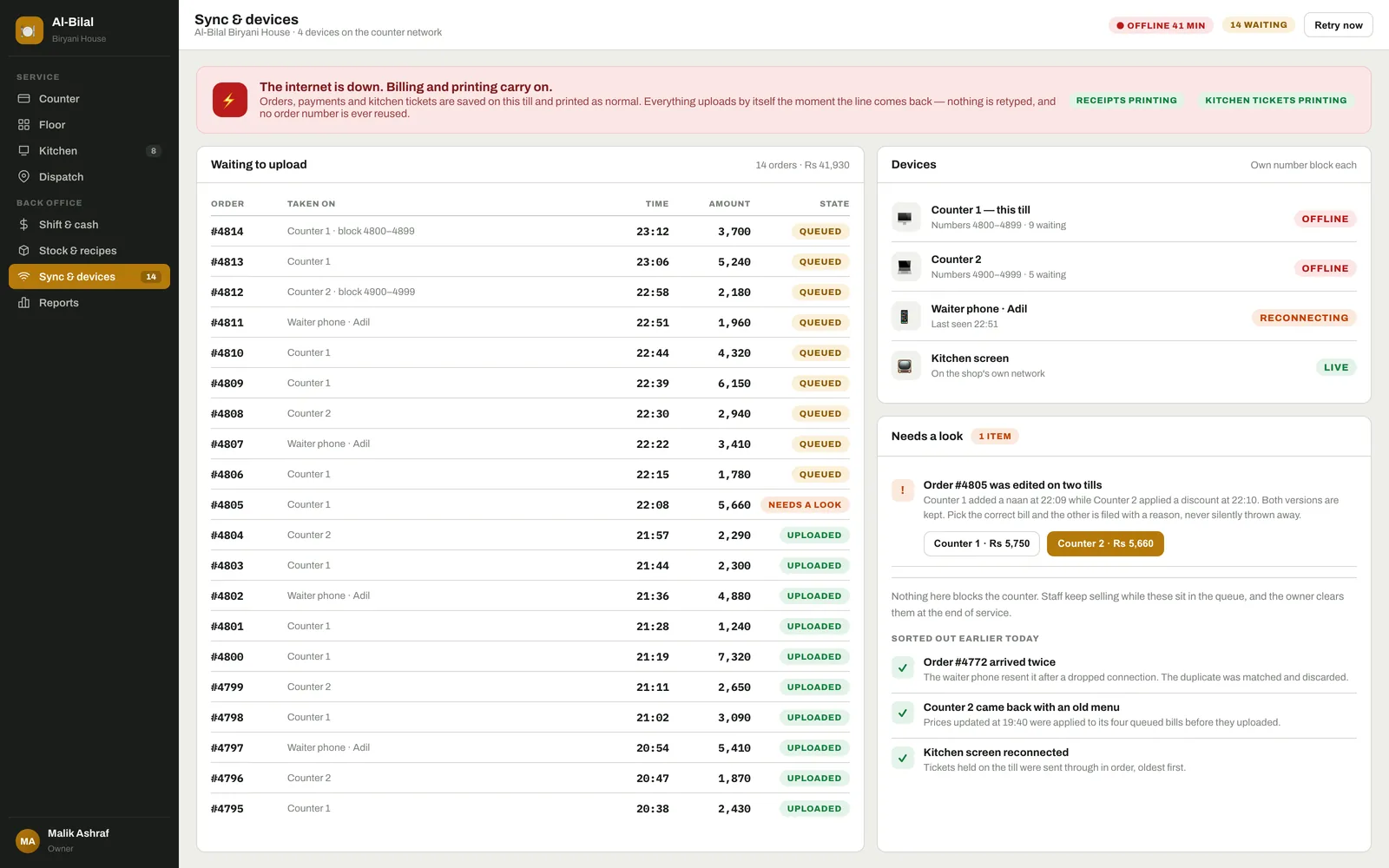
Built the till to work from its own local copy first and treat the server as something it catches up with. Orders, payments and kitchen tickets are written and printed locally, then uploaded when the line returns.
Gave every device its own block of bill numbers, so two tills that have been offline for an hour cannot possibly produce the same order number when they reconnect.
Put conflicts in a queue for a human instead of resolving them silently. When two devices edited the same bill, both versions are kept, the owner picks the right one at the end of service, and the other is filed with a reason.
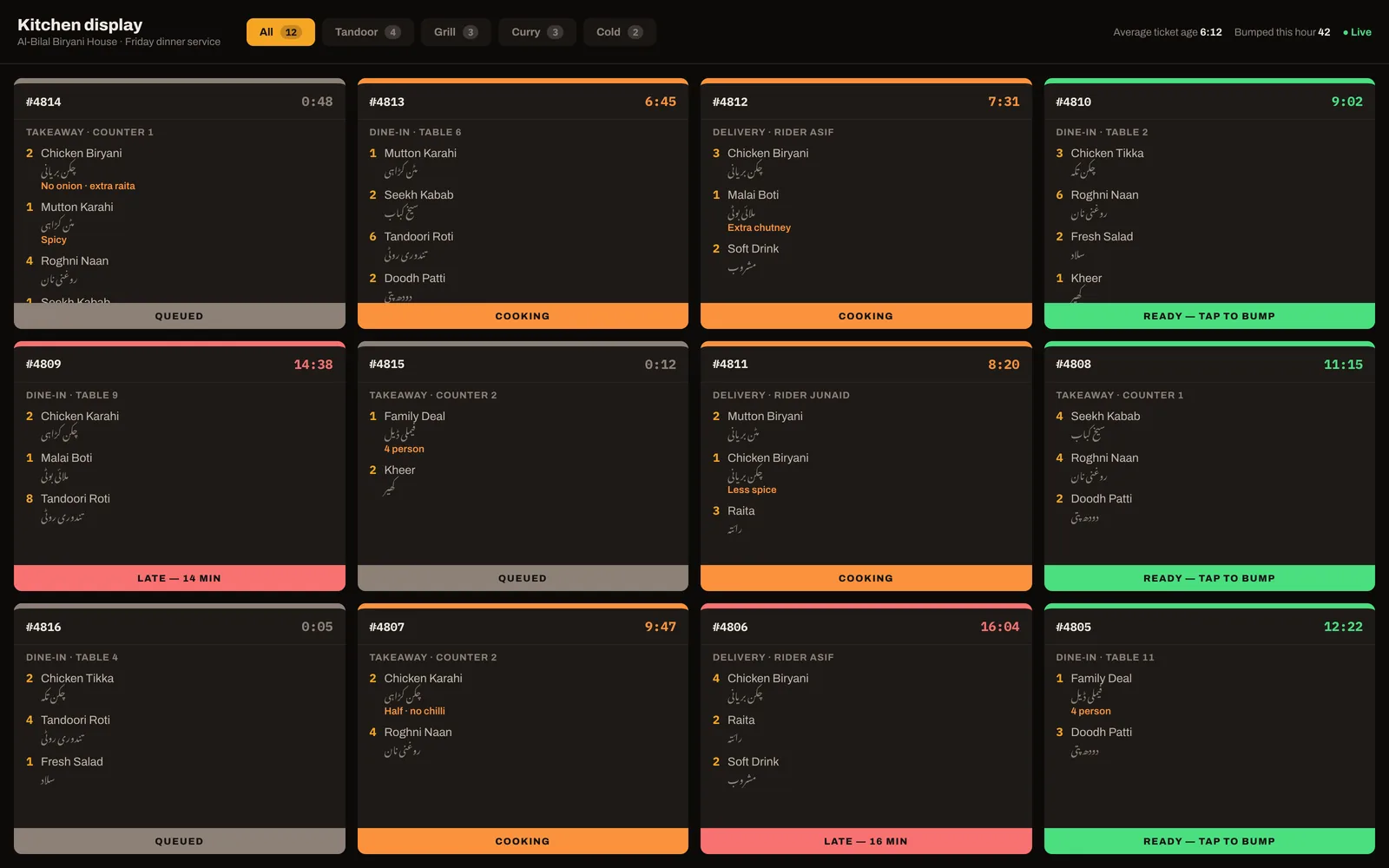
Made the kitchen display part of the base product, on a permanently dark palette designed to be read from two metres away in heat and steam, with ticket age carried by colour and position together so it still reads on a bad screen.
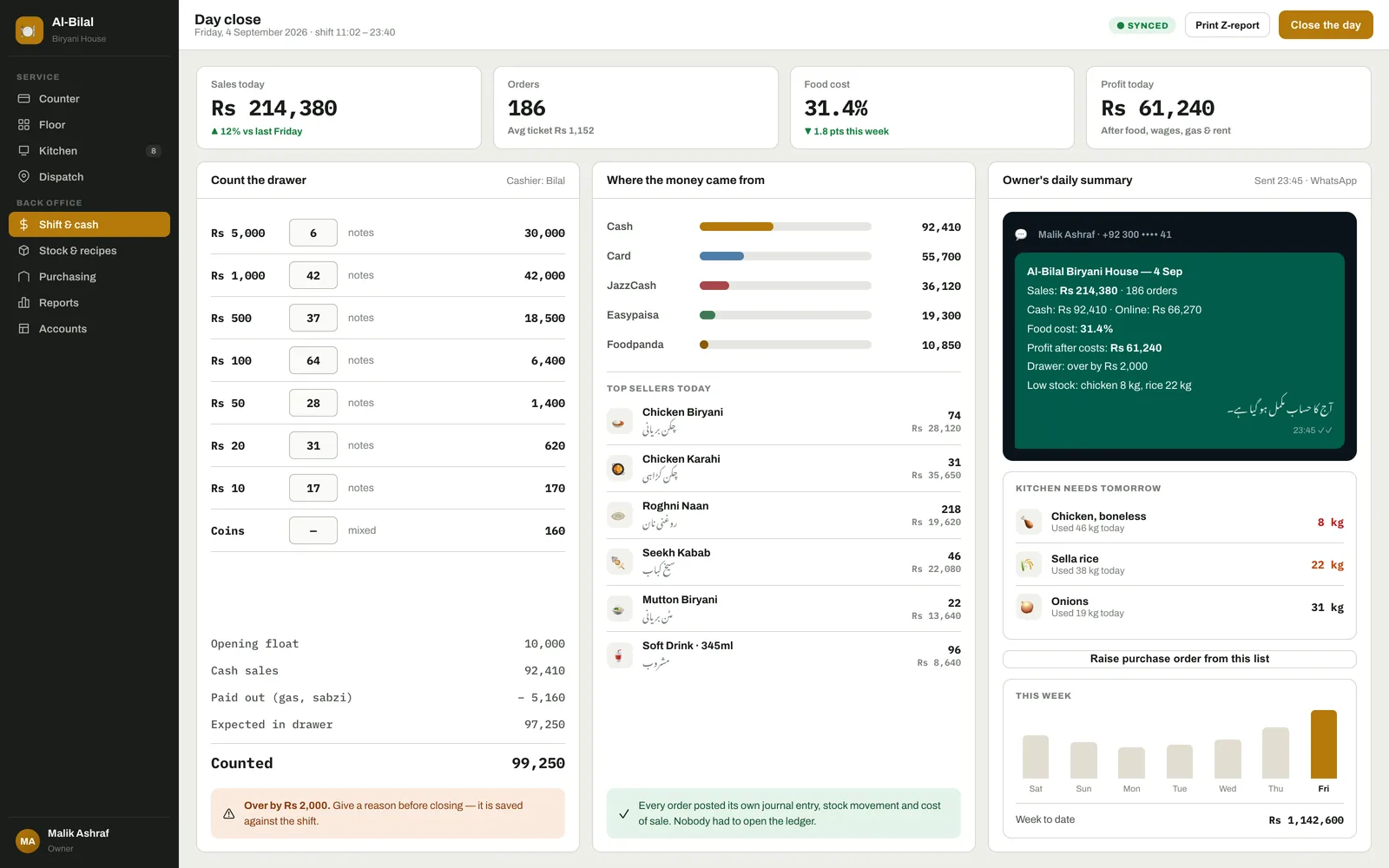
Ran a real double entry accounting engine, stock ledger and recipe costing underneath every order, and surfaced it as three numbers and a WhatsApp message at closing time rather than a reporting suite.
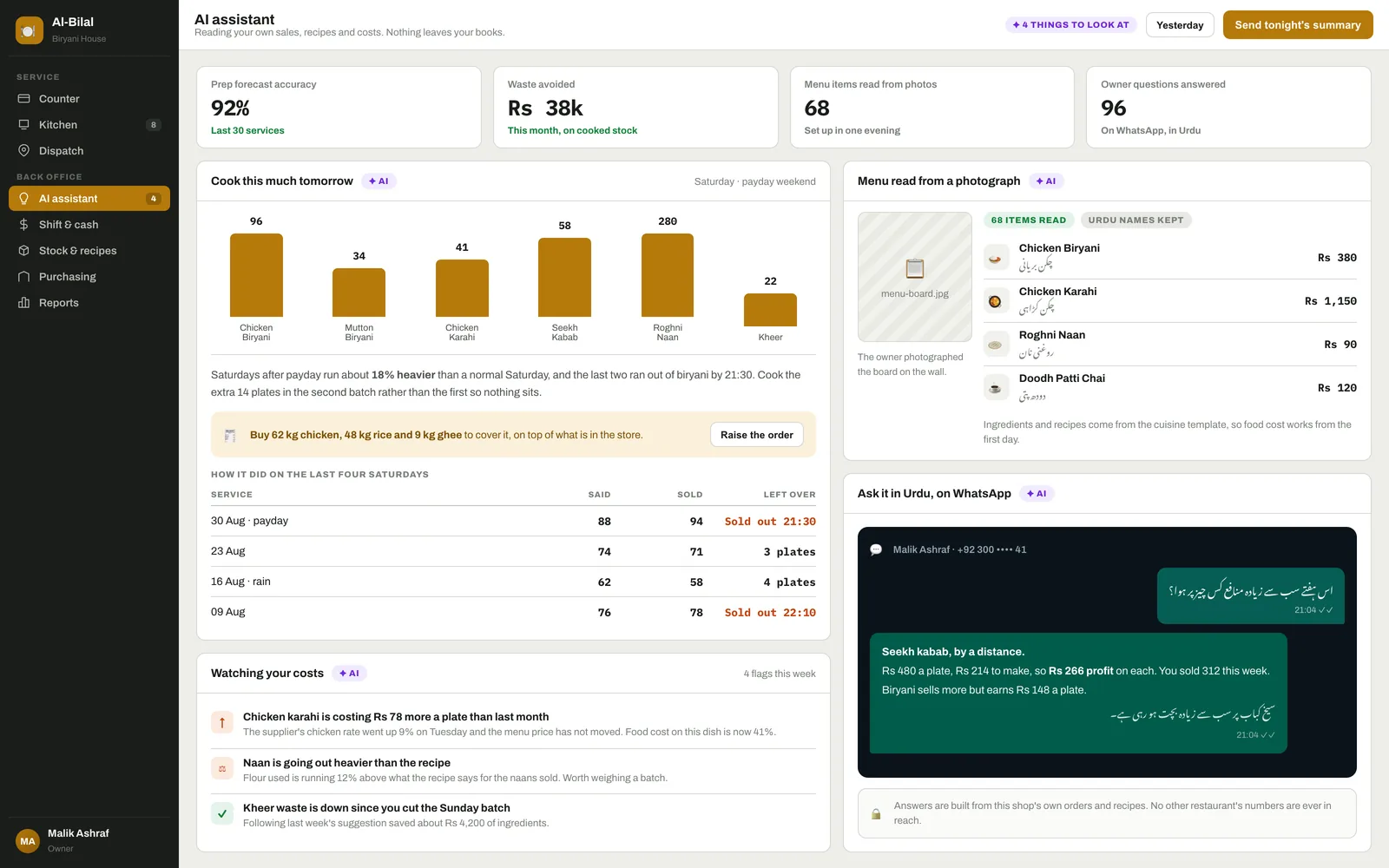
Made setup something an owner does alone in an evening: cuisine templates that arrive with a starting menu and ingredients, a spreadsheet import, and the menu board photographed on a phone and read by AI into items, Urdu names and prices, ready to correct rather than type.
Turned the shop's own order history into a prep plan. The assistant forecasts how many plates of each dish tomorrow needs, allowing for the day of the week, paydays and weather, and turns the gap against the store room into a purchase order the owner can raise in one press.
Set the AI to watch costs rather than produce reports. It compares what recipes say against what stock actually moved and what suppliers charged this week, then says the useful sentence: this dish now costs seventy eight rupees more a plate and the menu price has not moved.
Let the owner ask questions the way they actually speak, in Urdu on WhatsApp, and answer from that shop's own orders and recipes. The assistant is given checked queries scoped to one restaurant, never the database, so no shop's numbers can surface in another's answer.
Why it holds up
The counter never stops
Orders, bills and kitchen tickets carry on through a power cut or a dead connection, so a bad line costs the shop nothing.
Nothing is lost and nothing is doubled
Each device owns its own bill numbers and anything ambiguous waits in a queue for a person, so a night of outages reconciles cleanly instead of producing two versions of the truth.
Staff can use it on day one
Photographs and both languages on every button mean a new waiter is productive in minutes, which matters in a trade where people come and go.
The books keep themselves
Every order writes its own accounting entry, stock movement and cost of sale, so the owner gets real figures without ever opening a ledger.
The bill does not grow with the team
No charge per waiter and no charge for the kitchen screen, so hiring a second cook or adding a tablet does not raise the monthly cost.
Leaving paper behind is not a leap
The menu can be set up from a photograph and a template in an evening, so the shop is running on it before doubt sets in.
The advice arrives in the kitchen, not in a report
Tomorrow's cook list and a rising ingredient cost turn up as a sentence and a button, so a busy owner acts on them instead of promising to look later.
Every shop's numbers stay its own
The assistant answers from checked queries against one restaurant's records, so a neighbouring shop's takings can never appear in an answer.
Key features
- Photo led ordering with Urdu and English on every button, three taps to an order and no typing on the normal path
- Dine in, takeaway and delivery, with modifiers, variants, deals, split bills and preset notes instead of free text
- Cash with a change calculator and quick cash keys, card, JazzCash, Easypaisa and split payment across methods
- Kitchen tickets routed per station, and a full screen kitchen display with colour coded ticket ages, included as standard
- Tables and floor plan with occupied and billing states, merging, splitting and moving orders between tables
- Offline first billing and printing with an outbox, per device bill number blocks and a queue for anything ambiguous
- Rider dispatch and delivery, with a customer address book that recognises repeat callers by phone number
- Ingredients, recipes and automatic stock depletion on every sale, with food cost percentage per dish and waste entry
- Purchasing and goods receipt, supplier bills, low stock alerts and a purchase order raised from the day's usage
- Shift open and close with a denomination cash count, over and short, and a single day close
- Double entry accounting, expenses and profit and loss running underneath, surfaced as a handful of numbers
- Owner's daily WhatsApp summary: takings, food cost, profit, drawer difference and what the kitchen needs tomorrow
- Staff on PIN login with owner, manager, cashier, waiter and kitchen roles
- Setup by the owner: cuisine templates, spreadsheet import, and a menu read from a photograph of the board, Urdu names kept
- AI prep forecast: how many plates of each dish to cook tomorrow, with the shopping list to cover it and a purchase order in one press
- AI cost watch: dishes whose food cost has drifted, ingredients going out heavier than the recipe, and waste worth cutting
- Ask it in Urdu on WhatsApp: what sold, what earned the most, what today's takings were, answered from this shop's own orders
- Nightly AI summary to the owner's phone: takings, food cost, profit, drawer difference and what the kitchen needs tomorrow
The outcome
The commercial argument here is not a cheaper monthly price, because that market is already crowded at the bottom. It is that the headline price in this segment is not the real price. Setup fees, per waiter charges and a paid kitchen screen are where the money actually goes, and removing all three while keeping a genuine accounting and inventory engine underneath is the difference. AI earns its place the same way: not as a chat box bolted on the side, but as the thing that sets the menu up from a photograph, decides how much chicken to buy, and notices that a dish quietly stopped being profitable.
Point of sale is one module of the systems we build. See our ERP and POS software in Pakistan for how counter billing connects to stock and accounts.