ERP for Manufacturing Businesses in Pakistan: Production, Inventory & Costing
20 min read
On this page
- Why Do Manufacturing Businesses in Pakistan Need ERP?
- How Does ERP Manage the Manufacturing Process in a Pakistani Factory?
- How Does ERP Manage Raw Materials and Manufacturing Inventory in Pakistan?
- What Is BOM and Why Does It Matter in Manufacturing ERP?
- How Does ERP Handle Production Planning and Work Orders?
- How Does ERP Track Work-in-Progress (WIP)?
- How Does Manufacturing ERP Calculate Product Cost in Pakistan?
- How Does ERP Track Wastage, Scrap and Production Variance?
- Can ERP Connect Production With Purchasing, Sales and Accounting?
- Which Manufacturing ERP Features Matter Most for Pakistani Factories?
- Does Every Factory Need a Full Manufacturing ERP?
- Ready-Made vs Configured vs Custom ERP for Manufacturing
- How Much Does Manufacturing ERP Cost in Pakistan?
- How to Implement ERP in a Manufacturing Business
- What Should Pakistani Manufacturers Check Before Choosing ERP?
- Common Manufacturing ERP Mistakes
- FAQs
- Conclusion
ERP for manufacturing businesses in Pakistan connects raw materials, purchasing, production, inventory, quality, costing and accounting in one system, so every department works from the same data. A customer order can trigger a material check, a purchase requirement, a production order, stock movements, and finally an invoice and cost report.
Many factories already have some software. Accounting sits in one package, stock in another, and production planning lives in Excel or on a whiteboard. The problem is rarely a lack of tools. The tools do not talk to each other, so nobody can answer simple questions with confidence. What did this batch really cost? How much raw material is already committed? Which orders are late?
This guide explains how manufacturing ERP works as one connected workflow, when a simpler system is enough, and how to choose and implement the right approach.
Why Do Manufacturing Businesses in Pakistan Need ERP?
Manufacturers need ERP when disconnected tools stop giving reliable answers about stock, production and cost. The problem is usually not one big failure but many small gaps between departments.
Where Disconnected Tools Break Down
- Excel-based production tracking. Sheets work until versions multiply, formulas break or one person leaves.
- Separate inventory systems. Finished goods may be tracked well, while raw material committed to open production orders stays invisible.
- Manual purchasing. Buyers reorder from memory or a quick store check, causing shortages or excess stock.
- Difficult product costing. A business may know its selling price but not its actual production cost after material variance, labour and overhead.
- Poor WIP visibility. Managers cannot see which stage an order is in without walking the floor.
- Untracked wastage. Losses get absorbed into cost without anyone knowing where they happened.
- Delayed reporting. Month-end numbers arrive late and are rebuilt by hand.
- Disconnected departments. Sales promises dates that production cannot meet, and finance works from stale figures.
In Pakistan, raw material prices can move quickly, and many manufacturers buy from several local suppliers and store goods in more than one warehouse. Without connected data, a price change on one purchase order may never reach the product cost sheet.
Why Connected ERP Data Matters
A material receipt updates stock and the supplier payable. A production order consumes that stock and accumulates cost. A delivery reduces finished goods and posts to accounts. One event, recorded once, appears everywhere it matters. That is the core value of production ERP software in Pakistan: fewer re-entries, fewer reconciliations and one version of the truth.
How Does ERP Manage the Manufacturing Process in a Pakistani Factory?
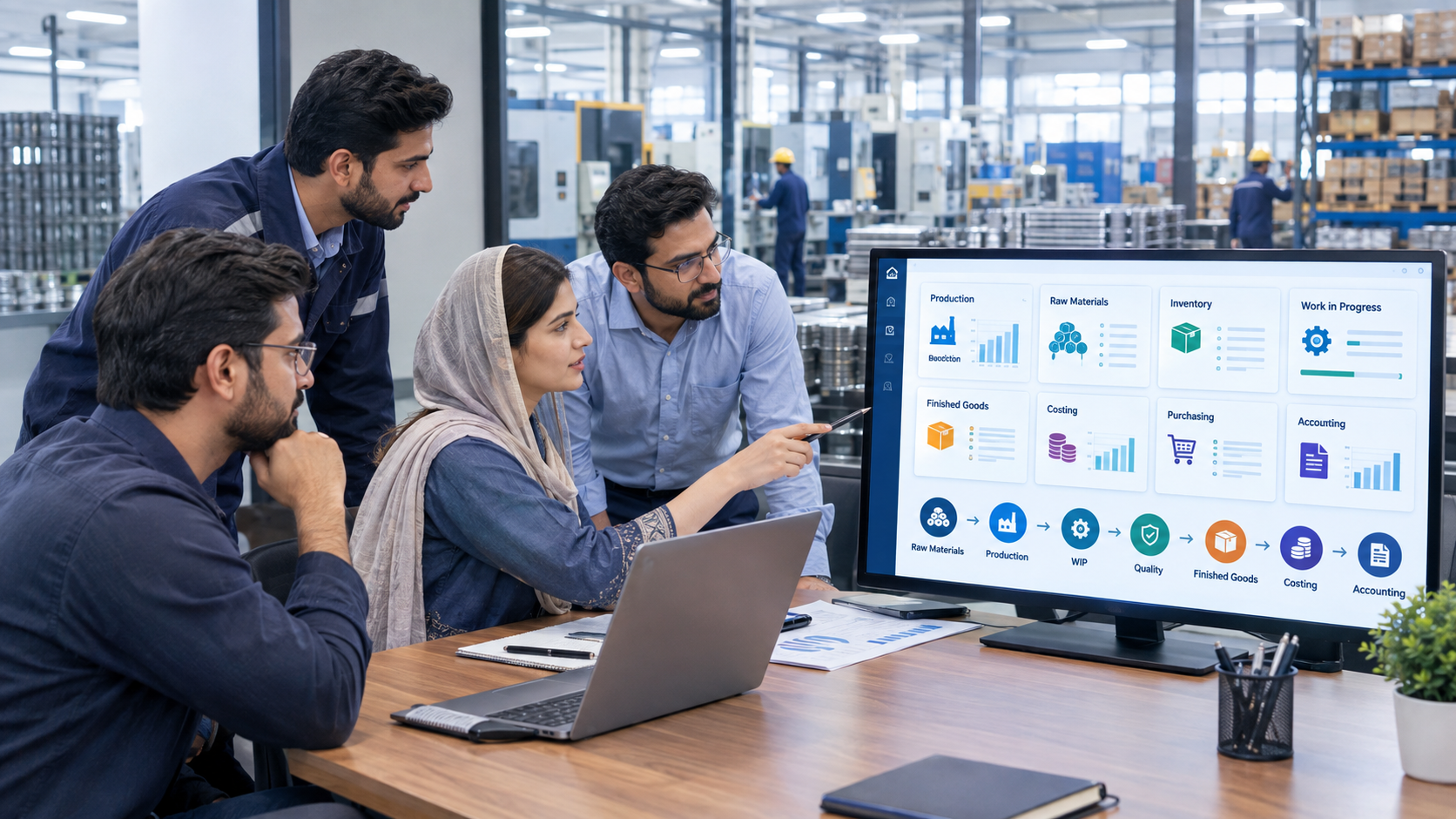
ERP manages manufacturing as a single chain: Demand → Planning → Material Requirement → Purchasing → Receiving → Production → Quality → Finished Goods → Delivery → Accounting. Each step creates the data the next step needs. Exact functionality depends on the ERP platform and how it is configured.
Example: A Packaging Manufacturer
A packaging business receives an order for 20,000 printed cartons.
- Demand: the sales order records quantity, specification and delivery date.
- Planning: the system creates a production requirement from the product's bill of materials (BOM).
- Material availability check: required board, ink and adhesive are compared with stock, after quantities reserved for other orders.
- Purchase requirement: shortfalls become purchase requests, which buyers convert to purchase orders.
- Raw material receiving: goods received are recorded against the purchase order, with batch details where needed.
- Production order: production is released with its materials, operations and dates.
- Material consumption: issued and consumed materials are recorded against the order.
- Work-in-progress: partly completed quantities are visible by stage.
- Quality check: inspections record accepted, rejected and reworked quantities.
- Finished goods: accepted output moves into finished stock.
- Delivery: dispatch reduces stock and supports invoicing.
- Accounting: costs, sales and receivables flow into the financial records.
Why Connecting the Stages Matters
Each handoff is where information is normally lost. When the purchase requirement comes from the real production plan, buyers stop guessing. When consumption is recorded against the order, costing stops being an estimate built after the fact.
How Does ERP Manage Raw Materials and Manufacturing Inventory in Pakistan?
ERP manages manufacturing inventory by tracking each material state as a separate, connected stock position: raw materials, components, consumables, packaging, work-in-progress and finished goods, across warehouses and locations. Every movement between states is recorded, so stock shows what is available and what is already committed. This is the foundation of manufacturing inventory management in Pakistan.
Inventory Types ERP Tracks
- Raw materials and components bought from suppliers.
- Consumables and packaging, which affect cost even when they seem small.
- Work-in-progress (WIP) currently in production.
- Finished goods ready for sale or delivery.
Warehouses, Batches and Reorder Levels
- Multiple warehouses and stock locations, such as a raw material store, a production floor store and a finished goods warehouse.
- Batch or lot tracking where applicable, useful for food, pharmaceutical and chemical products.
- Serial tracking where individual units must be identified.
- Reorder levels that flag when materials need replenishment.
- Stock movements for receipts, issues to production, returns, transfers and adjustments.
Why Manufacturing Inventory Differs From Trading Inventory
A trader buys an item and sells the same item. A manufacturer buys materials, transforms them and sells something different, often with losses along the way. A manufacturer may know how many finished products are in stock but not how much raw material is committed to production. Good manufacturing inventory software closes that gap by showing available stock after reservations, not just what is physically on the shelf.
What Is BOM and Why Does It Matter in Manufacturing ERP?
A Bill of Materials (BOM) is the recipe for a product: the components and quantities needed to make one unit or one batch. In a BOM ERP in Pakistan, this list drives planning, purchasing, production and costing. If the BOM is wrong, everything built on it is wrong.
What a BOM Contains
- Components and quantities, such as 1.2 kg of resin per unit.
- Units of measure, including conversions between kilograms, litres, metres and pieces.
- Multi-level structure, where a finished product uses sub-assemblies with their own BOMs.
- Product variants, such as different sizes, colours or packaging.
- Routings where applicable, defining the operations and work centres used.
- BOM revisions, so changes in formulation or design are controlled and dated.
How BOM Accuracy Affects the Business
Material planning uses the BOM to calculate requirements. Purchasing relies on it to order the right quantities. Production issues materials from it. Costing starts with it. Inventory is depleted by it. Product margins depend on all of these, so an outdated BOM can quietly turn a profitable-looking product into a loss-maker.
BOM quality is one of the most underestimated tasks in ERP projects. Many factories keep recipes in supervisors' heads, and writing them down properly is often the first real benefit of the project.
How Does ERP Handle Production Planning and Work Orders?
ERP handles production planning by turning demand into manufacturing orders, checking material and capacity availability, and releasing work orders to the floor. It then compares planned output with actual output. How much is automated depends on the platform and configuration, so it should never be assumed.
Manufacturing Orders and Work Orders
- Manufacturing orders define what to make, how much and by when.
- Production schedules sequence orders by priority and due date.
- Work orders break a manufacturing order into operations.
- Work centres represent machines, lines or departments.
Capacity, Priorities and Planned vs Actual
- Machine and resource capacity shows whether a line is overloaded.
- Material availability prevents release of orders without required inputs.
- Production priorities balance urgent orders against efficient batching.
- Planned vs actual production shows the gap between plan and reality.
Some systems offer basic scheduling, while others support more advanced production planning software features through configuration or add-ons. A small manufacturer may need only a clear order list with material checks. A multi-stage plant may need detailed routings and capacity logic. Define requirements before selecting a platform.
How Does ERP Track Work-in-Progress (WIP)?
Work-in-progress (WIP) is the quantity and cost of goods that have started production but are not yet finished. ERP tracks WIP by recording each order's movement through production stages, so managers can see what is in process, where it is and how much cost it has absorbed.
What ERP Can Show
Depending on configuration, ERP can show production stages, quantities started, quantities completed, remaining quantities, delays against plan, rejections, rework and work-centre status such as running, idle or waiting for material.
WIP Example
A garment manufacturer starts an order of 1,000 shirts. Cutting completes 1,000 pieces, stitching completes 700, and finishing has received 400. At stitching, 20 pieces are rejected and 15 of them are sent for rework. The ERP shows 300 pieces still to stitch, 400 in finishing, and the rejected quantities separately. The production manager sees the stitching bottleneck without a floor walk, and finance sees how much cost sits in WIP rather than finished stock.
Without WIP tracking, that information lives in supervisors' notebooks, and late orders are discovered when the customer calls.
How Does Manufacturing ERP Calculate Product Cost in Pakistan?
Manufacturing ERP calculates product cost by collecting the costs attached to a production order, such as materials, labour, machine time, overheads and other charges, and spreading them across the output. Methods vary between systems and depend on configuration, so the costing approach should be agreed before implementation. Good manufacturing costing software in Pakistan makes these components visible instead of buried in one number.
Cost Components
- Material cost: raw materials and components consumed.
- Labour: time spent on operations, recorded or estimated.
- Machine or operation costs: rates per hour or per operation.
- Overheads: indirect costs such as utilities or supervision, allocated on a chosen basis.
- Packaging: cartons, labels, bottles and similar items.
- Freight or landed cost where applicable: inward freight, duties and handling added to purchased materials.
- Wastage: material lost in normal processing.
- Scrap: rejected output with little or no value.
- Subcontracting where applicable: work performed by outside parties.
As an illustration only, if a batch records material, labour, machine time and overhead, the batch cost is the sum of those components, and unit cost is that total divided by good output. Any real formula must be defined for the specific business.
Standard Cost vs Actual Cost
Standard cost is a predetermined expected cost per unit, built from the BOM, routing and agreed rates. Actual cost is what was really spent on a production order once materials, labour and overheads are recorded. The gap between them is cost variance.
Why Cost Variance Matters for Pricing
If actual cost exceeds standard cost, the business needs to know why. Material prices may have risen, consumption may exceed the BOM, machine time may have run long, or scrap may be higher. Each cause needs a different action. A manufacturer may have quoted a customer using a standard cost set months earlier. If raw material prices have since moved, only variance reporting reveals that the margin has shifted.
How Does ERP Track Wastage, Scrap and Production Variance?
ERP tracks wastage and variance by comparing the material a BOM says an order should consume with what was actually consumed, then recording the difference. It improves visibility and traceability, but it does not eliminate wastage by itself.
Key Terms
- Expected consumption: quantity per the BOM, scaled to order size.
- Actual consumption: quantity issued or recorded as used.
- Wastage: normal or abnormal material loss during processing.
- Scrap: rejected output or offcuts.
- Rework: items reprocessed to meet specification.
- Variance: the difference between expected and actual.
Variance Example
A production order expects 500 kg of material, but actual consumption reaches 540 kg. The 40 kg variance is now visible on the order. Management can investigate. Was the BOM allowance unrealistic? Was a machine misconfigured? Did a supplier deliver lower-quality material? Was there spillage or handling loss? The ERP flags the difference, and people still have to find the cause and act. Over time, variance data by product, shift, machine or supplier reveals patterns that support better decisions.
Can ERP Connect Production With Purchasing, Sales and Accounting?
Yes, ERP can connect production with purchasing, sales, inventory and accounting so data entered once reaches every department that needs it. How much is automatic depends on the platform, the modules and the configuration, and integrations should never be assumed to work out of the box.
How Each Function Connects
- Sales: customer demand and orders drive production requirements and delivery commitments.
- Purchasing: material shortfalls create purchase requests, and supplier receipts update stock.
- Inventory: stock availability and movements show what can be promised and what must be bought.
- Production: manufacturing orders consume materials and create finished goods.
- Accounting: costs, invoices, payments and reports draw on the same transactions.
Consider a business with purchasing data in accounting software, production planning in Excel and finished goods in a separate inventory system. Every week someone reconciles three sources. With connected modules, the goods receipt, stock movement and supplier liability come from one transaction. This is where manufacturing accounting software in Pakistan is most useful: costs post from production instead of being re-typed.
Pakistan-Specific Tax and Invoicing Considerations
Manufacturers also deal with PKR accounting, sales tax workflows, withholding tax requirements and FBR-related invoicing where applicable. Support varies by ERP and may require configuration or integration, so it should be verified during requirements analysis. This article is not legal or tax advice.
Which Manufacturing ERP Features Matter Most for Pakistani Factories?
The features that matter most are the ones that reflect how your factory actually works. Here they are by business function, with the reason each matters.
Production Features
BOM, manufacturing orders, work orders and production planning turn demand into executable work and drive material needs.
Inventory Features
Raw material stock, WIP, finished goods and batch or lot tracking give visibility at every stage, plus traceability where products are regulated.
Costing Features
Material costs, labour and operation costs, overhead, and standard vs actual cost turn margins from guesses into measurements.
Quality Features
Inspections, rejections, rework and quality checkpoints explain why output differs from input and feed into cost.
Purchasing Features
Purchase orders, supplier management and material planning tie procurement to real production needs.
Finance Features
Accounting, costing, profitability and reporting let finance see production transactions without re-entry.
Reporting Features
Production, inventory, WIP, variance, costing and margin reports turn connected data into decisions.
Industry-Specific Needs
Priorities differ by sector. ERP for textile manufacturing in Pakistan often focuses on multi-stage WIP and product variants. ERP for food manufacturing in Pakistan and ERP for pharmaceutical manufacturing in Pakistan usually emphasize batch traceability, expiry and quality checkpoints. ERP for packaging businesses in Pakistan often values job costing and material yield. Confirm any regulatory or documentation needs during requirements analysis.
Does Every Factory Need a Full Manufacturing ERP?
No. Not every factory needs a complex manufacturing ERP. A simpler system may be enough when the operation is straightforward, and full ERP becomes more relevant as complexity grows. There is no universal threshold based on employee count or revenue.
When Simpler Software Is Enough
- Production is simple.
- The product range is small.
- One location is used.
- Transaction volume is limited.
- Costing requirements are basic.
- Inventory requirements are straightforward.
When Manufacturing ERP Becomes More Relevant
- Production has multiple stages.
- BOMs are complex.
- Material consumption needs tracking.
- WIP needs visibility.
- Costing is difficult.
- Wastage matters.
- Multiple warehouses exist.
- Multiple departments need shared information.
- Production must connect with purchasing and accounting.
- The business is growing.
This is also the honest answer for ERP for small manufacturing business in Pakistan. Many small factories do well with a lighter setup and move to fuller ERP later. Buying too much creates unused complexity, while buying too little leads to workarounds and a second migration.
Ready-Made vs Configured vs Custom ERP for Manufacturing
These three approaches differ in how much they adapt to your process. The right one comes from your requirements, not from a preference for building or buying.
Ready-Made ERP
Mostly standard workflows. It suits businesses whose processes match common practice and is usually quicker to start. The trade-off is less flexibility for unusual processes.
Configured or Customized ERP
An established platform adapted through configuration, workflows, custom fields, reports and integrations. Odoo and ERPNext are examples of established platforms that can be adapted this way. Many Pakistani manufacturers land here because it balances proven functionality with local needs.
Custom ERP
Purpose-built functionality, justified where existing systems genuinely cannot meet important requirements, such as a highly specialized production process. Custom ERP in Pakistan is not automatically better. It brings higher build and maintenance responsibility.
A requirements-first approach means documenting your workflow, testing it against existing platforms, and only then deciding how much to configure, customize or build. Platform names here are examples, not rankings.
How Much Does Manufacturing ERP Cost in Pakistan?
There is no reliable single price for ERP software in Pakistan, because cost depends on scope and complexity. Any quoted average given without knowing your requirements should be treated with caution.
Main Cost Drivers
Users, modules, manufacturing complexity, locations, configuration, customization, integrations, data migration, training, hosting, support, reporting needs and maintenance.
Four Types of Cost to Separate
- Software cost: licences or subscriptions, where applicable.
- Implementation cost: analysis, configuration, testing and rollout.
- Customization and integration cost: custom fields, workflows, reports and connections to other systems.
- Ongoing support cost: hosting, updates, help desk and improvements.
Looking only at software cost can mislead, because implementation and support shape total cost of ownership. For a deeper breakdown, see our guide to ERP software cost in Pakistan.
How to Implement ERP in a Manufacturing Business
Successful implementation follows a structured sequence, and the timeline depends on scope, data quality and how quickly decisions are made. No fixed duration should be assumed. For a fuller walkthrough, read our guide to ERP implementation in Pakistan.
Prepare
- Requirements discovery: document what the business needs, from production to reporting.
- Process mapping: map the real workflow from demand to delivery, including workarounds.
- Product and BOM data preparation: clean and validate recipes, units and routings.
Build and Test
- Configuration: set up the system to match agreed processes.
- Data migration: move items, suppliers, customers, opening stock and balances.
- Integrations: connect accounting, tax, banking, e-commerce or other systems as needed.
- Testing: verify workflows end to end.
- UAT: let real users test real scenarios and sign off.
Launch and Support
- Training: prepare storekeepers, planners, supervisors and finance staff.
- Pilot or phased rollout where appropriate, such as one plant or product line first.
- Go-live: switch operations to the new system.
- Post-go-live support: resolve issues and refine reports as users learn.
LumenAI Consultancy works requirements-first: understand the workflow, evaluate established platforms, configure where appropriate, integrate where required, and customize or build only when justified. You can explore ERP and CRM solutions for Pakistani manufacturers to see how that approach applies to your operation.
What Should Pakistani Manufacturers Check Before Choosing ERP?
Before choosing an ERP for manufacturing companies in Pakistan, test the system against your real workflow rather than a demo script. Use these questions as a checklist:
- Does the system fit our production workflow?
- Can it handle our BOM structure?
- Can it track raw materials, WIP and finished goods?
- Can it support batch or serial requirements where needed?
- Can it handle relevant costing?
- Can it track wastage and variance?
- Can it integrate with accounting?
- Can it connect purchasing and inventory?
- Can it support multiple warehouses?
- Can it support required reports?
- What integrations are required?
- What data needs to be migrated?
- How much customization is actually required?
- What support is available after go-live?
- What is the total cost of implementation and ownership?
Ask vendors to demonstrate your own scenarios, such as a multi-level BOM with a material variance, rather than generic examples. Tax and invoicing requirements should be confirmed with the vendor and your advisers for your exact setup.
Common Manufacturing ERP Mistakes
Planning Mistakes
- Choosing software before understanding processes. Features cannot fix a workflow nobody has defined.
- Treating manufacturing as simple inventory management. Production needs BOMs, consumption and WIP, not just stock in and out.
- Not defining costing methodology. Finance and production must agree on rules before configuration.
Data and Design Mistakes
- Ignoring BOM quality. Bad recipes produce bad plans, purchases and costs.
- Migrating poor-quality data. Duplicate items and wrong units carry their problems into the new system.
- Over-customizing. Every custom change adds testing, upgrade and support effort.
- Ignoring WIP. Without stage tracking, the factory floor stays a black box.
Rollout Mistakes
- Skipping UAT. Problems found in testing are cheaper than problems found in live production.
- Insufficient training. A system is only as accurate as the entries staff make.
- Ignoring post-go-live support. The first months reveal gaps that need quick attention.
FAQs
What is manufacturing ERP software?
Manufacturing ERP software connects production, inventory, purchasing, costing, quality, sales and accounting in one database, so departments share the same information.
How does ERP help manufacturing businesses in Pakistan?
It gives connected visibility over materials, production, stock, costs and finances, reducing duplicate entry and disconnected reports. Results depend on the ERP, configuration and how consistently it is used.
Can ERP track raw materials and finished goods?
Yes. ERP can track raw materials, WIP and finished goods across warehouses and locations, including batch or lot details where configured.
Can ERP calculate manufacturing costs?
Yes, it can accumulate material, labour, operation and overhead costs against production orders. The exact method varies by ERP and configuration.
What is BOM in manufacturing ERP?
A BOM is the list of components and quantities required to make a product. It drives planning, purchasing, production and costing.
Can ERP track work-in-progress?
Yes. Depending on configuration, it shows production stages, completed and remaining quantities, delays, rejections and rework.
Can ERP track wastage and scrap?
Yes, by comparing expected and actual consumption and recording scrap. This gives visibility, though it does not eliminate wastage by itself.
Is manufacturing ERP suitable for small factories?
It can be, if the factory has enough complexity to benefit, such as multiple stages, costing challenges or several warehouses. Very simple operations may be well served by lighter software.
How much does manufacturing ERP cost in Pakistan?
It depends on users, modules, complexity, customization, integrations, training and support. A reliable figure requires a scoped requirements review.
Should a manufacturer choose custom or ready-made ERP?
Start with requirements. Ready-made or configured platforms often fit well, and custom development is justified when important needs cannot be met otherwise.
Can manufacturing ERP integrate with accounting software?
Many ERPs include accounting modules, and others can integrate with external accounting systems. The method and effort depend on the platforms involved.
Conclusion
Manufacturing ERP is most valuable when a business needs connected visibility across materials, production, inventory, costing and financial operations. The goal is not more software. It is making sure a customer order, a purchase, a production run and an invoice all tell the same story.
Start by understanding your workflow, decide honestly whether you need full ERP or something simpler, and choose the approach that fits your requirements, whether ready-made, configured or custom. If you would like to talk through your production process, LumenAI Consultancy can help you evaluate the options and plan the next step.